You are viewing an older revision! See the latest version
m3pi
The m3pi robot consists of an mbed connected to the Pololu 3pi robot
The 3pi contains a low level MCU that takes care of motor control, optical sensors and other hardware oriented functions. When the 3pi is programmed with the stock "slave" firmware, will make this functionality available through an API over a serial port.
The m3pi consists of an mbed Microcontroller running the high level functions and control algorithms, implemented by API calls to 3pi hardware. The mbed Microcontroller is then free run protocol stacks and communications interfaces (bluetooth, Zigbee, Wifi and so on) as well as control algorithms, mass storage for preprogrammed routines and so on.

Hello World!
This simple program will drive the m3pi forward, spin it left, reverse it and spin it right.
Import program
00001 #include "mbed.h"
00002 #include "m3pi.h"
00003
00004 m3pi m3pi;
00005
00006 int main() {
00007
00008     m3pi.locate(0,1);
00009     m3pi.printf("LO World");
00010
00011     wait (2.0);
00012
00013     m3pi.forward(0.5); // Forward half speed
00014     wait (0.5);        // wait half a second
00015     m3pi.left(0.5);    // Turn left at half speed
00016     wait (0.5);        // wait half a second
00017     m3pi.backward(0.5);// Backward at half speed
00018     wait (0.5);        // wait half a second
00019     m3pi.right(0.5);   // Turn right at half speed
00020     wait (0.5);        // wait half a second
00021
00022     m3pi.stop();
00023 }
| You Tube Clip |
Hardware
There is very little connectivity required between the mbed 3pi work
| mbed | 3pi |
|---|---|
| Ground | Ground |
| Vin | Vcc |
| p8 | nRST to the 3pi |
| p9 (from mbed) | RXD (to the 3pi) |
| p10 (to the 3pi) | TXD (from the 3pi) |
Library and API
Import library
Public Member Functions |
|
| m3pi () | |
|
Create the
m3pi
object connected to the default pins.
|
|
| m3pi (PinName nrst, PinName tx, PinName rx) | |
|
Create the
m3pi
object connected to specific pins.
|
|
| void | reset (void) |
|
Force a hardware reset of the 3pi.
|
|
| void | left_motor (float speed) |
|
Directly control the speed and direction of the left motor.
|
|
| void | right_motor (float speed) |
|
Directly control the speed and direction of the right motor.
|
|
| void | forward (float speed) |
|
Drive both motors forward as the same speed.
|
|
| void | backward (float speed) |
|
Drive both motors backward as the same speed.
|
|
| void | left (float speed) |
|
Drive left motor backwards and right motor forwards at the same speed to turn on the spot.
|
|
| void | right (float speed) |
|
Drive left motor forward and right motor backwards at the same speed to turn on the spot.
|
|
| void | stop (void) |
|
Stop both motors.
|
|
| float | pot_voltage (void) |
|
Read the voltage of the potentiometer on the 3pi.
|
|
| float | battery (void) |
|
Read the battery voltage on the 3pi.
|
|
| float | line_position (void) |
|
Read the position of the detected line.
|
|
| char | sensor_auto_calibrate (void) |
|
Calibrate the sensors.
|
|
| void | calibrate (void) |
|
Set calibration manually to the current settings.
|
|
| void | reset_calibration (void) |
|
Clear the current calibration settings.
|
|
| void | leds (int val) |
|
Write to the 8 LEDs.
|
|
| void | locate (int x, int y) |
|
Locate the cursor on the 8x2 LCD.
|
|
| void | cls (void) |
|
Clear the LCD.
|
|
| int | putc (int c) |
|
Send a character directly to the 3pi serial interface.
|
|
| int | getc () |
|
Receive a character directly to the 3pi serial interface.
|
|
| int | print (char *text, int length) |
|
Send a string buffer to the 3pi serial interface.
|
|
Resources
Useful numbers
- Speed of rotation: 720 degrees per second at half speed
- Forward/Backward: 470mm per second at half speed
m3pi with Remote Procedure Call (RPC) Interface
The RPC interface is a very powerful way to remotely execute functions. Michael Walker did some excellent work on the RPC interface, and wrote the RPC Interface cookbook page.
The main initial interest for m3pi is to execute RPC calls over a serial interface. This could be directly from USB serial, or using any one of many serial-cable-replacement techniques, including Bluetooth and Zigbee.
Import program
00001 #include "mbed.h"
00002 #include "m3pi.h"
00003 #include "SerialRPCInterface.h"
00004
00005 SerialRPCInterface Interface(USBTX, USBRX); // defaults to 9600
00006 m3pi m3pi;
00007
00008 int main() {
00009
00010     m3pi.locate(0,1);
00011     m3pi.printf("USB RPC");
00012
00013     // do nothing, just wait for RPC comands over USB
00014     while (1) {}
00015 }
To keep things simple initially, the first experiment will be to use the mbed USB Serial port. If this is your first encounter with mbed, you can read more about the USB Serial port mbed provides on the Serial PC page in the handbook.
If you are using Windows, you will need to install a driver to have access to the mbed USB Serial port. You can find more information on the Windows Serial Configuration page.
To get this example working:
- Build the USB RPC example, and program it into your mbed
- If you are using Windows, run the Windows Serial Configuration
- Open a serial terminal, if you are not sure which to use, see the Serial Terminals page in the handbook.
- Connect to your mbeds Serial port using standard/default "9600 8-N-1" settings
- Ensure that your serial terminal sends "CR+LF" on transmission
- Start typing commands to control your m3pi
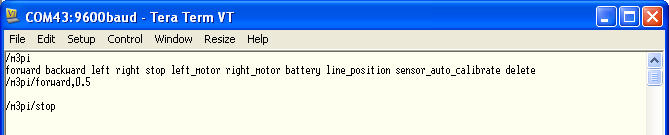
Typing /m3pi into the terminal will display the list of commands possible. For reference they are:
A subset of the function in the m3pi class can be called over RPC, they are:
- forward - both motors forward at the same speed (0.0 to 1.0)
- backward - both motors backwards at the same speed (0.0 to 1.0)
- left - Rotate, left motor backwards, right motor forwards (0.0 to 1.0)
- right - Rotate, right motor backwards, left motor forwards (0.0 to 1.0)
- left_motor - Direct control of direction and speed (-1.0 to 0.0)
- right_motor - Direct control of direction and speed (-1.0 to 0.0)
- stop - As it says :-)
- battery - Read the battery voltage as a float
- line_position - Where the line is detected, from left to right (-1.0 to 1.0)
- sensor_auto_calibrate - Run the auto calibration routine
Bluetooth Interface
Import programm3pi_BluetoothRPC
Accepts RPC commands over bluetooth (RN42)
Last commit 12 May 2011 by  Chris Styles