You are viewing an older revision! See the latest version
RS Animatronic Lab Board
Introduction
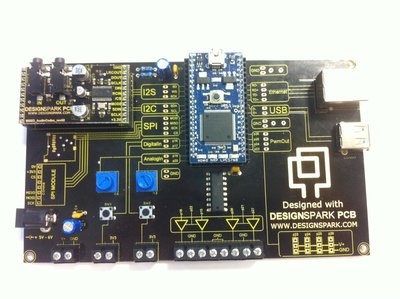
RS has released the RS Animatronic Lab Board to help with mbed learning and development. The board is equipped with Ethernet, USB, a motor driver, two potentiometers, two tactile push buttons, a barrel jack power input and headers for the RS Audio Codec board (sold seperately) along with the headers for the mbed.
Components
USB
The Lab Board is equipped with a USB socket for USB host applications; making it easy to just plug in a USB flash drive or bluetooth dongle and use the mbed (user created) libraries:
Import programMSCUsbHost
Implementation of USB Host for mbed 1768 which can access USB flash drives. See notebook page for details.
Last commit 30 Jul 2012 by  Igor Skochinsky
Import programBlueUSB
Bluetooth support for MBED with $2 Bluetooth dongles. Includes a USB host and built in support for bluetooth HID devices such as mice, keyboards and wii controllers.
Last commit 10 Apr 2010 by Peter Barrett
Ethernet
The lab board also has a Ethernet jack with magnetics integrated. This allows the mbed to be connected to LAN and the internet easily: you only have to load up a simple sketch to get started:
Import programTCPSocket_HelloWorld
TCP Socket Hello World with Ethernet
Last commit 14 May 2014 by mbed official
Potentiometers and switches
The potentiometers wipe between 0 and 3.3V. The switches require the pull down enabled in software:
#include "mbed.h"

DigitalIn button(p16);

int main() {
   button.mode(PullDown);
   bool isButtonPressed = button;
}
For anything else, the handbook is what you want: The Handbook.