You are viewing an older revision! See the latest version
CRP Unbricking
This page is intended to show how to manually erase the LPC1768 using the serial bootloader, which is the only way to "unbrick" an mbed if the Code Read Protection (CRP) bits have been set.
When set, the CRP bits prevent access to the the flash to prevent the image being read back from the LPC1768. This is usually done to protect a software design from being cloned or reverse engineered.
As the interface device on the mbed uses JTAG to access the flash on the LPC1768 and load the new binary image, setting the CRP bits prevents any updates to the LPC1768 flash being loaded by the mbed interface, hence no way for it to clear the CRP bits. This leaves the mbed permanently programmed.
Part of the CRP mechanism is to stop access to the LPC1768 via JTAG. It is still possible to erase the device (thereby clearing the CRP bits) using the serial boot loader interface, and here is how to do this.
Ingredients
- One mbed, bricked. If your mbed isnt bricked, you can still practice this technique.
- One small piece of wire
- A male-female jumper wire is ideal
- A Serial bootloader of your choice
- We will be using Flash magic
- For Windows users, the serial port driver for mbed
- A terminal application
- We will be using TeraTerm
Method
Putting the LPC1768 into ISP mode
First, windows users must install the serial driver, and a terminal application, and confirm they are able to run serial communication with the mbed. For more information on how to do this, see the SerialPC page in the handbook.
Now that you have serial communications, unplug your mbed from any breadboard it may be in, and disconnect all power, including the USB Cable. If you are using windows, don't forget to close the Serial terminal first!
Now for the good bit. You need to connect the LPC1768's ISP (In System Programming) pin to ground while you power it up (by inserting USB Cable).
You can do this by:
- Shorting the two pads circled on this diagram with a piece of wire, while someone plugs the USB cable in for you.
- Put the female end of a male-female jumper on the GND DIP pin of the mbed, and hold the make end on the TOP circled pad on the diagram (to be clear, the one on the black resistor)
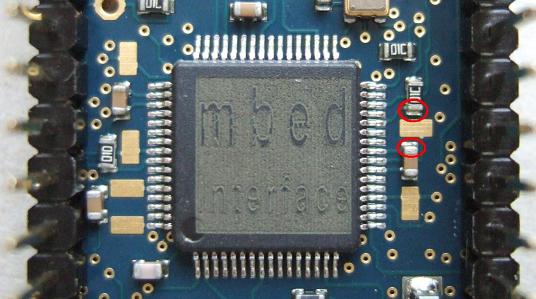
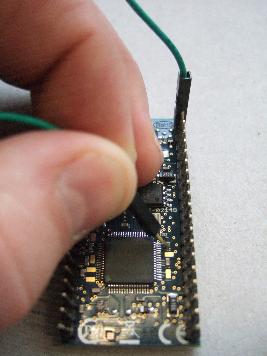
Once the ISP pin is shorted to ground, power up the mbed by inserting the USB cable.
Erasing the device
Now that the LPC1768 is in ISP mode, it is waiting for ISP commands, which you can send over the USB serial port. First you have to establish communication.
Open your terminal application, 9600-8-N-1 is a safe set up, and make sure you have your newline settings to CR+LF for both Rx and Tx.. this will make the exchange clearer to follow.
You are now in the realms of the ISP section of the NXP LPC1768 User Manual
The part of interest is page X.
For those who dont want to be spared the details, here is what you do :
1. Type "?" <return> The LPC1768 will send back "Synchronized"
2. Type "Synchronized" <return> The LPC1768 will send back "OK"
3. Type "OK" <return> The LPC1768 will send back another "OK"
4. Unlock the device for Erase/Write operation.
Type "U 23130" <return>
The LPC1768 will send back "0"
The device is now unlocked.
5. Prepare sectors for Erase/Write. For the 512kB parts, the user sectors are numbered 0-26. We will erase them all.
Type "P 0 26" <return>
The LPC1768 will send back "0"
6. Erase sectors
Type "E 0 26" <return>
The LPC1768 will send back "0"
The sectors are now erased, the device is completely blank