sakura.io を128倍使う
 sakura fan.
0
replies
arduino,
Cellular,
IOT,
lte,
sakura internet,
sakura.io.4G
sakura fan.
0
replies
arduino,
Cellular,
IOT,
lte,
sakura internet,
sakura.io.4G
sakura.io を128倍使う
Information
Components >> SCM-LTE-01 (sakura.io)
一次情報はそちらをご覧ください。
さくらインターネットが提供する「sakura.io」を使うためのプログラムです。
(さくらのIoT Platform α についてはこちら)
(さくらのIoT Platform β についてはこちら)
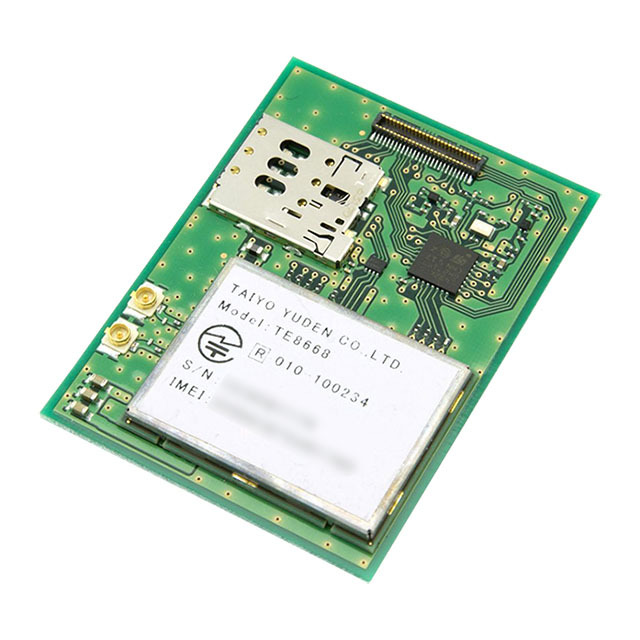 さくらの通信モジュール(LTE)- SCM-LTE-01 ¥8000!!
モノがつぶやく・・・
データを迎えに来てくれるモジュールです。
Warning
このページは さくらインターネット とは関係ありません。
このページの内容について さくらインターネット へ問い合わせしないでください。
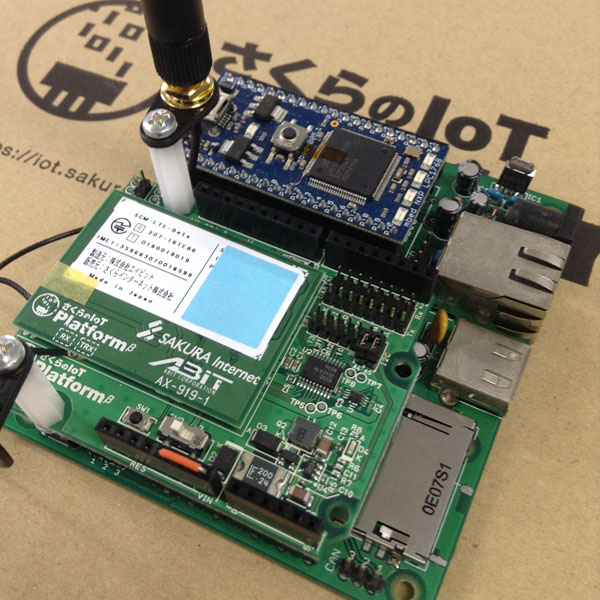
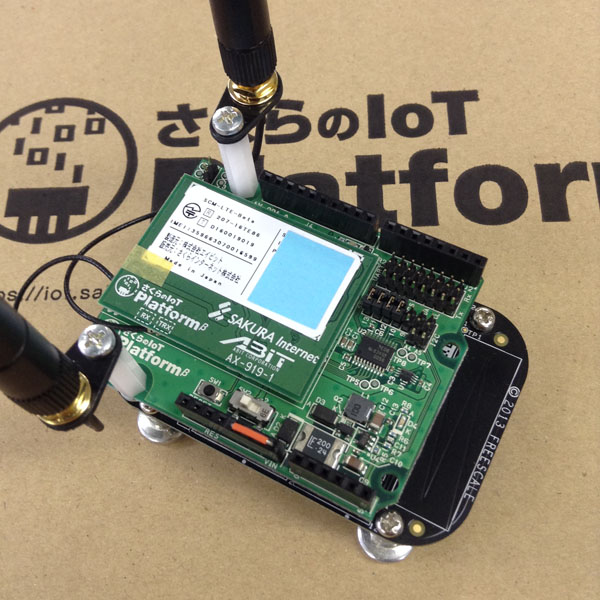
Arduinoフォームファクターのmbedなら、sakura.io シールド for Arduinoが使えます。
(例:FRDM-KL25Z、I2Cジャンパーは上側に設定。 UART(Serial)のジャンパーは外しておきます)
(VINピンへの電源供給のため橙色のジャンパーを接続しています、しっかりした電源を用意しましょう)
サンプル
ファームウェアをアップデートする
モジュールのコマンドにより、オンラインでアップデートできます。
Import programSakuraIO_FirmwareUpdate
src: https://github.com/sakuraio/SakuraIOArduino/tree/master/examples/FirmwareUpdate
Last commit 24 Jul 2017 by sakura fan
https://github.com/sakuraio/SakuraIOArduino/tree/master/examples/FirmwareUpdate からの移植
Outgoing Webhook をPHPで受ける
モジュールから送信されたデータを、リアルタイムにウェブサーバで受け取る。
あらかじめ、このウェブページを置いたURLをコントロールパネルで登録しておく。
outgoing.php
<?
$secret = "xxx";

$json = file_get_contents('php://input');
$object = json_decode($json, true);

if (!empty($secret)) {
    $hash = hash_hmac('sha1', $json, $secret);
    if ($hash != $_SERVER["HTTP_X_SAKURA_SIGNATURE"]) exit;
}

ob_start();
var_dump($object);
$str = ob_get_contents();
ob_end_clean();

$fp = fopen("data.txt", "w");
fwrite($fp, $str);
fclose($fp);
こんなふうにデータが届く
object(stdClass)#1 (4) {
  ["module"]=>
  string(12) "xxxxxxxxxxxx"
  ["type"]=>
  string(8) "channels"
  ["datetime"]=>
  string(30) "2017-01-02T03:04:05.000000000Z"
  ["payload"]=>
  object(stdClass)#2 (1) {
    ["channels"]=>
    array(5) {
      [0]=>
      object(stdClass)#3 (4) {
        ["channel"]=>
        int(0)
        ["type"]=>
        string(1) "i"
        ["value"]=>
        int(1234567)
        ["datetime"]=>
        string(30) "2017-01-02T03:04:05.000000000Z"
      }
      [1]=>
      object(stdClass)#4 (4) {
        ["channel"]=>
        int(1)
        ["type"]=>
        string(1) "f"
        ["value"]=>
        float(3.14159)
        ["datetime"]=>
        string(30) "2017-01-02T03:04:05.000000000Z"
      }
        :
    }
  }
}
簡易位置情報提供機能の緯度・経度は独立したデータで届く。
object(stdClass)#1 (4) {
  ["module"]=>
  string(12) "xxxxxxxxxxxx"
  ["type"]=>
  string(8) "location"
  ["datetime"]=>
  string(30) "2017-01-02T03:04:05.000000000Z"
  ["payload"]=>
  object(stdClass)#2 (1) {
    ["coordinate"]=>
    object(stdClass)#3 (3) {
      ["longitude"]=>
      float(135.00000)
      ["latitude"]=>
      float(34.000000)
      ["range_m"]=>
      int(0)
    }
  }
}
参考:https://saka24.blue/index.php/2017/05/20/sakura-io_outgoing/
Incoming Webhook へPHPから送る
ウェブサーバから、モジュールへデータを送信する。
incoming.php
<?
$url = "https://api.sakura.io/incoming/v1/";
$token = "xxxxx-xx-xx-xx-xxxxx";
$module = "xxxxxxxxxxxx";
$secret = "xxx";

$channel[0] = array(
        "channel" => 0,
        "type" => "i",
        "value" => 123);
$payload = array("channels" => $channel);
$object = array(
        "type" => "channels",
        "module" => $module,
        "payload" => $payload);
$json = json_encode($object);

if (empty($secret)) {
    $header = array(
        "Accept: application/json",
        "Content-Length: " . strlen($json) );
} else {
    $hash = hash_hmac('sha1', $json, $secret);
    $header = array(
        "Accept: application/json",
        "Content-Length: " . strlen($json),
        "X-Sakura-Signature: " . $hash );
}
$options = array("http" => array(
        "method" => "POST",
        "header"  => implode("\r\n", $header),
        "content" => $json) );

$str = file_get_contents($url . $token, false, stream_context_create($options));

header("Content-type: text/plain");
var_dump($options);
参考:https://api.sakura.io/incoming/v1/docs/
DataStore API をPHPで操作する
モジュールから送信されたデータが蓄積されているデータストアを、ウェブサーバからアクセスする。
datastore.php
<?
$url = "https://api.sakura.io/datastore/v1/messages";
$token = "xxxxx-xx-xx-xx-xxxxx";
$module = "xxxxxxxxxxxx";
$type = "channels"; // location / connection
$size = 1;

$options = array("http" => array("header"  => "Accept: application/json"));

$query = "token=" . $token . "&module=" . $module . "&size=" . $size . "&type=" . $type . "&order=desc";
$json = file_get_contents($url . "?" . $query, false, stream_context_create($options));
$object = json_decode($json);

header("Content-type: text/plain");
var_dump($object);
参考:https://api.sakura.io/datastore/v1/docs/
メモ
- IoT ゆうても、サービスを考えるのが大変
- データストアに蓄積されるので、ユーザーがデータを保存する必要がなくなった
- 基地局をもとにしただいたいの座標もわかるので、簡易なGPS代わりに使えそう
- セルラーモジュールは太陽誘電のIoT機器向けのLTE Category1モデム。これ?
- プロトコル処理用に STM32L431KC っぽいのが載っています。ハックしてはいけません。
- 回線はソフトバンク?、SIMの流用は不可。
- 設定いらず。 APN? SSID? なにそれ美味しいの?
- セキュリティの確保された閉域網に勝手につながります。
- インターネットからは専用のAPIを経由してデータのやり取りを行います。
- 小容量のデータ転送向けのため、大容量が必要な用途には向きません。
- 電源電圧が中途半端なのは、セルラーモジュールがLi-Ion (Li-Po)をつなぐ前提のよう。
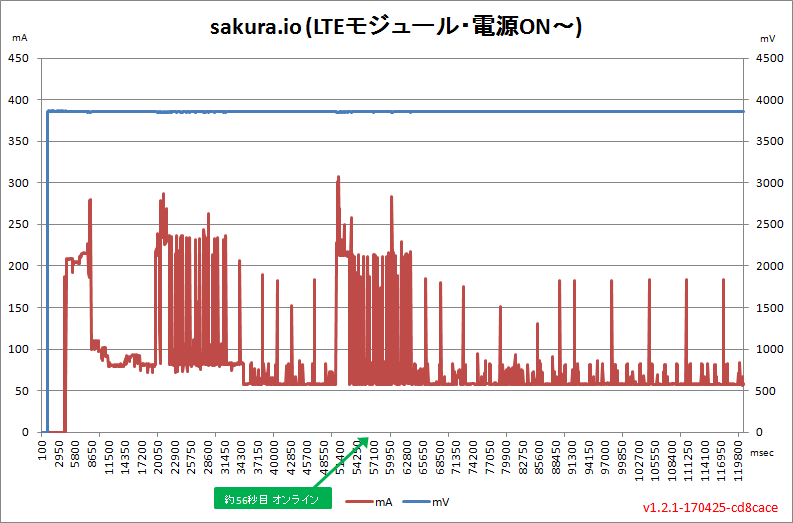
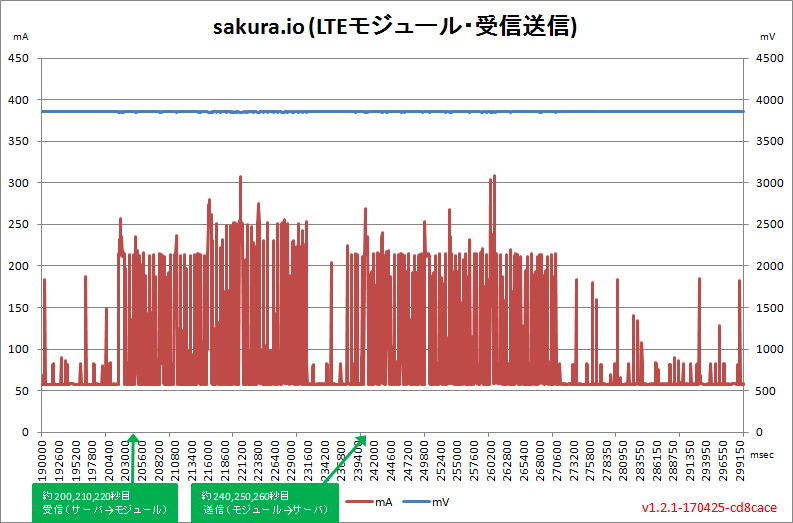
省電力?
Max 310mA, Min 58mA くらい。 動作後10秒でスリープしてるっぽい。
Please log in to post comments.
sakura.io を128倍使う
arduino, Cellular, IOT, lte, sakura internet, sakura.io.4G
Page owner: sakura fan
Created 24 Jul 2017.
Last updated 29 Aug 2017