Important changes to repositories hosted on mbed.com
Mbed hosted mercurial repositories are deprecated and are due to be permanently deleted in July 2026.
To keep a copy of this software download the repository Zip archive or clone locally using Mercurial.
It is also possible to export all your personal repositories from the account settings page.
Dependencies: BLE_API X_NUCLEO_6180XA1 X_NUCLEO_IDB0XA1 X_NUCLEO_IHM01A1 X_NUCLEO_IKS01A1 mbed
Fork of
SunTracker_BLE
by  ST Expansion SW Team
Overview
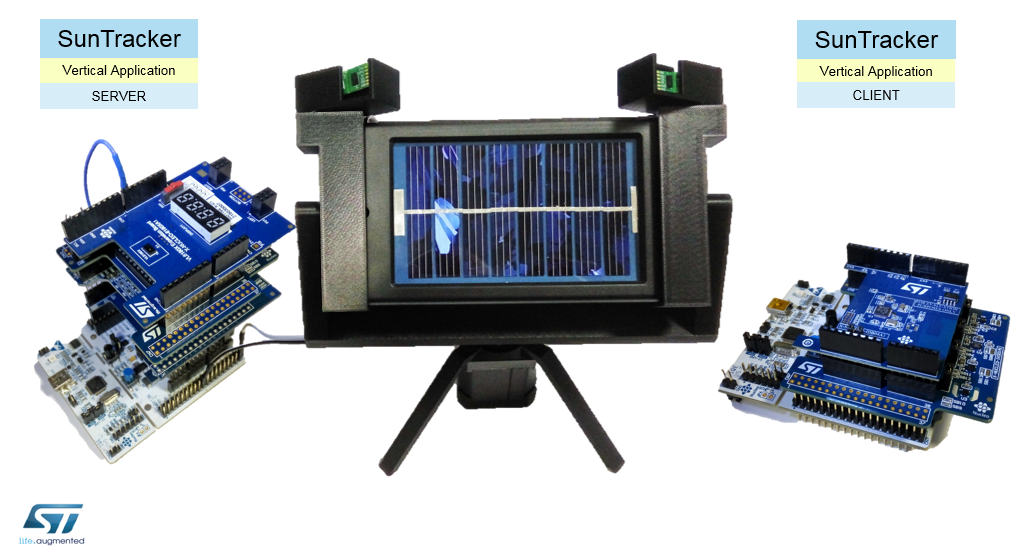
The SunTracker is a demo application running on ST Nucleo-F401RE stacking a set of ST X-NUCLEO expansion boards.
Main features provided are:
- A solar panel follows the light source, orienting the panel in order to achieve the best panel efficiency.
- Orientation is controlled thanks to a couple of VL6180X FlightSense light sensors mounted on a X-NUCLEO-6180XA1 expansion board and driven by X-NUCLEO-IHM01A1 controlled stepper motor acting as actuator to orientate the panel.
- The system features a progressive control on the stepper motor in order to modulate the panel rotation speed according to the light angle.
- The application is also able to control the panel productivity reading the panel voltage through an ADC and proving feedback on the local display.
- A manual orientation is possible by using the accelerometer on a X-NUCLEO-IKS01A1 expansion board that, according on board tilt, controls the speed and the rotate direction.
- A remote control is available using a X-NUCLEO-IDB04A1 or a X-NUCLEO-IDB05A1 Bluetooth Low Energy expansion board. Remote control software is here.
Working Status
- SunTracker has 3 working status visible on FlightSense display and switchable by pressing the User Button:
Status 0 (Idle)
- Motor: Free Turning
- Display: Waiting for User Button
Status 1
- Motor: Driven by Light
- Display: Direction and Light Intensity = Direction and Motor Speed
Status 2
- Motor: Driven by Light
- Display: Solar Panel Efficiency
Status 3
- Motor: Driven by Accelerometer
- Display: Direction and Accelerometer Intensity
Server Startup
- When you plug the power supply, the word ‘PUSH’ is shown on display.
- You can manually rotate the structure to assign the ‘Zero Point’. Then press the User Button to launch the application.
- The display will show this status, which means that the structure is oriented to maximize the efficiency of the solar panel.
- If there is a light displacement, the structure will rotate, left or right, to follow the light source and on display is shown the direction and the speed.
- You can press the User Button to show the panel efficiency with 4 digits that represent the range from 0v (0000) to 3,3v (3300).
- Further pressing the User Button you will manual rotate the panel by tilt the Server or Client accelerometer depending by BLE connection.
Client Startup
- The Client application can remotely control the User Button and the Accelerometer functions.
- Power on the Client AFTER the Server, it will automatically search for the SunTracker and will establish a BLE connection.
- The Green Led on Nucleo Client board will be powered on.
Rotation Features
- It has been implemented a block of rotation to avoid cables twist.
- The blocking point can be set in the firmware by changing a constant.
- You can manually rotate the structure to assign the ‘Zero Point’ before press the User Button to launch the application.
- The system features a progressive control on the stepper motor in order to modulate the rotation speed according to the light or accelerometer angle.
List of Components
SERVER SunTracker_BLE
- Nucleo-F401RE platform using a STM32F401RET6 microcontroller.
- X-NUCLEO-IHM01A1 - Stepper motor driver board based on the EasySPIN L6474.
- X-NUCLEO-6180XA1 - 3-in-1 proximity and ambient light sensor board based on ST FlightSense technology.
- VL6180X-SATEL - Satellite boards compatible with X-NUCLEO-6180XA1 board.
- X-NUCLEO-IKS01A1 - Motion MEMS and environmental sensor board.
- X-NUCLEO-IDB04A1 or X-NUCLEO-IDB05A1 - Bluetooth Low Energy Bluetooth low energy evaluation board.
- Stepper Motor 400’’ (Part Number 5350401) - To orientate the Mechanical Structure.
- Solar Panel 0.446w (Part Number 0194127) - To capture sunlight and generate electrical current.
- Power Supply 12v (Part Number 7262993) - To provide power supply at the Stepper Motor.
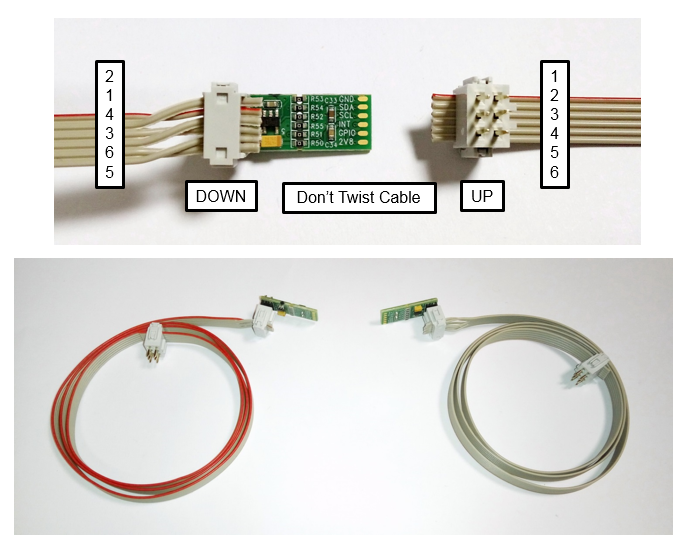
- Flat Cable 6 ways (Part Number 1807010) - To plug VL6180X-SATEL with X-NUCLEO-6180XA1 (60cm length each x2).
- Cable Connector (Part Number 6737694) - To plug the Flat Cable (x4).
- Power Connector (Part Number 0487842) - To provide Power Supply to X-NUCLEO-IHM01A1.
CLIENT SunTracker_BLE_Remote
- Nucleo-F401RE platform using a STM32F401RET6 microcontroller.
- X-NUCLEO-IKS01A1 - Motion MEMS and environmental sensor board.
- X-NUCLEO-IDB04A1 or X-NUCLEO-IDB05A1- Bluetooth Low Energy Bluetooth low energy evaluation board.
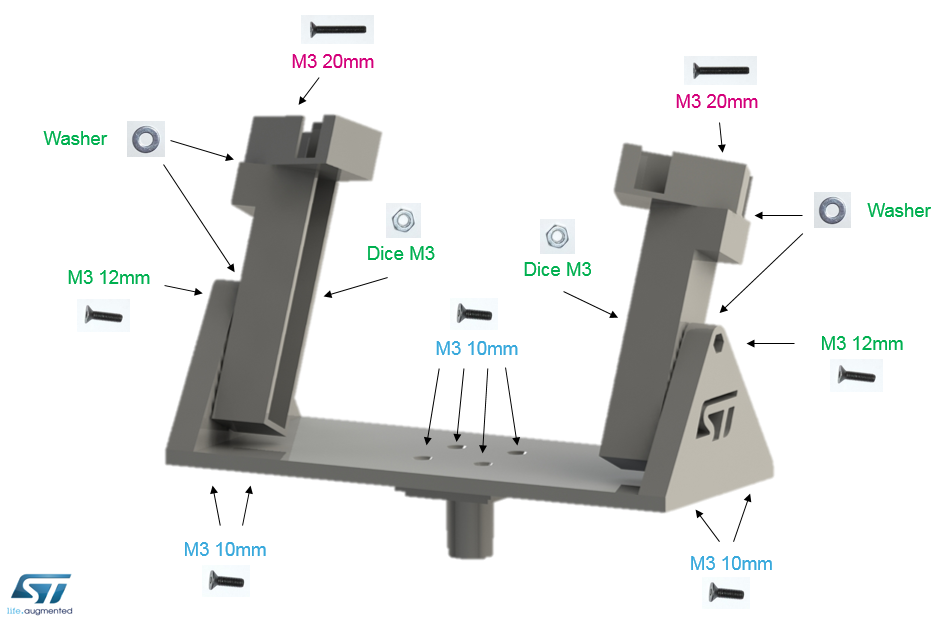
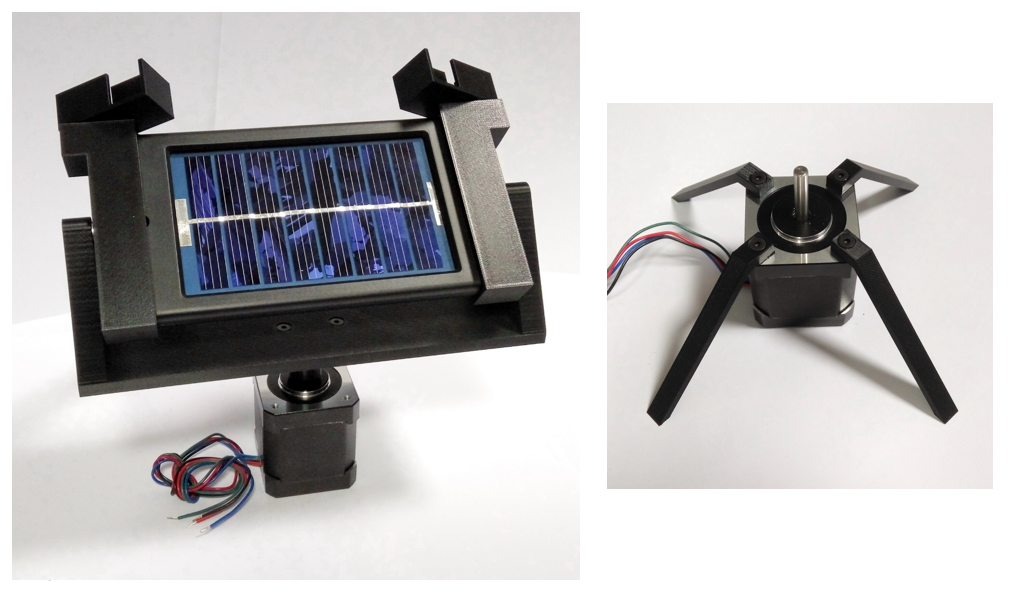
MECHANICAL STRUCTURE
Find here the STL files to print with a 3D printer.
FLAT CABLE ASSEMBLY
HARDWARE SETUP
Nucleo ADC + Solar Panel
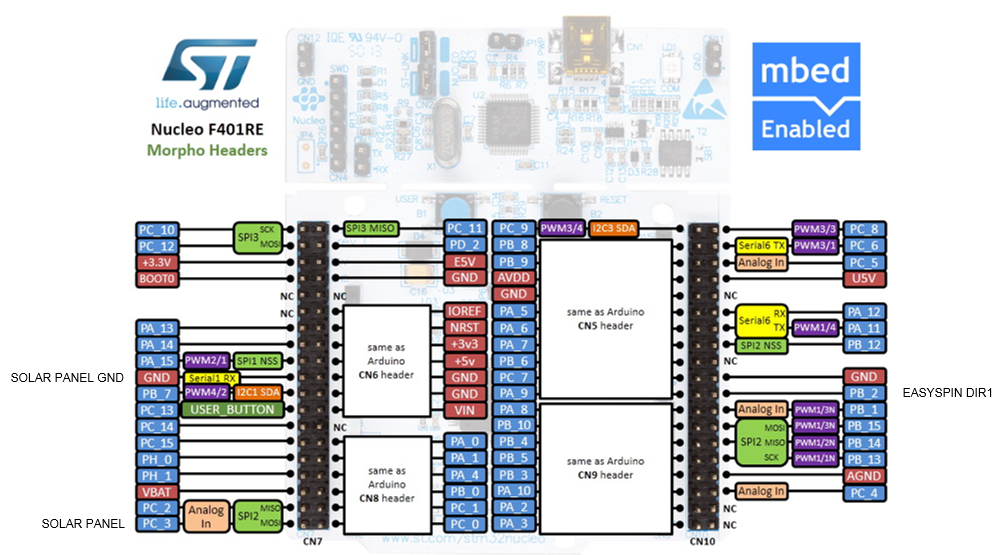
Connect Solar Panel cables to Nucleo Morpho PC_3 (white) and Nucleo Morpho GND (black). Connect a capacitor 10uF between PC_3 and GND to stabilize its voltage value shown on display.
EasySpin (L6474) + BLE
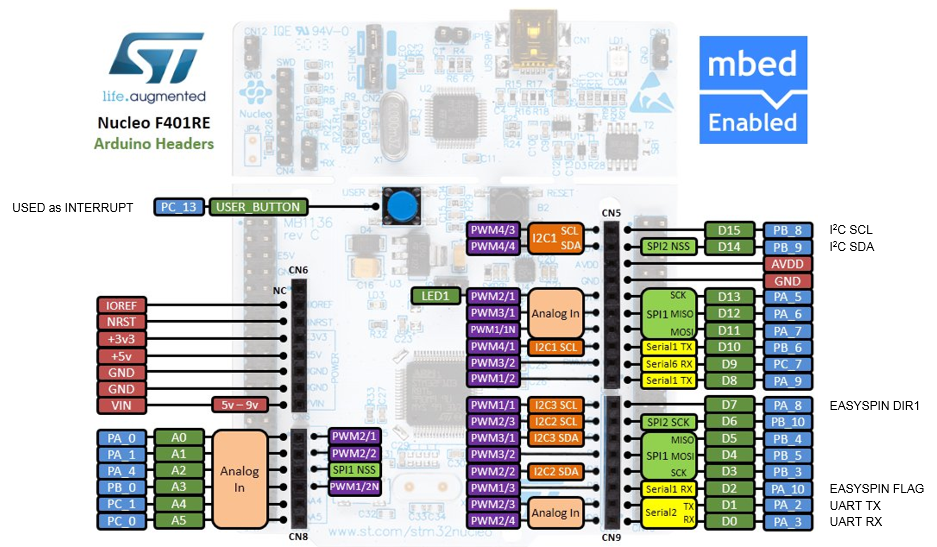
Hardware conflict between EasySpin DIR1 and BLE Reset, both on same Arduino Pin PA_8. Disconnect PA_8 between EasySpin and Nucleo by fold EasySpin Pin. PB_2 has been configured as EasySpin DIR1 in the firmware . Connect Nucleo Morpho PB_2 to FlightSense Arduino PA_8 by a wire.
FlightSense Satellites
In case of instability with I2C due to long flat cables, solder 4 SMD capacitors 47pF on FlightSense board in parallel between R15, R16, R17, R18 and plug 2 capacitors 15pF between FlightSense Arduino PB_8 and PB_9 to GND pin to cut-off noises over 720 KHz.
Arduino & Morpho Pinout
Revision 9:ca289bf57f52, committed 2016-02-26
- Comitter:
- fabiombed
- Date:
- Fri Feb 26 12:51:03 2016 +0000
- Parent:
- 8:144855fe02bd
- Child:
- 10:d154094297ce
- Commit message:
- SunTracker with MEMS but without BLE
Changed in this revision
| CustomControlService.h | Show annotated file Show diff for this revision Revisions of this file |
| main.cpp | Show annotated file Show diff for this revision Revisions of this file |
--- a/CustomControlService.h	Fri Feb 12 10:52:50 2016 +0000
+++ b/CustomControlService.h	Fri Feb 26 12:51:03 2016 +0000
@@ -65,9 +65,9 @@

         GattCharacteristic *charTable[] = {&userbuttonCharacteristic};

-        GattService   configService(CONTROL_SERVICE_UUID_128, charTable, sizeof(charTable) / sizeof(GattCharacteristic *));
+        GattService   controlService(CONTROL_SERVICE_UUID_128, charTable, sizeof(charTable) / sizeof(GattCharacteristic *));

-        ble.gattServer().addService(configService);
+        ble.gattServer().addService(controlService);

         isEnabledControlNotify = false;
         memset (controlData, 0, SIZEOF_CONTROL_DATA_LEN);
--- a/main.cpp	Fri Feb 12 10:52:50 2016 +0000
+++ b/main.cpp	Fri Feb 26 12:51:03 2016 +0000
@@ -135,7 +135,7 @@

 InterruptIn mybutton(USER_BUTTON);

-//AnalogIn analog_read(A1); // A1 Conflict with BLE SPI_CS --> Changed it!!!
+AnalogIn analog_read(PC_3); // A1 Conflict with BLE SPI_CS del BLE --> Changed in Morpho PC_3

 /* User_Button_Pressed -------------------------------------------------------*/

@@ -150,6 +150,87 @@

 }

+/* Bluetooth CallBack ---------------------------------------------------------*/
+
+static void onUpdatesEnabledCallback(GattAttribute::Handle_t handle)
+{
+
+}
+
+static void onUpdatesDisabledCallback(Gap::Handle_t handle)
+{
+
+}
+
+static void onDataReadCallback(const GattReadCallbackParams *eventDataP)
+{
+
+}
+
+static void myonDataWriteCallback(const GattWriteCallbackParams *eventDataP)
+{
+    printf ("myonDataWriteCallback attr_handle: %x  att_data[3]: %x  data_length: %d\n\r", eventDataP->handle, eventDataP->data[3], eventDataP->len );
+
+    if (p_customcontrolservice->isContHandle(eventDataP->handle)) // Only if write come from this Service
+    {
+        uint8_t Command = eventDataP->data[3];  // Riceve 8 byte: data[0] + data[1] + data[2] + data[3]
+        printf("myonDataWriteCallback (Command %x)\r\n", Command);
+    }
+}
+
+static void onConnectionCallback(const Gap::ConnectionCallbackParams_t * connectionParams)
+{
+    printf("onConnectionCallback (Line %d)\r\n", __LINE__);
+}
+
+static void onDisconnectionCallback(const Gap::DisconnectionCallbackParams_t * disConnectionReason)
+{
+    printf("onDisconnectionCallback (Line %d)\r\n", __LINE__);
+    p_BLEdev->gap().startAdvertising();
+}
+
+/* Bluetooth Initialization ---------------------------------------------------*/
+
+bool BLE_Initialization(void)
+{
+
+    p_BLEdev = new BLE;
+    if (!p_BLEdev) { printf("\r\nBLE Device creation failed\r\n"); }
+    const Gap::Address_t BLE_address_BE = {BLE_DEV_MAC};
+    p_BLEdev->gap().setAddress(BLEProtocol::AddressType::PUBLIC, BLE_address_BE);
+
+    p_BLEdev->init();
+
+    // Set BLE CallBack Functions
+    p_BLEdev->gattServer().onUpdatesEnabled(onUpdatesEnabledCallback);
+    p_BLEdev->gattServer().onUpdatesDisabled(onUpdatesDisabledCallback);
+    p_BLEdev->gattServer().onDataRead(onDataReadCallback);
+    p_BLEdev->gattServer().onDataWritten(myonDataWriteCallback);
+    p_BLEdev->gap().onConnection(onConnectionCallback);
+    p_BLEdev->gap().onDisconnection(onDisconnectionCallback);
+    //p_BLEdev->gattServer().onConfirmationReceived(onConfirmationReceivedCallback);
+    //p_BLEdev->gattServer().onDataSent(onDataSentCallback);
+    //p_BLEdev->gap().onTimeout(onTimeoutCallback);
+
+    // BLE Services
+    p_customcontrolservice =  new CustomControlService(*p_BLEdev);
+    p_customsensorservice = new CustomSensorService(*p_BLEdev);
+
+    // Setup BLE Advertising
+    const static char DEVICE_NAME[] = BLE_DEV_NAME;
+    p_BLEdev->gap().accumulateAdvertisingPayload(GapAdvertisingData::BREDR_NOT_SUPPORTED | GapAdvertisingData::LE_GENERAL_DISCOVERABLE);
+    uint8_t dat[] = {0x01,0x80,0x00,0xFC,0x00,0x00};
+    p_BLEdev->gap().accumulateScanResponse(GapAdvertisingData::MANUFACTURER_SPECIFIC_DATA,dat,6);
+    p_BLEdev->gap().accumulateAdvertisingPayload(GapAdvertisingData::UNKNOWN);
+    p_BLEdev->gap().accumulateAdvertisingPayload(GapAdvertisingData::COMPLETE_LOCAL_NAME, (uint8_t *)DEVICE_NAME, sizeof(DEVICE_NAME));
+    p_BLEdev->gap().setAdvertisingType(GapAdvertisingParams::ADV_CONNECTABLE_UNDIRECTED);
+    p_BLEdev->gap().setAdvertisingInterval(BLE_ADVERTISING_INTERVAL);
+    p_BLEdev->gap().startAdvertising();
+
+    return true;
+
+}
+
 /* Initialization ------------------------------------------------------------*/

 bool Initialization(void)
@@ -165,8 +246,8 @@
     //board=X_NUCLEO_6180XA1::Instance(&dev_i2c);
     board=X_NUCLEO_6180XA1::Instance(&dev_i2c, NC, NC, NC, NC);

-    //status=board->InitBoard();
-    //if(status) VL6180x_ErrLog("Failed to init the board!\n\r");
+    status=board->InitBoard();
+    if(status) VL6180x_ErrLog("Failed to init the board!\n\r");

     // Put GPIO not used as Interrupt in Hi-Z
     status_t=board->sensor_top->SetGPIOxFunctionality(1, GPIOx_SELECT_OFF);
@@ -183,7 +264,8 @@
 //----

     // Initializing Motor Component
-    motor = new L6474(D2, D8, D7, D9, D10, dev_spi); // D7 conflict with BNRG_RST (when motor change direction 0-1 reset BLE)
+    motor = new L6474(D2, D8, PB_2, D9, D10, dev_spi); // D7 conflict with BNRG_RST (when motor change direction 0-1 reset BLE)
+                                                       // Used Morpho PB_2 and made HW wiring
     if (motor->Init(NULL) != COMPONENT_OK)
         return false;

@@ -298,7 +380,7 @@
 {

     // AnalogIn: 0V return 0.0 , 3.3V return 1.0
-    float measure = 0; //analog_read.read() * 3300;
+    float measure = analog_read.read() * 3300;
     //printf("Measure = %.0f mV\r\n", measure);
     //board->display->DisplayDigit("A", 0);

@@ -309,87 +391,6 @@

 }

-/* Bluetooth CallBack ---------------------------------------------------------*/
-
-static void onUpdatesEnabledCallback(GattAttribute::Handle_t handle)
-{
-
-}
-
-static void onUpdatesDisabledCallback(Gap::Handle_t handle)
-{
-
-}
-
-static void onDataReadCallback(const GattReadCallbackParams *eventDataP)
-{
-
-}
-
-static void myonDataWriteCallback(const GattWriteCallbackParams *eventDataP)
-{
-    printf ("myonDataWriteCallback attr_handle: %x  att_data[3]: %x  data_length: %d\n\r", eventDataP->handle, eventDataP->data[3], eventDataP->len );
-
-    if (p_customcontrolservice->isContHandle(eventDataP->handle)) // Only if write come from this Service
-    {
-        uint8_t Command = eventDataP->data[3];  // Riceve 8 byte: data[0] + data[1] + data[2] + data[3]
-        printf("myonDataWriteCallback (Command %x)\r\n", Command);
-    }
-}
-
-static void onConnectionCallback(const Gap::ConnectionCallbackParams_t * connectionParams)
-{
-    printf("onConnectionCallback (Line %d)\r\n", __LINE__);
-}
-
-static void onDisconnectionCallback(const Gap::DisconnectionCallbackParams_t * disConnectionReason)
-{
-    printf("onDisconnectionCallback (Line %d)\r\n", __LINE__);
-    p_BLEdev->gap().startAdvertising();
-}
-
-/* Bluetooth Initialization ---------------------------------------------------*/
-
-bool BLE_Initialization(void)
-{
-
-    p_BLEdev = new BLE;
-    if (!p_BLEdev) { printf("\r\nBLE Device creation failed\r\n"); }
-    const Gap::Address_t BLE_address_BE = {BLE_DEV_MAC};
-    p_BLEdev->gap().setAddress(BLEProtocol::AddressType::PUBLIC, BLE_address_BE);
-
-    p_BLEdev->init();
-
-    // Set BLE CallBack Functions
-    p_BLEdev->gattServer().onUpdatesEnabled(onUpdatesEnabledCallback);
-    p_BLEdev->gattServer().onUpdatesDisabled(onUpdatesDisabledCallback);
-    p_BLEdev->gattServer().onDataRead(onDataReadCallback);
-    p_BLEdev->gattServer().onDataWritten(myonDataWriteCallback);
-    p_BLEdev->gap().onConnection(onConnectionCallback);
-    p_BLEdev->gap().onDisconnection(onDisconnectionCallback);
-    //p_BLEdev->gattServer().onConfirmationReceived(onConfirmationReceivedCallback);
-    //p_BLEdev->gattServer().onDataSent(onDataSentCallback);
-    //p_BLEdev->gap().onTimeout(onTimeoutCallback);
-
-    // BLE Services
-    p_customcontrolservice =  new CustomControlService(*p_BLEdev);
-    p_customsensorservice = new CustomSensorService(*p_BLEdev);
-
-    // Setup BLE Advertising
-    const static char DEVICE_NAME[] = BLE_DEV_NAME;
-    p_BLEdev->gap().accumulateAdvertisingPayload(GapAdvertisingData::BREDR_NOT_SUPPORTED | GapAdvertisingData::LE_GENERAL_DISCOVERABLE);
-    uint8_t dat[] = {0x01,0x80,0x00,0xFC,0x00,0x00};
-    p_BLEdev->gap().accumulateScanResponse(GapAdvertisingData::MANUFACTURER_SPECIFIC_DATA,dat,6);
-    p_BLEdev->gap().accumulateAdvertisingPayload(GapAdvertisingData::UNKNOWN);
-    p_BLEdev->gap().accumulateAdvertisingPayload(GapAdvertisingData::COMPLETE_LOCAL_NAME, (uint8_t *)DEVICE_NAME, sizeof(DEVICE_NAME));
-    p_BLEdev->gap().setAdvertisingType(GapAdvertisingParams::ADV_CONNECTABLE_UNDIRECTED);
-    p_BLEdev->gap().setAdvertisingInterval(BLE_ADVERTISING_INTERVAL);
-    p_BLEdev->gap().startAdvertising();
-
-    return true;
-
-}
-
 /* Main ----------------------------------------------------------------------*/

 int main()
@@ -397,12 +398,12 @@

     // Printing to the console
     printf("SunTracker by Fabio Brembilla\r\n\n");
-
+
     Initialization();
     printf("Initialization OK (Line %d)\r\n", __LINE__);

-    BLE_Initialization();
-    printf("BLE_Initialization OK (Line %d)\r\n", __LINE__);
+    //BLE_Initialization();
+    //printf("BLE_Initialization OK (Line %d)\r\n", __LINE__);

     mybutton.fall(&User_Button_Pressed);
     printf("Wait Push Button\r\n");
@@ -411,13 +412,13 @@
     strcpy(DisplayStr,"pusH");
     while(start<1) {
         board->display->DisplayString(DisplayStr, 4);
-        p_BLEdev->waitForEvent();
+        //p_BLEdev->waitForEvent();
         //printf("%s\n\r", DisplayStr);
     }

     printf("Start Main Loop\r\n");

-    static int INTLOOP=0;
+    //static int INTLOOP=0;

     // Main Loop
     while(true)
@@ -428,10 +429,10 @@
         Control_Motor();
         Measure_SolarPanel();

-        INTLOOP++;
-        if (INTLOOP==100) { p_customsensorservice->sendEnvPosition(rand(),0); printf("Read BLE\n\r"); INTLOOP=0; }
+        //INTLOOP++;
+        //if (INTLOOP==100) { p_customsensorservice->sendEnvPosition(rand(),0); printf("Read BLE\n\r"); INTLOOP=0; }

-        p_BLEdev->waitForEvent();
+        //p_BLEdev->waitForEvent();
     }

     //status_l=board->sensor_left->StopMeasurement(als_continuous_polling);