
Important changes to forums and questions
All forums and questions are now archived. To start a new conversation or read the latest updates go to forums.mbed.com.
10 years, 10 months ago.
8" Buydisplay LCD with capacitiv touch
Hi mbed-friends,
I got an 7" Buydisplay LCD. (I mispelled 8" in the title) It is based on the RA8875 controller. http://www.buydisplay.com/default/7-inch-lcd-module-capacitive-touch-screen-panel-i2c-spi-serial
The RA8875_Demo runs just fine (on the Seeed Arch Pro). https://developer.mbed.org/users/WiredHome/code/RA8875_Demo/
Only when I try to use the Arial12x12 bitmapped font instead of the built-in font, it prints a square block of about 100x100 pixels, with 'random' pixels on and of, for each printed character.
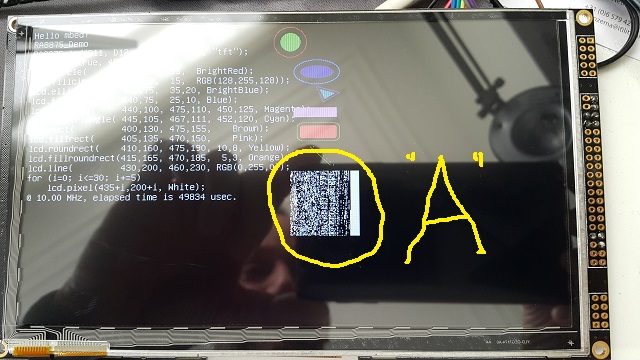
Below, I print just one character (I got some bitmap):
    lcd.set_font("Arial12x12");
    lcd.puts(400,240, "A");
Has anybody used this display, and got bitmapped fonts working just fine?
Below my code
#include "mbed.h"

#include "RA8875.h"

#define PIN_SCLK        D13
#define PIN_MISO        D12
#define PIN_MOSI        D11
#define PIN_CS_TFT      D10  // chip select pin
#define PIN_DC_TFT      D9   // data/command select pin.
#define PIN_RESET_TFT   D8
#define PIN_BL_TFT      D7
#define PIN_CS_SD       D4

Serial pc(USBTX, USBRX);

int main()
{
    int i;
    Timer t;
    float f = 10000000;

    pc.baud(460800);    // I like a snappy terminal, so crank it up!
    pc.printf("\r\nRA8875 Test - Build " __DATE__ " " __TIME__ "\r\n");

    pc.printf("Turning on display\r\n");
    RA8875 lcd(PIN_MOSI, PIN_MISO, PIN_SCLK, PIN_CS_TFT, PIN_RESET_TFT, "tft");    // MOSI, MISO, SCK, /ChipSelect, /reset, name

    t.start();
//    lcd.init();
    lcd.init(800, 480, 16, true, true, true);
//    lcd.frequency(f);
    lcd.cls();
    lcd.Backlight_u8(255);
    lcd.SetOrientation(RA8875::normal);

    lcd.cls();
    uint32_t tStart = t.read_us();
    lcd.foreground(RGB(255,255,255));
    lcd.claim(stdout);
    lcd.background(Black);
    lcd.printf("Hello mbed!\r\n");
    printf("RA8875_Demo\r\n");

    lcd.puts(0,32,
        "RA8875 lcd(D11, D12, D13, D10, D8, \"tft\");\r\n"
        "lcd.init(true, 480,272,16);\r\n"
        "lcd.circle(       400,25,  25,  BrightRed);\r\n"
        "lcd.fillcircle(   400,25,  15,  RGB(128,255,128));\r\n"
        "lcd.ellipse(      440,75,  35,20, BrightBlue);\r\n"
        "lcd.fillellipse(  440,75,  25,10, Blue);\r\n"
        "lcd.triangle(     440,100, 475,110, 450,125, Magenta);\r\n"
        "lcd.filltriangle( 445,105, 467,111, 452,120, Cyan);\r\n"
        "lcd.rect(         400,130, 475,155,    Brown);\r\n"
        "lcd.fillrect(     405,135, 470,150,    Pink);\r\n"
        "lcd.roundrect(    410,160, 475,190, 10,8, Yellow);\r\n"
        "lcd.fillroundrect(415,165, 470,185,  5,3, Orange);\r\n"
        "lcd.line(         430,200, 460,230, RGB(0,255,0));\r\n"
        "for (i=0; i<=30; i+=5)\r\n"
        "    lcd.pixel(435+i,200+i, White);");

    lcd.circle(       400,25,  25,               BrightRed);
    lcd.fillcircle(   400,25,  15,               RGB(128,255,128));
    lcd.ellipse(      440,75,  35,20,            BrightBlue);
    lcd.fillellipse(  440,75,  25,10,            Blue);
    lcd.triangle(     440,100, 475,110, 450,125, Magenta);
    lcd.filltriangle( 445,105, 467,111, 452,120, Cyan);
    lcd.rect(         400,130, 475,155,          Brown);
    lcd.fillrect(     405,135, 470,150,          Pink);
    lcd.roundrect(    410,160, 475,190, 10,8,    Yellow);
    lcd.fillroundrect(415,165, 470,185,  5,3,    Orange);
    lcd.line(         430,200, 460,230,          RGB(0,255,0));
    for (i=0; i<=30; i+=5)
        lcd.pixel(435+i,200+i, White);
    uint32_t tEnd = t.read_us();

    lcd.foreground(RGB(255,255,255));
    lcd.printf("@ %4.2f MHz, elapsed time is %u usec.\r\n", (float)f/1000000, tEnd-tStart);

    lcd.set_font("Arial12x12");
    lcd.puts(400,240, "A");

    while(1) {
    }
}
Best regards, Jack.
1 Answer
10 years, 10 months ago.
Hi Jack, Paul,
Sorry I didn't see this sooner, but I see also that you got it sorted out. My first quick thought was to check the return value - but in looking at the code, that won't work - as you see below.
RetCode_t GraphicsDisplay::set_font(const unsigned char * _font)
{
font = _font; // trusting them, but it might be good to put some checks in here...
return noerror;
}
My current RA8875-based projects are [presently] complete and stable, so I don't know if I'll get a chance to address this before this fall. If either of you propose a [more robust] change with a pull request, I could easily do a quick review and honor that.
Hi David,
The display works just fine with your library on an Arch Pro and on the much faster Arch Max.
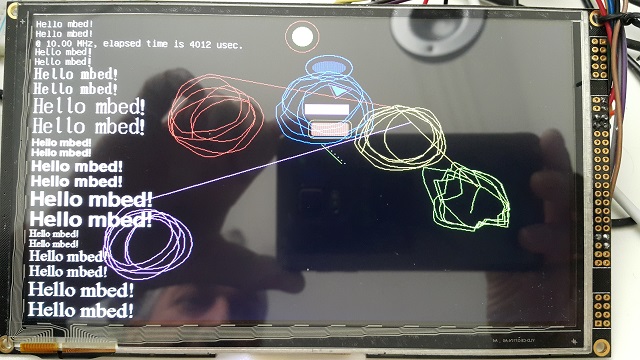
These fonts are fast-rendered build-in fonts, using the optional ER3304-1 font chip.
Regards, Jack.
posted by 17 Jun 2015Hi David, I wrote a simple 5-point Capacitive touch panel driver for the FT5206. https://developer.mbed.org/users/JackB/code/FT5206/ Regards, Jack.
posted by 18 Jun 2015
Just tried, (I have the 8" version), same issue, also with the "Small_6" font. Did you get the font chip ?
edit..
I have sent a message to David Smart about this in case he knows the answer.
posted by Paul Staron 16 Jun 2015Hi Vitaliy, yes I ordered the font chip ER3304-1. But honestly, I amused it is just the build-in font shown on the photo? I will try to get Capacitive touch working later. Regards, Jack
posted by Jack Berkhout 16 Jun 2015Hi,
I sorted it out, stupid error from me. I let it point to the string "Arial12x12" and some memory following it. The pointer just needs to point to the actual font character array, so I had to leave out the quotes at the font name:
    lcd.set_font(Arial12x12);
    lcd.puts(400,240, "A");
Regards, Jack.
posted by Jack Berkhout 16 Jun 2015These are working as well Jack:
https://developer.mbed.org/users/star297/code/HY-1_8TFT_fonts_ST7735/
Import the library and #include the font files you want to use.
posted by Paul Staron 16 Jun 2015Hi Paul,
Hi Paul, thank you very much! I have created quite a lot as well, Calibri, Monaco, Consolas, Courier, Terminal, Verdana, and a couple more. You may find them on my page. Do I need this "align(2)" that I found somewhere?
/** Arial Font with 12*12 matrix to use with SPI_TFT lib
 */
__align(2)
const unsigned char Arial12x12[] = {
    25, 12, 12, 2,    // Bytes/char, horz, vert, byte/vert
Also, is it best practice to use the define statement to have it referenced only once?