You are viewing an older revision! See the latest version
Socket
Network Interfaces
The mbed C++ Socket API is a simple abstraction on top of the Berkeley sockets API.
The Socket library is included within the Networking libraries (Ethernet Interface and VodafoneK3770 Interface).

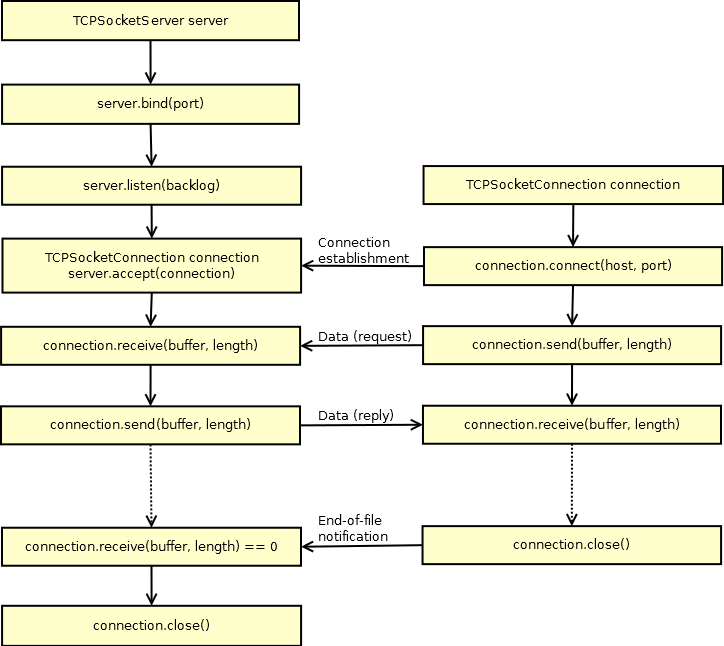
TCP Socket
Import library
Public Member Functions |
|
| TCPSocketServer () | |
|
Instantiate a TCP Server.
|
|
| int | bind (int port) |
|
Bind a socket to a specific port.
|
|
| int | listen (int backlog=1) |
|
Start listening for incoming connections.
|
|
| int | accept ( TCPSocketConnection &connection) |
|
Accept a new connection.
|
|
| void | set_blocking (bool blocking, unsigned int timeout=1500) |
|
Set blocking or non-blocking mode of the socket and a timeout on blocking socket operations.
|
|
| int | set_option (int level, int optname, const void *optval, socklen_t optlen) |
|
Set socket options.
|
|
| int | get_option (int level, int optname, void *optval, socklen_t *optlen) |
|
Get socket options.
|
|
| int | close (bool shutdown=true) |
|
Close the socket.
|
|
Import library
Public Member Functions |
|
| TCPSocketConnection () | |
|
TCP socket connection.
|
|
| int | connect (const char *host, const int port) |
|
Connects this TCP socket to the server.
|
|
| bool | is_connected (void) |
|
Check if the socket is connected.
|
|
| int | send (char *data, int length) |
|
Send data to the remote host.
|
|
| int | send_all (char *data, int length) |
|
Send all the data to the remote host.
|
|
| int | receive (char *data, int length) |
|
Receive data from the remote host.
|
|
| int | receive_all (char *data, int length) |
|
Receive all the data from the remote host.
|
|
| void | set_blocking (bool blocking, unsigned int timeout=1500) |
|
Set blocking or non-blocking mode of the socket and a timeout on blocking socket operations.
|
|
| int | set_option (int level, int optname, const void *optval, socklen_t optlen) |
|
Set socket options.
|
|
| int | get_option (int level, int optname, void *optval, socklen_t *optlen) |
|
Get socket options.
|
|
| int | close (bool shutdown=true) |
|
Close the socket.
|
|
| void | reset_address (void) |
|
Reset the address of this endpoint.
|
|
| int | set_address (const char *host, const int port) |
|
Set the address of this endpoint.
|
|
| char * | get_address (void) |
|
Get the IP address of this endpoint.
|
|
| int | get_port (void) |
|
Get the port of this endpoint.
|
|
Friends |
|
| class | TCPSocketServer |
TCP Echo Server
Import program
00001 #include "mbed.h"
00002 #include "EthernetInterface.h"
00003
00004 #define ECHO_SERVER_PORT   7
00005
00006 int main (void) {
00007     EthernetInterface eth;
00008     eth.init(); //Use DHCP
00009     eth.connect();
00010     printf("\nServer IP Address is %s\n", eth.getIPAddress());
00011
00012     TCPSocketServer server;
00013     server.bind(ECHO_SERVER_PORT);
00014     server.listen();
00015
00016     while (true) {
00017         printf("\nWait for new connection...\n");
00018         TCPSocketConnection client;
00019         server.accept(client);
00020         client.set_blocking(false, 1500); // Timeout after (1.5)s
00021
00022         printf("Connection from: %s\n", client.get_address());
00023         char buffer[256];
00024         while (true) {
00025             int n = client.receive(buffer, sizeof(buffer));
00026             if (n <= 0) break;
00027
00028             // print received message to terminal
00029             buffer[n] = '\0';
00030             printf("Received message from Client :'%s'\n",buffer);
00031
00032             // reverse the message
00033             char temp;
00034             for(int f = 0, l = n-1; f<l; f++,l--){
00035                 temp = buffer[f];
00036                 buffer[f] = buffer[l];
00037                 buffer[l] = temp;
00038                 }
00039
00040             // print reversed message to terminal
00041             printf("Sending message to Client: '%s'\n",buffer);
00042
00043             // Echo received message back to client
00044             client.send_all(buffer, n);
00045             if (n <= 0) break;
00046         }
00047
00048         client.close();
00049     }
00050 }
00051
You can test the above server running on your mbed, with the following Python script running on your PC:
import socket

ECHO_SERVER_ADDRESS = "10.2.131.195"
ECHO_PORT = 7

s = socket.socket(socket.AF_INET, socket.SOCK_STREAM)
s.connect((ECHO_SERVER_ADDRESS, ECHO_PORT))

s.sendall('Hello, world')
data = s.recv(1024)
s.close()
print 'Received', repr(data)
TCP Echo Client
Import program
00001 #include "mbed.h"
00002 #include "EthernetInterface.h"
00003
00004 const char* ECHO_SERVER_ADDRESS = "192.168.2.2";
00005 const int ECHO_SERVER_PORT = 7;
00006
00007 int main() {
00008     EthernetInterface eth;
00009     eth.init(); //Use DHCP
00010     eth.connect();
00011     printf("\nClient IP Address is %s\n", eth.getIPAddress());
00012
00013     // Connect to Server
00014     TCPSocketConnection socket;
00015     while (socket.connect(ECHO_SERVER_ADDRESS, ECHO_SERVER_PORT) < 0) {
00016         printf("Unable to connect to (%s) on port (%d)\n", ECHO_SERVER_ADDRESS, ECHO_SERVER_PORT);
00017         wait(1);
00018     }
00019     printf("Connected to Server at %s\n",ECHO_SERVER_ADDRESS);
00020
00021     // Send message to server
00022     char hello[] = "Hello World";
00023     printf("Sending  message to Server : '%s' \n",hello);
00024     socket.send_all(hello, sizeof(hello) - 1);
00025
00026     // Receive message from server
00027     char buf[256];
00028     int n = socket.receive(buf, 256);
00029     buf[n] = '\0';
00030     printf("Received message from server: '%s'\n", buf);
00031
00032     // Clean up
00033     socket.close();
00034     eth.disconnect();
00035
00036     while(true) {}
00037 }
You can test the above Client running on your mbed, with the following Python script running on your PC:
import socket

s = socket.socket(socket.AF_INET, socket.SOCK_STREAM)
s.bind(('', 7))
s.listen(1)

while True:
    conn, addr = s.accept()
    print 'Connected by', addr
    while True:
        data = conn.recv(1024)
        if not data: break
        conn.sendall(data)
    conn.close()
UDP Socket

Import library
Public Member Functions |
|
| UDPSocket () | |
|
Instantiate an UDP
Socket
.
|
|
| int | init (void) |
|
Init the UDP Client
Socket
without binding it to any specific port.
|
|
| int | bind (int port) |
|
Bind a UDP Server
Socket
to a specific port.
|
|
| int | join_multicast_group (const char *address) |
|
Join the multicast group at the given address.
|
|
| int | set_broadcasting (bool broadcast=true) |
|
Set the socket in broadcasting mode.
|
|
| int | sendTo ( Endpoint &remote, char *packet, int length) |
|
Send a packet to a remote endpoint.
|
|
| int | receiveFrom ( Endpoint &remote, char *buffer, int length) |
|
Receive a packet from a remote endpoint.
|
|
| void | set_blocking (bool blocking, unsigned int timeout=1500) |
|
Set blocking or non-blocking mode of the socket and a timeout on blocking socket operations.
|
|
| int | set_option (int level, int optname, const void *optval, socklen_t optlen) |
|
Set socket options.
|
|
| int | get_option (int level, int optname, void *optval, socklen_t *optlen) |
|
Get socket options.
|
|
| int | close (bool shutdown=true) |
|
Close the socket.
|
|
Import library
Public Member Functions |
|
| Endpoint (void) | |
|
IP
Endpoint
(address, port)
|
|
| void | reset_address (void) |
|
Reset the address of this endpoint.
|
|
| int | set_address (const char *host, const int port) |
|
Set the address of this endpoint.
|
|
| char * | get_address (void) |
|
Get the IP address of this endpoint.
|
|
| int | get_port (void) |
|
Get the port of this endpoint.
|
|
Friends |
|
| class | UDPSocket |
UDP Echo Server
Import program
00001 #include "mbed.h"
00002 #include "EthernetInterface.h"
00003
00004 #define ECHO_SERVER_PORT   7
00005
00006 int main (void) {
00007     EthernetInterface eth;
00008     eth.init(); //Use DHCP
00009     eth.connect();
00010     printf("\nServer IP Address is %s\n", eth.getIPAddress());
00011
00012     UDPSocket server;
00013     server.bind(ECHO_SERVER_PORT);
00014
00015     Endpoint client;
00016     char buffer[256];
00017     while (true) {
00018         printf("\nWaiting for UDP packet...\n");
00019         int n = server.receiveFrom(client, buffer, sizeof(buffer));
00020         buffer[n] = '\0';
00021
00022         printf("Received packet from: %s\n", client.get_address());
00023         printf("Packet contents : '%s'\n",buffer);
00024         printf("Sending Packet back to Client\n");
00025         server.sendTo(client, buffer, n);
00026     }
00027 }
You can test the above Server running on your mbed, with the following Python script running on your PC:
import socket

ECHO_SERVER_ADDRESS = '10.2.131.195'
ECHO_PORT = 7

sock = socket.socket(socket.AF_INET, socket.SOCK_DGRAM)

sock.sendto("Hello World\n", (ECHO_SERVER_ADDRESS, ECHO_PORT))
response = sock.recv(256)
sock.close()

print response
UDP Echo Client
Import program
00001 #include "mbed.h"
00002 #include "EthernetInterface.h"
00003
00004 const char* ECHO_SERVER_ADDRESS = "192.168.2.2";
00005 const int ECHO_SERVER_PORT = 7;
00006
00007 int main() {
00008     EthernetInterface eth;
00009     eth.init(); //Use DHCP
00010     eth.connect();
00011     printf("\nClient IP Address is %s \n", eth.getIPAddress());
00012
00013     UDPSocket sock;
00014     sock.init();
00015
00016     Endpoint echo_server;
00017     echo_server.set_address(ECHO_SERVER_ADDRESS, ECHO_SERVER_PORT);
00018
00019     char out_buffer[] = "Hello World";
00020     printf("Sending  message '%s' to server (%s)\n",out_buffer,ECHO_SERVER_ADDRESS);
00021     sock.sendTo(echo_server, out_buffer, sizeof(out_buffer));
00022
00023     char in_buffer[256];
00024     int n = sock.receiveFrom(echo_server, in_buffer, sizeof(in_buffer));
00025
00026     in_buffer[n] = '\0';
00027     printf("Received message from server: '%s'\n", in_buffer);
00028
00029     sock.close();
00030
00031     eth.disconnect();
00032     while(1) {}
00033 }
You can test the above Client running on your mbed, with the following Python script running on your PC:
import socket

ECHO_PORT = 7

sock = socket.socket(socket.AF_INET, socket.SOCK_DGRAM)
sock.bind(('', ECHO_PORT))

while True:
    data, address = sock.recvfrom(256)
    print "datagram from", address
    sock.sendto(data, address)
Blocking/Non-Blocking and Timeout
The standard Berkeley sockets functions (accept, send, receive, etc) are blocking, for this reason also our Socket methods are blocking by default.
If you want a non-blocking behaviour, waiting for a certain event only for a certain amount of time, you have to explicitly make a call to the set_blocking(bool blocking, unsigned int timeout) method:
// [Default] Blocking: wait the socket being (readable/writable) forever
socket.set_blocking(true)

// Non-Blocking: Return after a maximum of (timeout)ms.
socket.set_blocking(false, timeout)