Sam Choy
/
Oled_display_128x64
Important changes to repositories hosted on mbed.com
Mbed hosted mercurial repositories are deprecated and are due to be permanently deleted in July 2026.
To keep a copy of this software download the repository Zip archive or clone locally using Mercurial.
It is also possible to export all your personal repositories from the account settings page.
You are viewing an older revision! See the latest version
Homepage
OLED library for 128x64 Display
This is a cheap 6 pin OLED Display Module, easily available on ebay or other stores for 2-4 USD.
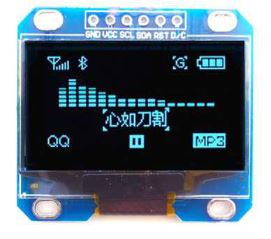
Example
example >
OLED_SCL            PB_5
OLED_SDA            PB_4
OLED_RES            PB_3
OLED_DC             PA_15

oled            myoled(OLED_SCL, OLED_SDA, OLED_RES, OLED_DC);

int main() {

    myoled.OLED_ShowString(0, LINE_2_FONT16, FONT16, "Hellow World!");
    myoled.OLED_ShowString(0, LINE_3_FONT16, FONT16, "This is Line 3");
    myoled.OLED_ShowString(0, LINE_4_FONT16, FONT16, "ABCDEFGHIJKLMNOP");
    myoled.OLED_ShowNumber(0, LINE_1_FONT16, FONT16, 1234567890);
    myoled.OLED_Refresh();
    myoled.OLED_Display_Off();   //Turn off display
    wait_ms(1000);
    myoled.OLED_Display_On();  //Turn on display
    wait_ms(1000);
    myoled.OLED_Clear();
    myoled.OLED_ShowString(0, LINE_1_FONT16, FONT16, "Message after clear");
}
Library functions list
oled.h
         /** Create a oled control interface
         *
         * @param oled_SCL A DigitalOut, Clock pin
         * @param oled_SDA A DigitalOut, Data pin
         * @param oled_RES A DigitalOut, Reset pin
         * @param oled_DC A DigitalOut, Command Pin
         */
        oled(PinName oled_SCL, PinName oled_SDA, PinName oled_RES, PinName oled_DC);

         /** Draw a point on screen at specific co-ordinate
         *
         * @param x An unisgned integer byte, X co-ordinate of the point to be draw on screen (Range from 0~127)
         * @param y An unisgned integer byte, Y co-ordinate of the point to be draw on screen (Range from 0~63)
         * @param t A boolean, 1 = Fill, 0=Clear
         */
        void OLED_DrawPoint(uint8_t x,uint8_t y,bool t);

        /** Display a charcter at specific position
         *
         * @param x An unisgned integer byte, X co-ordinate of the point to be draw on screen (Range from 0~127)
         * @param y An unisgned integer byte, Y co-ordinate of the point to be draw on screen (Range from 0~63)
         * @param chr An unisgned integer byte, the character to be display
         * @param size An unisgned integer byte, the font size of the character (12pt or 16pt)
         * @param mode A boolean, 0 = inverted display,  1 = normal display
         */
        void OLED_ShowChar(uint8_t x,uint8_t y,uint8_t chr,uint8_t size,bool mode);

        /** Display a number at specific position
         *
         * @param x An unisgned integer byte, X co-ordinate of the point to be draw on screen (Range from 0~127)
         * @param y An unisgned integer byte, Y co-ordinate of the point to be draw on screen (Range from 0~63)
         * @param size An unisgned integer byte, the font size of the character (12pt or 16pt)
         * @param num An unisgned integer 32bit, value of the number to be display
         */
        void OLED_ShowNumber(uint8_t x,uint8_t y,uint8_t size, uint32_t num );

        /** Display a string at specific position with 16 x 8 font size
         *
         * @param x An unisgned integer byte, X co-ordinate of the point to be draw on screen (Range from 0~127)
         * @param y An unisgned integer byte, Y co-ordinate of the point to be draw on screen (Range from 0~63)
         * @param size An unisgned integer byte, the font size of the character (12pt or 16pt)
         * @param *p A string pointer, the address of the string to be display on screen (Maximium 16 characters for a line)
         */
        void OLED_ShowString(uint8_t x,uint8_t y,uint8_t size,const uint8_t *p);


        void OLED_Display_On(void);
        void OLED_Display_Off(void);
        void OLED_Refresh(void);
        void OLED_Clear(void);
Pin Connection
This OLED module tested with STM32F103RBT6 with following pin connection
- OLED_SCL PB_5
- OLED_SDA PB_4
- OLED_RES PB_3
- OLED_DC PA_15
Demo Video
TBD