Tank Game -- ECE4180 Lab
 Cindy Chen.
0
replies
Cindy Chen.
0
replies
Project Overview
The mini project we designed is a tank game.
To follow the lab instruction, this game includes: Reasonably Complex Color Graphics, User Input Device (accelerometer, push-bottoms), Quality Audio output and sound effects using the SD Card and speaker, Loading images from uLCD SD.
The game will include open screen, menu, actual game and end screen. In the open screen, the tank image will load onto the screen. The menu have the option for single player. The programmer can add more mode according to their need. Under each mode, there are three difficult levels, which are easy, medium , hard. In our design, higher difficulty level means longer life of each tank in a single turn. The player wins the game when he or she wins two out of three rounds.
The screen of the game includes a glass field. There are two tanks on each side with a wall in the middle. Two trees are on the two edges of the screen. The sun is also displayed in the screen and there are two life bars showing each tank's health status. The game uses accelerometer's output to control position and shooting angle of the tank. Player tilts the board in a direction controls the moving direction of the car. The other tilting direction will control the shooting angle of the tank. When player accomplish the position ans direction of shoot, he can hit the push button to shoot the bullet. The movement of the bullet will obey the newtons law and falling with the gravity. When the bullet hits an object (could be a wall, the opponent, etc), the explosion effects will be displayed. When the tank is hit, it will lose part of its life. The game automatically take turns for each tank to shoot and it will end when one tank lost his three lives. The ending song will play when the game ends.
Parts details and codes
1. SD Card file system:
The cookbook page: [https://developer.mbed.org/cookbook/SD-Card-File-System ] There are five songs in the game: beginning of the game, end of the game, shooting sound effect, one tank lose a life, the other tank lose a life.
2. Audio with an amplifier:
The cookbook page: [https://developer.mbed.org/users/4180_1/notebook/using-a-speaker-for-audio-output/] The TI TPA2005D1 class D audio amp chip can play the sound louder. However while doing the project, we realized that an additional power supply might be useful when the songs are too loud. Otherwise, it will drain more current and cause the mbed to reset all the time. In order for the amplifier to connect with SD card, analogout pin 18 has to be used in order to play the wave file.
Audio player with amplifier
SDFileSystem sd(p5, p6, p7, p8, "sd");      // SD  (mosi, miso, sck, cs)
AnalogOut DACout(p18);                      // speaker
wave_player player(&DACout);                // wav player
3. uLCD:
The notebook page: [https://developer.mbed.org/users/4180_1/notebook/ulcd-144-g2-128-by-128-color-lcd/ ] uLCD has its own library to draw graph and images. This is the main component of our game design.
In the beginning of the game, an image is displayed from the uLCD SD card. To do this, the graphic composer tool is used to modify the image to 128*128 size and a readable format for uLCD (we use uLCD-144-G2 module). To load the image into the uLCD display, the address of the image is found in a ".GC" file.
uLCD display code
    uLCD.baudrate(BAUD_3000000);
    uLCD.media_init();
    uLCD.set_sector_address(0x0000, 0x0000);
    uLCD.display_image(0,0);
4. Accelerometer :
The cookbook page: [https://developer.mbed.org/components/MMA8452Q-Triple-Axis-Accelerometer/] The game uses the y direction to control the shooting angle and the x direction to control the position of the tank.
use of accelerometer
if(p1_buttons[R_BUTTON]) {
   t2.invisible();
   }

if(ax1 > ACC_THRESHOLD) {
    // Move the tank to the right if the accelerometer is tipped far enough to the right.
    t2.reposition(+1, 0, 0);
   } else if(ax1 <  -ACC_THRESHOLD){
    t2.reposition(-1, 0, 0);
   }

  if(ay1 >  ACC_THRESHOLD) {
  // Move the tank to the right if the accelerometer is tipped far enough to the right.
  t2.reposition(0, 0, -PI/10);
   } else if(ay1 <  -ACC_THRESHOLD){
  t2.reposition(0, 0, PI/10);
 }
5. Pushbottom:
The cookbook page: [https://developer.mbed.org/users/4180_1/notebook/pushbuttons/ ] Instead of an external pull up, the game uses mode .pullup to use less hardware components. Bottoms 1 and 3 are for shootings and bottoms 2 and 4 are for invisible.
Overall Design
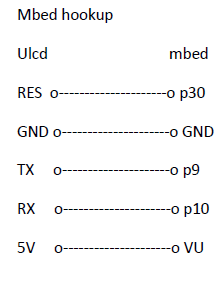
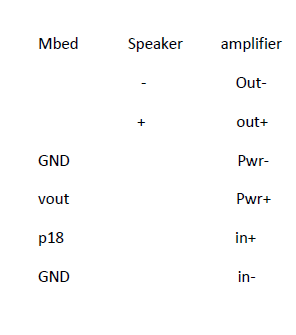
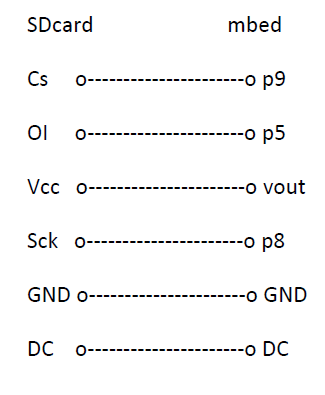
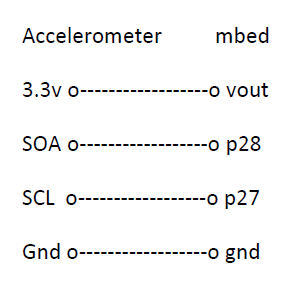
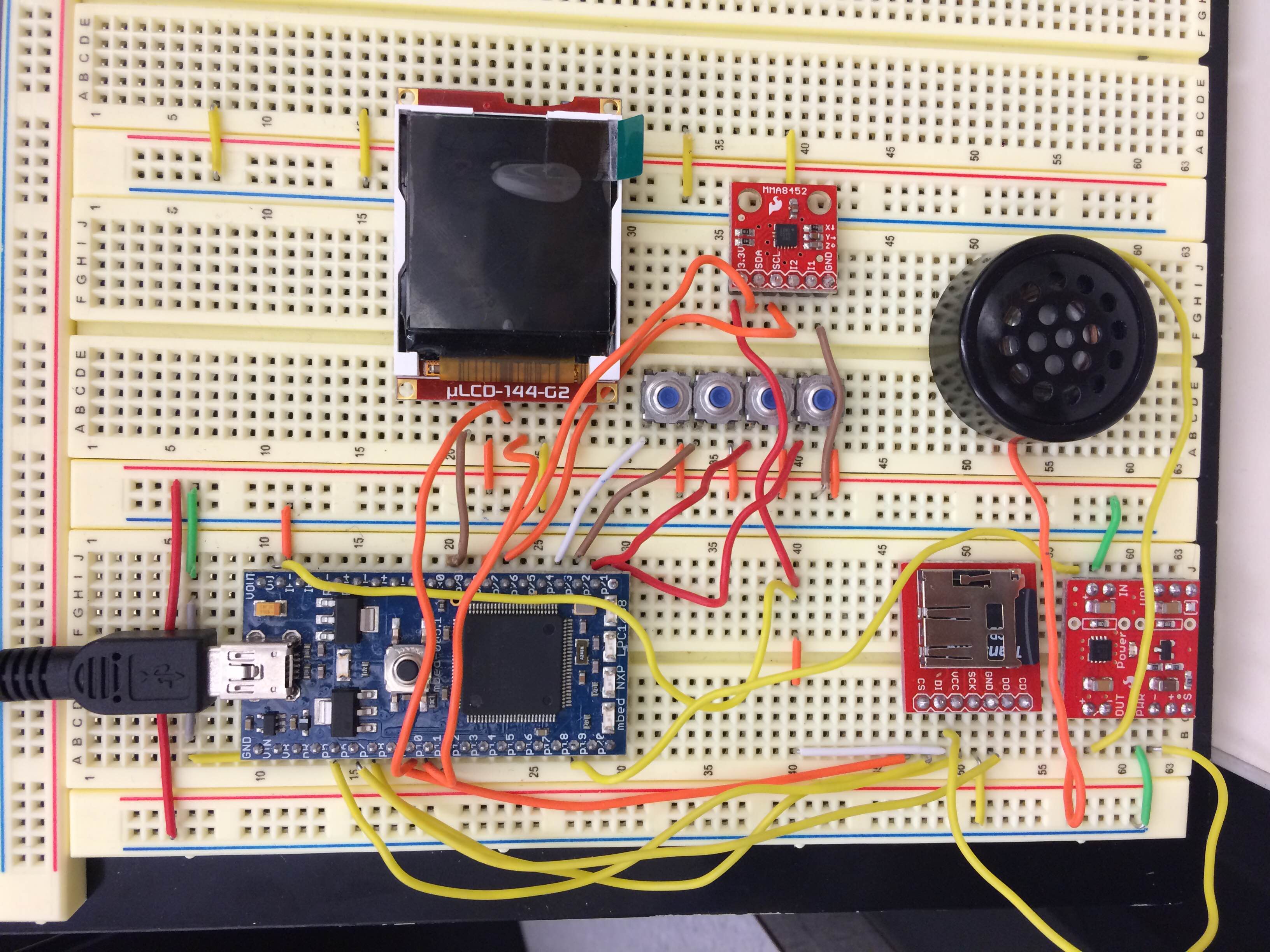
Hookup Image
Demo Video
Import Program:: /media/uploads/cchen385/p2_zip_lpc1768.zip
Please log in to post comments.