You are viewing an older revision! See the latest version
DigitalOut
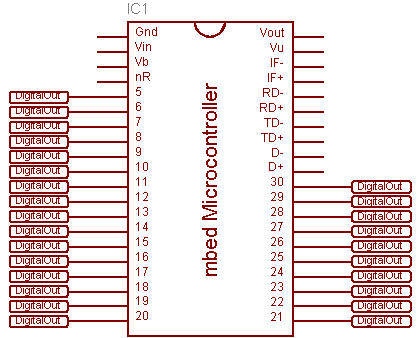
The DigitalOut interface is used to configure and control a digital output pin.
Hello World!
Flash an LED
#include "mbed.h"

DigitalOut myled(LED1);

int main() {
    while(1) {
        myled = 1;
        wait(0.25);
        myled = 0;
        wait(0.25);
    }
}
API
API summary
Import library
Public Member Functions |
|
| DigitalOut (PinName pin, const char *name=NULL) | |
|
Create a
DigitalOut
connected to the specified pin.
|
|
| void | write (int value) |
|
Set the output, specified as 0 or 1 (int)
|
|
| int | read () |
|
Return the output setting, represented as 0 or 1 (int)
|
|
| DigitalOut & | operator= (int value) |
|
A shorthand for
write()
|
|
| operator int () | |
|
A shorthand for
read()
|
|
| virtual struct rpc_method * | get_rpc_methods () |
|
Returns a pointer to an array describing the rpc methods supported by this object, terminated by either RPC_METHOD_END or RPC_METHOD_SUPER(Superclass).
|
|
| void | register_object (const char *name) |
|
Registers this object with the given name, so that it can be looked up with lookup.
|
|
| const char * | name () |
|
Returns the name of the object.
|
|
| virtual bool | rpc (const char *method, const char *arguments, char *result) |
|
Call the given method with the given arguments, and write the result into the string pointed to by result.
|
|
Static Public Member Functions |
|
| static bool | rpc (const char *name, const char *method, const char *arguments, char *result) |
|
Use the lookup function to lookup an object and, if successful, call its rpc method.
|
|
| static Base * | lookup (const char *name, unsigned int len) |
|
Lookup and return the object that has the given name.
|
|
| template<class C > | |
| static void | add_rpc_class () |
|
Add the class to the list of classes which can have static methods called via rpc (the static methods which can be called are defined by that class' get_rpc_class() static method).
|
|
Interface
The DigitalOut Interface can be used on mbed pins p5-p30, and also on-board LED1-LED4
The DigitalOut Interface can be used to set the state of the output pin, and also read back the current output state. Set the DigitalOut to zero to turn it off, or 1 to turn it on.
Details
The pin output is 0v and 3.3v (0 and 1), and can source or sink a maximum of 40mA.
Examples
Alternative flashing
#include "mbed.h"

DigitalOut myled(LED1);

int main() {
    while(1) {
        myled = !myled;
        wait(0.25);
    }
}
Alternative flashing
#include "mbed.h"

DigitalOut red(p5);
DigitalOut green(p6);
DigitalOut blue(p7);

int main() {
    // red
    red = 1;
    green = blue = 0;
    wait(1);

    // green
    green = 1;
    red = blue = 0;
    wait(1);

    // white
    red = green = blue = 1;
}