mSynth - mbed simple synthesizer
 Thomas Cooper.
2
replies
Thomas Cooper.
2
replies
Functionality
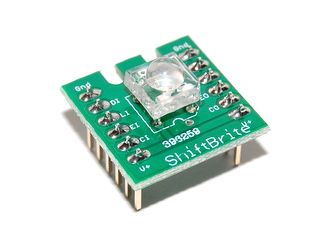
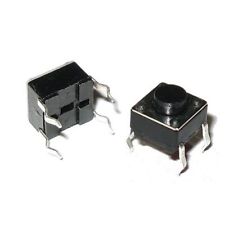
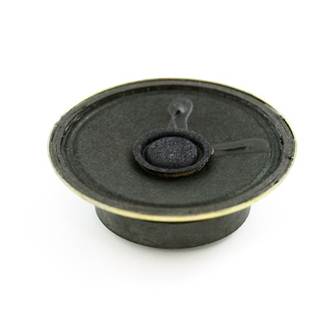
The mSynth, a simple synthesizer for the mbed, uses four basic peripherals: a twelve key sparkfun capacitive touch keypad, a shiftbrite peripheral, twelve pushbuttons, and a basic analog speaker. Each active-low pushbutton represents a key on a piano. When a pushbutton is held down, the mbed sends the appropriate signal through a PwmOut port. The port drives a BJT which controls the speaker. The sparkfun touch keypad uses an I2C connection to communicate with the mbed. Upon pressing a key on the touchpad, an interrupt is called in order to apply one of eight built in functions. Additionally, each key is associated with a color. The mbed uses SPI to communicate this color to the Shiftbrite in order to add visual cues to each shift in note name.
Peripherals
MPR121 Twelve Key Sparkfun Touch Keypad

Shiftbrite
Pushbutton
Analog Speaker
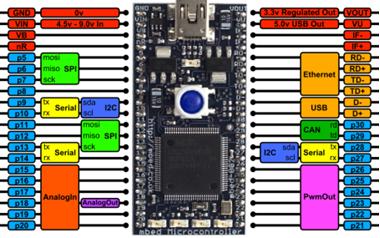
mbed
Built in Functions
- Key 0: Resets the Tone
- Key 1: Toggles the Strobe Effect
- Key 2: Decrements the Tonality
- Key 3: Increments the Tonality
- Key 4: Reserved
- Key 5: Reserved
- Key 6: Toggles the Shiftbrite Functionality
- Key 7: Resets Octave to Middle C
- Key 8: Reserved
- Key 9: Reserved
- Key 10: Decrements Octave
- Key 11: Increments Octave
Configuration
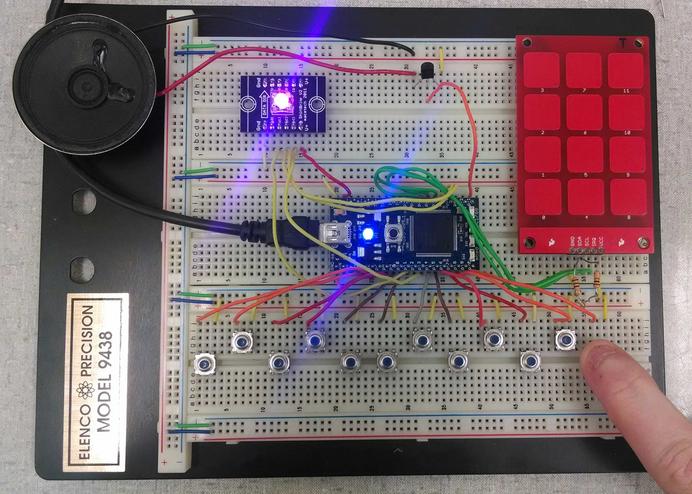
Pin Configurations



- Analog Speaker control signal set to p21 (PwmOut)
Using the mSynth Simple Synthesizer
- 0:00 - 0:14 : Using pushbuttons to play chromatic scale
- 0:15 : Touching keypad 11 to increment octave
- 0:16 - 0:20 : Continuing chromatic scale
- 0:21 - 0:25 : Adjusting effective range with keypad 10 and 11
- 0:25 : Touching keypad 7 to reset effective range to include middle C
- 0:26 - 0:29 : Touching keypad 2 and 3 to adjust tonality
- 0:29 : Touching keypad 0 to reset tonality
- 0:30 - 0:33 : Touching keypad 1 to enable Strobe effect (Note: LED1 illuminated)
- 0:33 : Touching keypad 6 to disable Shiftbrite
- 0:34 - 0:37 : Continuing chromatic scale
- 0:38 : Touching keypad 1 to disable Strobe effect
- 0:40 : Touching keypad 6 to enable Shiftbrite
- 0:41 - 0:47 : Touching keypad 10 to decrement effective range
Example Code
main.cpp
#include "mbed.h"
#include <mpr121.h>

//Initialize each key as a digital input.
DigitalIn C(p5);
DigitalIn Db(p6);
DigitalIn D(p7);
DigitalIn Eb(p8);
DigitalIn E(p9);
DigitalIn F(p10);
DigitalIn Gb(p14);
DigitalIn G(p15);
DigitalIn Ab(p16);
DigitalIn A(p17);
DigitalIn Bb(p18);
DigitalIn B(p19);


DigitalOut led1(LED1);
PwmOut signal(p21);

// Create the interrupt receiver object on pin 26
InterruptIn interrupt(p26);

// Setup the i2c bus on pins 9 and 10
I2C i2c(p28, p27);

// Setup the Mpr121:
// constructor(i2c object, i2c address of the mpr121)
Mpr121 mpr121(&i2c, Mpr121::ADD_VSS);

//Scales the frequency for octaves
volatile float freq_scale = 1.0f;
volatile float tone = 0.5f;
volatile int strobe = 0;
volatile float frequency = 440.0f;
volatile int sb_enable = 1;

//Initialize Shift Bright

DigitalOut latch(p25);
DigitalOut enable(p24);

//Cycles through different colors on RGB LED
SPI spi(p11, p12, p13);

//Use SPI hardware to write color values to LED driver chip
void RGB_LED(int red, int green, int blue) {
    unsigned int low_color=0;
    unsigned int high_color=0;
    high_color=(blue<<4)|((red&0x3C0)>>6);
    low_color=(((red&0x3F)<<10)|(green));
    spi.write(high_color);
    spi.write(low_color);
    latch=1;
    latch=0;
}

// ISR
void fallInterrupt() {
  int i=0;
  //Read in value from Touch Pad
  int value=mpr121.read(0x00);
  value +=mpr121.read(0x01)<<8;
  //Shift through value, checking for pressed keys
  for (i=0; i<12; i++) {
    if (((value>>i)&0x01)==1)
    {
        //TONE RESET
        if(i==0)
        {
            if(tone == 0.9f)
            {
                break;
            }
            tone = 0.5f;
            break;
        }
        //STROBE TOGGLE
        if(i==1)
        {
            if(strobe){
                strobe = 0;
                tone = 0.5f;
                break;
            }
            else
            {
                strobe = 1;
                tone = 0.9f;
                break;

            }
        }
        //TONE DOWN
        if(i==2)
        {
            if(tone == 0.9f)
            {
                break;
            }
            if(tone <= 0.2f){
                break;
            }
            else
            {
               tone = tone - 0.1f;
               break;
            }
        }
        //TONE UP
        if(i==3)
        {
            if(tone == 0.9f)
            {
                break;
            }
            if(tone >= 0.7f){
                break;
            }
            else
            {
               tone = tone + 0.1f;
               break;
            }
        }
        //RESERVED
        if(i==4)
        {
            break;
        }
        //RESERVED
        if(i==5)
        {
            break;
        }
        //SHIFTBRITE ENABLE
        if(i==6)
        {
            if(sb_enable){
                sb_enable = 0;
                break;
            }
            else
            {
                sb_enable = 1;
                break;

            }
        }
        //RETURN TO MIDDLE C
        if(i==7)
        {
            freq_scale = 1.0f;
            break;
        }
        //RESERVED
        if(i==8)
        {
            break;
        }
        //RESERVED
        if(i==9)
        {
            break;
        }
        //OCTAVE DOWN
        if(i==10)
        {
            if(freq_scale == 0.25f){
                break;
            }
            else
            {
               freq_scale = freq_scale / 2;
               break;
            }
        }
        //OCTAVE UP
        if(i==11)
        {
            if(freq_scale == 4.0f){
                break;
            }
            else
            {
               freq_scale = freq_scale * 2;
               break;
            }
        }
    }
  }
}

int main() {
    //Initiliaze LEDs
    spi.format(16,0);
    spi.frequency(500000);
    enable=0;
    latch=0;
    led1 = 0;

    RGB_LED(00, 00, 00);

    //Set each key as pulled-high (active low)
    C.mode(PullUp);
    Db.mode(PullUp);
    D.mode(PullUp);
    Eb.mode(PullUp);
    E.mode(PullUp);
    F.mode(PullUp);
    Gb.mode(PullUp);
    G.mode(PullUp);
    Ab.mode(PullUp);
    A.mode(PullUp);
    Bb.mode(PullUp);
    B.mode(PullUp);
    wait(.1);

    //Initialize signal and frequency for signal out
    signal = tone;

    //Initialize interrupt
    interrupt.fall(&fallInterrupt);
    interrupt.mode(PullUp);


    //Executive Loop
    while(1)
    {
      if(strobe == 1) led1 = 1;
      else led1 = 0;

       signal.period(1.0f/(freq_scale*frequency));
       if(!C)
       {
            RGB_LED(sb_enable*50, sb_enable*00, sb_enable*00);
            frequency = 261.626f;
            wait(.05);
            signal = tone;
            wait(.05);

       }
       else if(!Db)
       {
            RGB_LED(sb_enable*50, sb_enable*30, sb_enable*00);
            frequency = 277.183f;
            wait(.05);
            signal = tone;
            wait(.05);
       }
       else if(!D)
       {
             RGB_LED(sb_enable*50, sb_enable*50, sb_enable*00);
            frequency = 293.665f;
            wait(.05);
            signal = tone;
            wait(.05);
       }
       else if(!Eb)
       {
            RGB_LED(sb_enable*25, sb_enable*50, sb_enable*00);
            frequency = 311.125f;
            wait(.05);
            signal = tone;
            wait(.05);
       }
       else if(!E)
       {
            RGB_LED(sb_enable*00, sb_enable*50, sb_enable*00);
            frequency = 329.628f;
            wait(.05);
            signal = tone;
            wait(.05);
       }
       else if(!F)
       {
            RGB_LED(sb_enable*00, sb_enable*50, sb_enable*25);
            frequency = 349.228f;
            wait(.05);
            signal = tone;
            wait(.05);
       }
       else if(!Gb)
       {
            RGB_LED(sb_enable*00, sb_enable*50, sb_enable*50);
            frequency = 369.994f;
            wait(.05);
            signal = tone;
            wait(.05);
       }
       else if(!G)
       {
            RGB_LED(sb_enable*00, sb_enable*30, sb_enable*50);
            frequency = 391.995f;
            wait(.05);
            signal = tone;
            wait(.05);
       }
       else if(!Ab)
       {
            RGB_LED(sb_enable*00, sb_enable*00, sb_enable*50);
            frequency = 415.305f;
            wait(.05);
            signal = tone;
            wait(.05);
       }
       else if(!A)
       {
            RGB_LED(sb_enable*25, sb_enable*00, sb_enable*50);
            frequency = 440.00f;
            wait(.05);
            signal = tone;
            wait(.05);
       }
       else if(!Bb)
       {
            RGB_LED(sb_enable*50, sb_enable*00, sb_enable*50);
            frequency = 466.164f;
            wait(.05);
            signal = tone;
            wait(.05);
       }
       else if(!B)
       {
            RGB_LED(sb_enable*50, sb_enable*00, sb_enable*25);
            frequency = 493.883f;
            wait(.05);
            signal = tone;
            wait(.05);
       }
       else
       {
            RGB_LED(00, 00, 00);
            frequency = 0.0f;
            signal = 0.0f;
       }

    }
}
2 comments on mSynth - mbed simple synthesizer:
Please log in to post comments.
mSynth - mbed simple synthesizer
Page owner: Thomas Cooper
Created 17 Oct 2013.
Last updated 17 Oct 2013
hi cooper, I would like to have try on your project. would please help me go on this task ahead of me? I would also like to know all the components required for it.