Microphone Pre-Amplifier
 Shahed Meah.
0
replies
Shahed Meah.
0
replies
This wiki page is devoted to a two-stage, microphone pre-amp. The Adafruit MEMS microphone, which the demo in this page uses, has an output voltage in the range of 100mV. Typically, it would be necessary to scale the microphone reading in software to match the MBED's 0V-3.3V range for analog pins. However, the use of a pre-amp eliminates the need to scale the input in software.
The pre-amp design on this page has gain of about 33, which can be lowered with a potentiometer that is included in the design. A gain of greater than 33 results in clipping, hence the decision to not have a larger gain.
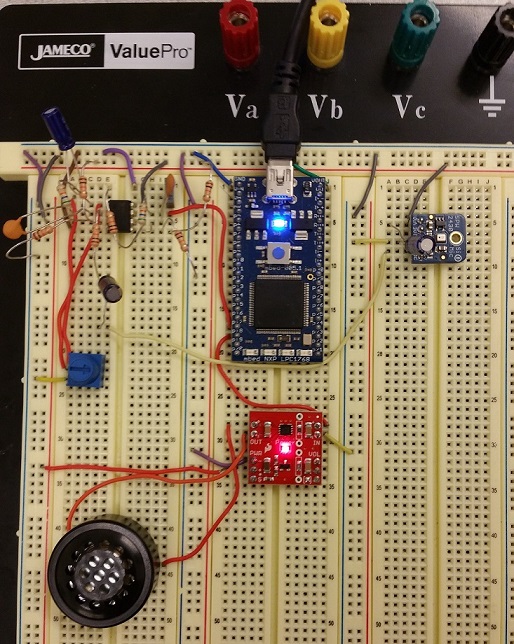
Image of Complete Demo Circuit
Image of complete demo circuit with an Adarfuit MEMS microphone, microphone pre-amp, speaker, and class-D audio amplifier for the speaker.
Wiring and Schematics
This section outlines the schematic for the pre-amp as well as the wiring for all components used by the demo program towards the bottom of this page.
Pre-Amp Schematic and Gain Plot
Schematic for the microphone pre-amp using a a TI tlv2462 op-amp. The pin numbers on the schematic correspond to the pins on the op-amp.
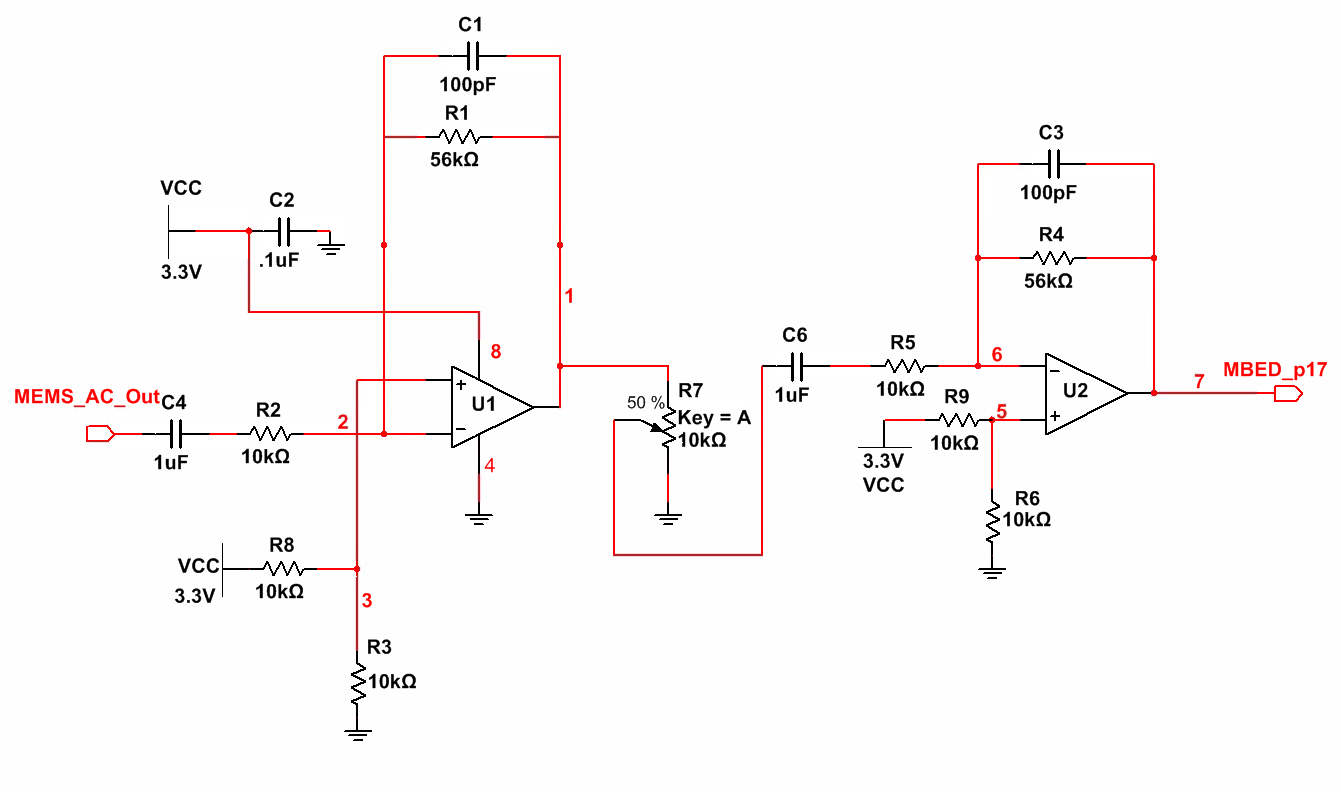 *The potentiometer can be used to scale the gain between 0 and 33.
Bode plot (in decibels) of the gain of the pre-amp. Note that the pre-amp also functions as a band-pass filter, helping to reduce some undesired noise.
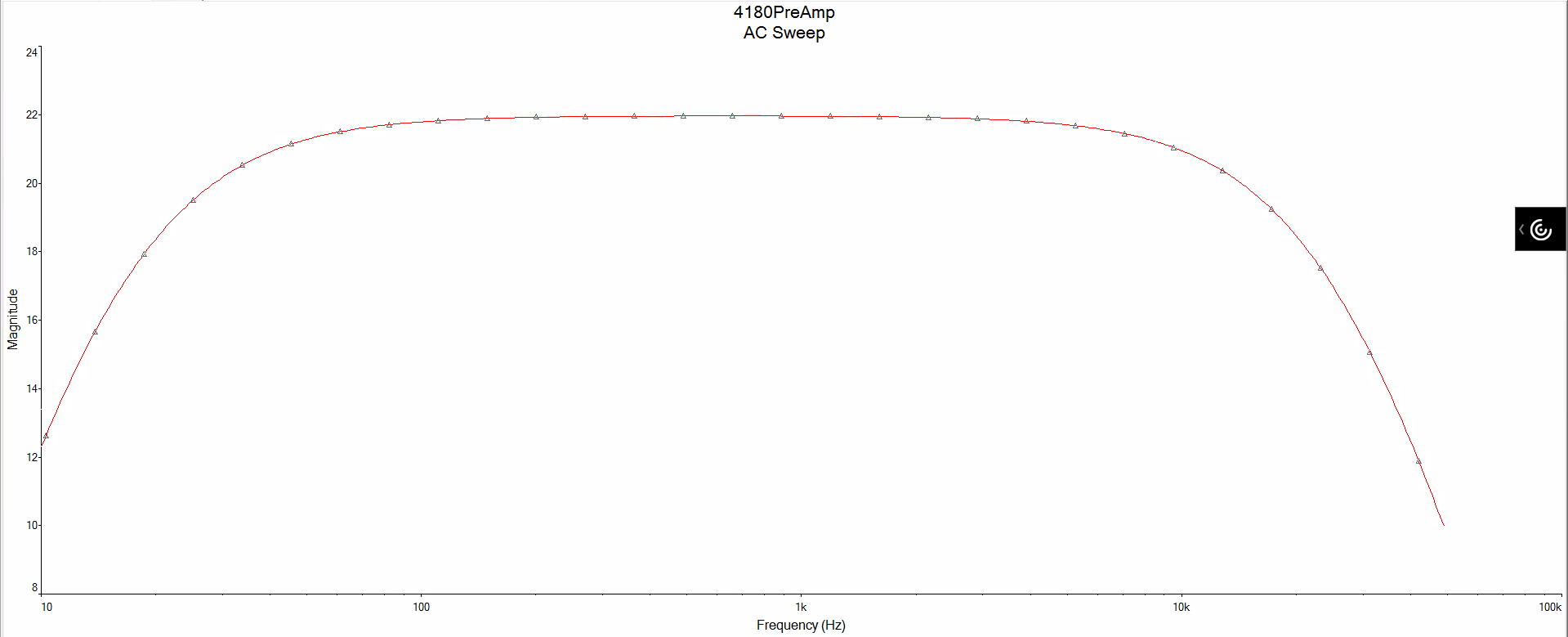 *This bode plot was created with the potentiometer set to 50%, thus setting the gain to half of its maximum value.
Adafruit MEMS Microphone Wiring
| Microphone | MBED | Pre-Amp |
|---|---|---|
| Vin | 3.3V | |
| Gnd | Gnd | |
| AC | Input |
*While not necessary, a 10uF capacitor may be added aross the Gnd and Vin terminals to reduce supply noise.
Class D Amplifier and Speaker Wiring
| Class D Amp | MBED | Speaker |
|---|---|---|
| pwr-, in- | Gnd | |
| pwr+ | 3.3V | |
| in+ | p18 | |
| out+ | + | |
| out- | - |
Demo Code
Under normal circumstances, the input signal from the microphone would need to be scaled up in software since it is so low. However, the use of the pre-amp makes the voltage from the microphone fall into the range of the MBED's 0V-3.3V, thus eliminating the need for software scaling.
Link to original code: https://developer.mbed.org/users/4180_1/notebook/adafruit-silicon-mems-microphone-breakout---spw243/
//Same as the Hello World! program for the MEMS microphone
//The only difference is that there is NO software scaling for the input signal.
#include "mbed.h"
//Adafruit MEMs SPW2430 microphone demo with audio output - the "mPA"
BusOut myleds(LED1,LED2,LED3,LED4);
AnalogOut speaker(p18);
//also setting any unused analog input pins to digital outputs reduces A/D noise a bit
//see http://mbed.org/users/chris/notebook/Getting-best-ADC-performance/
DigitalOut P15(p15);
DigitalOut P16(p16);
DigitalOut P19(p19);
DigitalOut P20(p20);
class microphone
{
public :
    microphone(PinName pin);
    float read();
    operator float ();
private :
    AnalogIn _pin;
};
microphone::microphone (PinName pin):
    _pin(pin)
{
}
float microphone::read()
{
    return _pin.read();
}
inline microphone::operator float ()
{
    return _pin.read();
}

microphone mymicrophone(p17);

int main()
{
    float sample;
    while(1) {
//read in sample value using AC coupled input option averaging four samples with op amp for gain
        sample = (mymicrophone + mymicrophone + mymicrophone + mymicrophone)/4.0;
        speaker = 0.5 + (sample -0.5);//subtract the DC bias (1.65V) and add gain for speaker
        myleds = int(abs((sample-0.5)*15)); //scale to around 15 for LEDs
        //Software scaling for signal was taken out.
    }
}
Video of demo code without pre-amp.
Notice that the blowing sound is not amplified by much, since the microphone signal does not go through a pre-amp and is not scaled in software.
Video of demo code with pre-amp.
This time, the blowing sound is much more audible, since the microphone signal is scales up before being read by the MBED.
Please log in to post comments.