mbed Workshop
 Avnet Silica.
0
replies
Avnet Silica.
0
replies
Introduction
Welcome to the Silica & mbed training session.
For this workshop session you will need an mbed microcontroller, and an mbed Workshop Breakout board.
Lab 1 : Registration & Hello World!
Registration
Unpack your mbed microcontroller. The box should contain :
- mbed microcontroller
- USB Cable
- mbed pinout card
- mbed sticker and business card
- Getting started guide
The instructions to register your mbed Microcontroller are on the getting started guide.
Hello World!
Once you have followed the registration process you will finish at the landing page for your mbed Microcontroller which contains some useful links and information. Follow the link to "getting started" which will take you to the handbook, from there, follow the link to "Downloading a Program".
Follow the instruction on the "Getting Started - Downloading a Program" - this will take you through the process of downloading and running a prebuilt program on your mbed. The HelloWorld_LPC1768.bin will simply flash LED1 on your mbed micorcontroller forever.
When you have sucessfully completed this, go back to the handbook, and follow the link to the "Compiling a Program". This will take you through the process of compiling your own HelloWorld program. As an experiment, try modifying your own HelloWorld program to flash LED4 instead of LED1.
All done?
You are now registered and know how to compile, download and run programs on your mbed Microcontroller...
Lab 2 : Rapid Prototyping - Data Logging
Applications often include data logging capabilities, and access to the data often involves bespoke software and interface cables. This example shows how standard methods and interfaces can be used to save and retrieve data from an application. We are going to access the USB flash drive filesystem of the mbed and use it to write a datalogging file.
For this experiment, we will be logging noise from an unconnected ADC. Touching the pin will influence the noise; it is a demonstration of logging techniques, imagine it is real data!
LocalFileSystem
Create a new program in your compiler, and replace the default Hello World program with the example below
| The mbed Flash disk is accessible from user code using the LocalFileSystem object. This is part of the standard mbed library Standard C file handling techniques apply fscanf for runtime configuration fprintf for data logging purposes This example logs 100 samples to a CSV file |  |
When you compile, download and run this program you will see a number of things happen.
- When the program runs, the USB drive disappears from your PC as it is now connected to your application
- The logging will take 5 seconds, be sure to touch pin 20 to create noise!
- When the logging is finished, LED1 comes on, and the mbed Flash drive returns to your PC
- You should now be able to see the new file data.csv on your mbed flash drive.
As the file in .csv format, it can be opened in Microsoft Excel, and the data plotted to a chart.
 |  |
Extend it to store lots of data!
The LocalFileSystem relies on the Flash Drive of the mbed Microcontroller, and is size limited. What is we wanted to store a lot of data, independent of the USB flash drive?
An SD Card would be ideal for this application. They have gigabyte capacity, are widely available and recognisable. SD card sockets are readily available as breakout boards.
 | GND MISO - p6 SCL - p7 Vcc MOSI - p5 nCS - p8 |
As before, mbed keeps it simple. Libraries exist for SD card that use the same FAT file system interface as the LocalFileSystem, so porting an application from LocalFileSystem to SD card in stright forward.
| Right click on your project, select "Import files" to add the SDFileSystem Library. The URL to import from is: http://mbed.org/users/chris/programs/SDCard/60euc/ In the code, Include the SDFileSystem header Swap LocalFileSystem for SDFileSystem, add the pin connections. Everything else remains the same |  |
This experiment should now recreate exactly the same effect, but by writing to the SD card rather than the mbed LocalFileSystem.
What about a USB drive?
USB drives are even more commonplace than SD cards, and to use a USB drive, you need minimal hardware - a USB-A (host) connector .. thats about it, but as ever it is the software that is the hard problem to solve.
Lets look at the hardware first.
 | 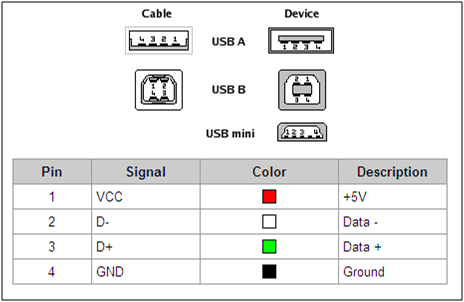 |
The connections are simple. +5v (from Vu), ground, D+ and D-
As before mbed makes it simple by. A Mass Storage Class (MSC) driver exists for the USB host, so you can start to use USB drive functionality without worrying about software complexity.
As before the interface to the USB drive is standard C file handling methods, so none of the application code needs to change.
| On your project, right click -> Import the files for MSCFileSystem Add #include for MSCFileSystem Call it “fs”, as before The change in storage medium is transparent to the application Right click on your project, select "Import files" to add the MSCUsbHost library. The URL to import from is: http://mbed.org/users/chris/programs/MSCUsbHost/5z8fm/ In the code, Include the MSCUsbHost header Swap SDFileSystem for MSCUsbHost, remove the pin connections Everything else remains the same |  |
0 comments
You need to log in to post a comment