Important changes to repositories hosted on mbed.com
Mbed hosted mercurial repositories are deprecated and are due to be permanently deleted in July 2026.
To keep a copy of this software download the repository Zip archive or clone locally using Mercurial.
It is also possible to export all your personal repositories from the account settings page.
You are viewing an older revision! See the latest version
Homepage
This section highlights the setup and operating guide to integrating PMT9213with the ST Nucelo DK board.
Setup
Hardware:
- 1. PC or Notebook with Windows Operating System
- 2. Nucleo Dev Kit Board from ST Micro
- 3. PMK9123IP-TVIT Aduino Enabled Board
- 4. USB Cable (one end with Mini-B)
Connection:
Please connect the board as show below.
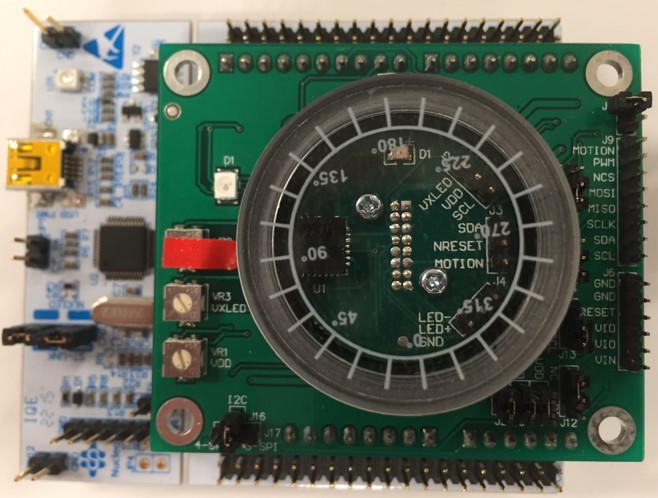
Supplying Power
Connect the one end of the USB to the PC USB and the other to the Nucleo USB Mini-B as shown in the figure below.

I am assuming that you already know and are able to download the code at this point. For ST Nucleo Dev Board, no RESET is needed after the code is downloaded. You should observe that the RED LED will change color to GREEN after the code is download successfully.