Vacuum Cleaner
Page last updated 04 Nov 2016, by  Boa-Lin Lai.
0
replies
Boa-Lin Lai.
0
replies
Boa-Lin Lai.
0
replies
Introduction
This project using an shadow robot to simulate Vacuum cleaner with bluetooth remote control. The robot will move counter clockwise with the (v^0.5) for one wheel and (v) for another one, and it has a circular movement. With this speed function , robot can achieve different radius and cover all the targeted areas.
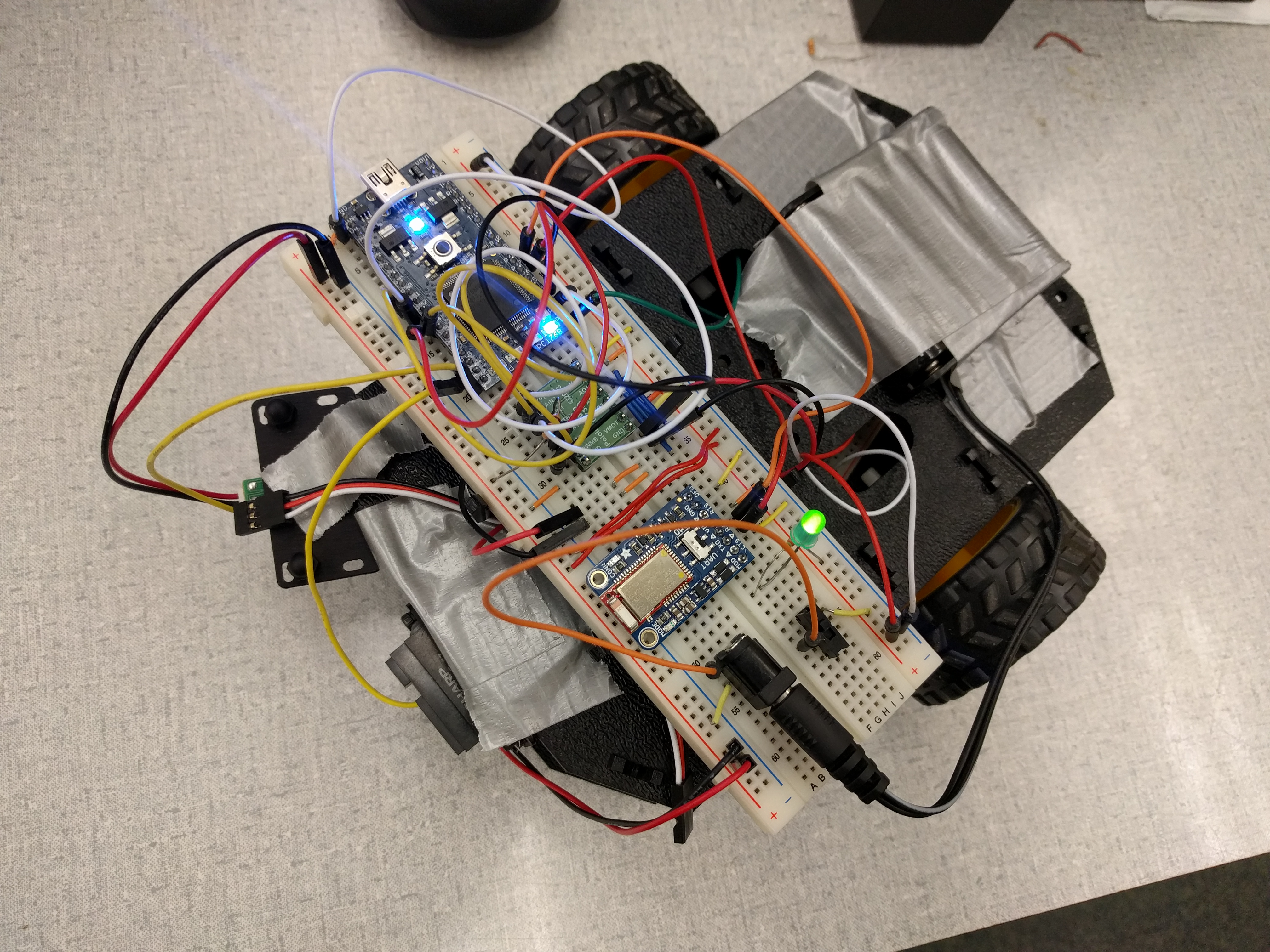
Features
Edge Detection
Using IR sensor to detect the edge and turn the robot to avoid falling.
Wall Detection
Using IR sensor to detect the close objects and turn the robot to avoid collision.
Remote Control
Implemented the bluetooth buttons functions to control the robots
button 1
Increase the robot speed and the radius of current move circle .
button 2
Decrease the robot speed and the radius of current move circle .
button 3
Complete Stop
button 4
Start moving the robot.
Sensors
| Downward Sensor | Front Sensor | mbed |
|---|---|---|
| signal | -- | p20 |
| -- | signal | p19 |
H-bridge
| mbed | =Hbridge |
|---|---|
| p23 | PWMA |
| p24 | PWMB |
| p11 | Ain2 |
| p12 | Ain1 |
| p13 | Bin1 |
| p14 | Bin2 |
| -- | STBY( pulled up to 1) |
Motor
| Left | Right | Hbridge |
|---|---|---|
| + | -- | AO1 |
| - | -- | AO2 |
| -- | + | BO1 |
| -- | - | BO2 |
Bluetooth
| Bluetooth | =mbed |
|---|---|
| TXD | P28 |
| RXI | P27 |
| CTS | gnd |
| gnd | gnd |
Code
main.cpp
/*
    ECE 4180 GATECH Fall 2016
    Boa-Lin Lai, Sameual Choi
*/
#include "mbed.h"
#include "Motor.h"
#include "ble.h"
#include <stdlib.h>
#include <algorithm>
DigitalOut myled1(LED1);
DigitalOut myled2(LED2);
DigitalOut myled3(LED3);
DigitalOut myled4(LED4);
AnalogIn wallSensor(p19);
AnalogIn edgeSensor(p20);
PwmOut speaker(p21);
Serial pc(USBTX, USBRX);
Motor ml(p23, p12, p11); // pwm, fwd, rev
Motor mr(p24, p14, p13); // pwm, fwd, rev
//Interrupt routine to parse message with one new character per serial RX interrupt
volatile bool isOn = false;
volatile bool edge = false;
volatile bool wall = false;
volatile double speed = 0.0;
volatile double wallDis = 0.0;
volatile double edgeDis = 0.0;
Ticker edge_detector;
Ticker wall_detector;

void edgeMove()
{
        ml.speed(-0.3);
        mr.speed(-0.3);
        for (int i=0; i<10; i=i+2) {
        speaker.period(1.0/969.0);
        speaker = float(i)/50.0;
        wait(.25);
        speaker.period(1.0/800.0);
        wait(.25);
    }
    edge = false;
    wall = false;
    speaker = 0;
     ml.speed(-0.5);
     mr.speed(0.5);
     wait(0.5);
}
void isEdge() {

    if(edgeDis > 2.5)
    {
         speed = 0;
         edge =  true;
    }
    else
    {
        edge = false;
    }
}

void isWall() {

    if(wallDis > 0.7)
    {
         speed = 0;
         wall = true;
    }
    else
    {
        wall = false;
    }
}


void BLE_action()
{
        if(button_ready && (bnum=='1')) { // button 4 changed
            if(isOn == true)
            {
              speed += 0.1;
              if(speed > 0.7) speed  = 0.7;
            }
            myled1 = bhit - '0'; //turn led4 on/off
            button_ready = 0; //reset flag after reading button message
        }
        else if(button_ready && (bnum=='2')) { // button 4 changed
            if(isOn == true)
            {
                speed -= 0.1;
                if(speed < 0.3 ) speed  = 0.3;
            }
            myled2 = bhit - '0'; //turn led4 on/off
            button_ready = 0; //reset flag after reading button message
        }
        else if(button_ready && (bnum=='3')) { // button 4 changed
            speed = 0;
            isOn = false;
            myled3 = bhit - '0'; //turn led4 on/off
            button_ready = 0; //reset flag after reading button message
        }
        else if(button_ready && (bnum=='4')) { // button 4 changed
            isOn = true;
            speed = 0.3;
            myled4 = bhit - '0'; //turn led4 on/off
            button_ready = 0; //reset flag after reading button message
        }


}
void print_speed()
{
    pc.printf("%-76s%0.2f\n",speed);
}
int main()
{
//attach interrupt function for each new Bluetooth serial character
    Blue.attach(&parse_message,Serial::RxIrq);
    edge_detector.attach(&isEdge, 0.02);
    wall_detector.attach(&isWall , 0.02);
    while(1) {
        //check for a new button message ready
        BLE_action();
        //do other tasks in main - interrupts will process button message characters
        myled4 = 1;
        wallDis = wallSensor;
        edgeDis = 1/edgeSensor;
        wait(0.05);
        myled4 = 0;
        wait(0.05);
        ml.speed(speed);
        mr.speed(pow(speed,0.2));
        if((edge == true) || (wall == true))
        {
            edgeMove();
        }
        //pc.printf("IR sensor reads %2.2f\n ", a);
        //pc.printf("\rDistance is %2.2f cm \n ", a);
        //pc.printf("%0.5f\n",dis);
    }
}
Demo Videos
Please log in to post comments.