Important changes to repositories hosted on mbed.com
Mbed hosted mercurial repositories are deprecated and are due to be permanently deleted in July 2026.
To keep a copy of this software download the repository Zip archive or clone locally using Mercurial.
It is also possible to export all your personal repositories from the account settings page.
Dependents: sample02_sw xbee_aging sample01_led sample04_sens
You are viewing an older revision! See the latest version
Homepage
XBee library 'ZB Coord API'
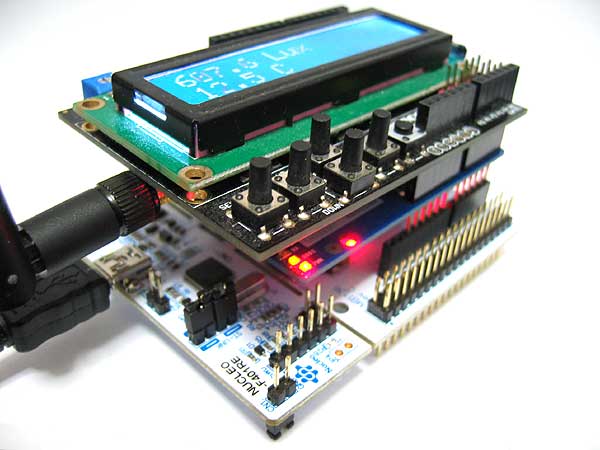
Nucleo Board + Arduino Wireless Shield + XBee ZB Module + LCD
This XBee liblary is developed for Digi XBee ZB Modules on Nucleo F401RE Micro Computer Board through Arduino Wireless Shield.
Quote:
When you will use this liblary for anything other than Nucleo microcomputer board, please change the 4th line of xbee/xbee.cpp. The above code is only for STM32 Nucleo board.
- RawSerial _xbee_serial(SERIAL_TX, SERIAL_RX);
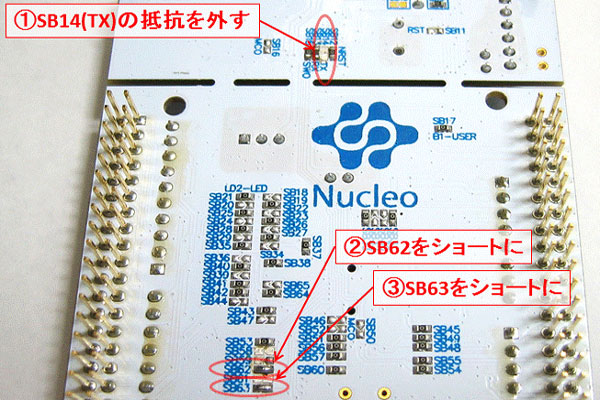
The hardware soldering jumper setting for the serial ports is necessary for Nucleo board.
- Set OPEN for SB14(TX)
- Set SHORT jumper for SB62
- Set SHORT jumper for SB63
Examples
Sample Code 01 led
An XBee ZB Coordinator on a Nucleo Board controls LEDs on the other XBee ZB device.
sample
#include "xbee.h"
DigitalOut myled(LED1);

int main(){
    // Please set MAC Address to access your remote XBee device.
    byte dev_gpio[]   = {0x00,0x13,0xA2,0x00,0x40,0x30,0xC1,0x6F};

    myled = 1;                          // NUCLEOのLEDをHigher Level(3.3V)へ
    xbee_init( 0 );                     // XBee用COMポートの初期化
    xbee_atnj( 0xFF );                  // デバイスの参加を受け入れる
    myled = 0;                          // NUCLEOのLEDをLower Level(0.0V)へ

    while(1){                           // 永久に受信する
        myled = 1;                      // NUCLEOのLEDをHレベル(3.3V)へ
        xbee_gpo(dev_gpio,11,1);        // GPOポート11をHレベル(3.3V)へ
        xbee_gpo(dev_gpio,12,1);        // GPOポート12をHレベル(3.3V)へ
        wait(1);
        myled = 0;                      // NUCLEOのLEDをHレベル(3.3V)へ
        xbee_gpo(dev_gpio,11,0);        // GPOポート11をLレベル(0.0V)へ
        xbee_gpo(dev_gpio,12,0);        // GPOポート12をLレベル(0.0V)へ
        wait(1);
    }
}
http://mbed.org/users/bokunimowakaru/code/sample01_led/
Sample Code 02 sw
To push buttons (or switches) on an XBee ZB device report the conditions of input ports on it to a Nucleo board, and display them on a LCD.
#include "xbee.h"
#include "TextLCD.h"
TextLCD lcd(PA_9, PC_7, PB_5, PB_4, PB_10, PA_8); // rs, e, d4-d7

int main(){
    byte data;
    int i;
    XBEE_RESULT xbee_result;
    byte dev_gpio[]   = {0x00,0x13,0xA2,0x00,0x40,0x30,0xC1,0x6F};

    lcd.cls(); lcd.printf("Sample 2 SW");
    xbee_init( 0x00 );                  // XBee用COMポートの初期化(引数はポート番号)
    lcd.cls(); lcd.printf("ATNJ");
    xbee_atnj( 0xFF );                  // デバイスを常に参加受け入れ(テスト用)
    lcd.cls(); lcd.printf("gpio init");
    xbee_gpio_init(dev_gpio);           // デバイスdev_gpioにIO設定を行うための送信
    lcd.cls(); lcd.printf("DONE");

    while(1){                           // 永久に受信する
        data = xbee_rx_call( &xbee_result );
        if( xbee_result.MODE == MODE_GPIN){     // PIO入力(リモート機のボタンが押された)の時
            lcd.cls();
            for( i=7; i>=0 ; i--) lcd.printf( "%c",(char)( (int)'0' + ((data>>i) & 0x01) ) );
                                        // dataに入った値をバイナリで表示
        }
    }
}
http://mbed.org/users/bokunimowakaru/code/sample02_sw/
Sample Code 04 sens
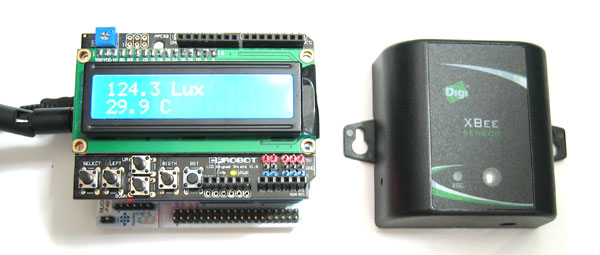
Measured results of an XBee wireless sensor device are displayed a LCD on Nucleo board with an XBee coordinator which is in API mode.
#include <xbee.h>
#include "TextLCD.h"
#define FORCE_INTERVAL  100             // 1~254 データ要求間隔
TextLCD lcd(PA_9, PC_7, PB_5, PB_4, PB_10, PA_8); // rs, e, d4-d7
byte dev_sens[8];   // IEEE Address

void setup(){
    lcd.cls(); lcd.printf("Sample 4 SENS");
    xbee_init( 0x00 );                  // XBee用COMポートの初期化(引数はポート番号)
}

void loop(){
    int i;
    int dev_en = 0;                 // センサー発見の有無(0:未発見)
    XBEE_RESULT xbee_result;            // 受信データ用の構造体
    int trig=0;
    float value;

    lcd.cls(); lcd.printf("Searching:SENSOR");
    if( xbee_atnj(10) ){                // 10秒間の参加受け入れ
        lcd.cls(); lcd.printf("Found a device");
        xbee_from( dev_sens );          // 受信したアドレスをdev_sensへ格納
        dev_en = 1;                     // sensor発見済
        xbee_gpio_config( dev_sens, 1 , AIN ); // 接続相手のポート1をAIN入力へ
        xbee_gpio_config( dev_sens, 2 , AIN ); // 接続相手のポート2をAIN入力へ
    }else{
        lcd.cls(); lcd.printf("Failed:no dev.");
    }
    wait(1);
    lcd.cls();

    while(1){                                   // 永久に受信する
        if(dev_en){
            if(trig<=0){
                lcd.locate(12,0); lcd.printf("Trig"); wait(0.1);
                xbee_force(dev_sens);           // デバイスdev_sensへデータ要求
                trig = FORCE_INTERVAL;
                lcd.locate(12,0); lcd.printf("    ");
            }
        }else{
            lcd.cls(); lcd.printf("Waiting for XBee");
            wait(0.5);
            lcd.cls();
        }
        trig--;

        xbee_rx_call( &xbee_result );       // データを受信します。
        switch( xbee_result.MODE ){         // 受信したデータの内容(MODE値)に応じて
            case MODE_RESP:                 // sensorからの応答の場合に照度と温度を表示
            case MODE_GPIN:                 // 周期方式でデータ受信した場合も想定
                if( bytecmp( dev_sens , &(xbee_result.FROM[0]) ,8 ) == 0 && xbee_result.STATUS == STATUS_OK ){
                    value = xbee_sensor_result( &xbee_result, LIGHT);
                    lcd.locate(0,0); lcd.printf( "%.1f Lux   ",value);
                    value = xbee_sensor_result( &xbee_result, TEMP);
                    lcd.locate(0,1); lcd.printf( "%.1f C   ",value);
                }
                break;
            case MODE_IDNT:             // 新しいデバイスを発見
                lcd.cls(); lcd.printf("found a new dev");
                for( i=0;i<8;i++ ) dev_sens[i]=xbee_result.FROM[i];
                                        // 発見したアドレスをdev_sensに読み込み
                dev_en = 1;             // sensor発見済
                trig = 0;
                xbee_gpio_config( dev_sens, 1 , AIN ); // 接続相手のポート1をAIN入力へ
                xbee_gpio_config( dev_sens, 2 , AIN ); // 接続相手のポート2をAIN入力へ
                lcd.cls();
                break;
            default:
                break;
        }
    }
}