GPS using BR 355 module & Nokia 6100 color display
Page last updated 28 Feb 2011, by  archana srinivasan.
0
replies
archana srinivasan.
0
replies
archana srinivasan.
0
replies
GPS display of absolute co-ordinates & movement on Nokia Color LCD
- Vaibhav Desai
- Archana Srinivasan
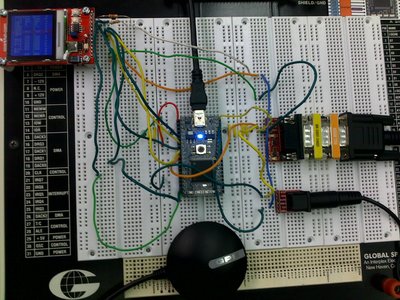
This mobile device obtains the GPS co-ordinates and displays it on a color LCD.
It has two menu options:
- To display absolute GPS co-ordinates in terms of latitude & longitude.
- To display movement in 20 seconds in terms of GPS co-ordinates.
List of mbed components and peripherals used:
- BR355 GPS Module
- RS 232 Breakout Board
- PS/2 Breakout Board
- Sparkfun Nokia 6100 Color LCD Breakout Board
Hardware:
- Power to GPS module is supplied using PS/2 break out board & 5V pin from MBED
- The RS 232 connection between the GPS module requires a null modem & a gender changer
- Tx of GPS is connected to Rx of MBED
- The LCD requires 5V backlight supply, 3.3V logic supply, GND
- SDATA of LCD is connected to p5 of mbed
- SCK of LCD is connected to p7 of mbed
- CS of LCD is connected to p8 of mbed
- RST of LCD is connected to p9 of mbed
- The push buttons on the LCD require pull up resistors
Algorithm:
- Display Menu on LCD screen
- Accept input from user using the two push button switches on the LCD breakout board
- Option 1 displays the absolute co-ordinates as obtained from the GPS on the LCD
- When option 2 is selected, the first sample of Latitude & Longitude is collected. After waiting for 15 seconds, a second sample is collected.
- The movement is calculated from subtracting the first reading from the second & appropriate direction (N/S, E/W) is displayed.
Videos:
#include "mbed.h"
#include "GPS.h"
#include "NokiaLCD.h"

Serial pc(USBTX, USBRX);
GPS gps(p9, p10);
AnalogIn s1(p20);
AnalogIn s2(p19);
NokiaLCD lcd(p5, p7, p8, p9, NokiaLCD::LCD6610); // mosi, sclk, cs, rst, type

int main()
{
    float oldlat,oldlong,lat1,long1,newlat,newlong;
    char ns1,ew1;
    lcd.background(0x0000FF);
    lcd.cls();
    lcd.fill(2, 51, 128, 10, 0x00FF00);
    lcd.fill(50, 1, 10, 128, 0xFF0000);
    while(1)
    {
        lcd.locate(4,2);
        lcd.printf("GPS MENU");
        lcd.locate(0,5);
        lcd.printf("1.Show Current "); lcd.locate(0,7);
        lcd.printf("2.Show Movement");  lcd.locate(0,9);
        if(s1==0)
        {
            lcd.cls();
            lcd.fill(2, 51, 128, 10, 0x00FF00);
            lcd.fill(50, 1, 10, 128, 0xFF0000);
            lcd.locate(0,2);
            lcd.printf("Option1 selected");
            while(1)
            {
                if(gps.sample())
                {
                    lcd.locate(4,4);
                    lcd.printf("GPS DATA"); lcd.locate(0,6);
                    lcd.locate(0,8);
                    lcd.printf("LAT : %f %c",gps.latitude,gps.ns); lcd.locate(0,10);
                    lcd.printf("LONG: %f %c",gps.longitude,gps.ew);
                    wait(10);
                }
            }
        }
        if(s2==0)
        {
            lcd.cls();
            lcd.fill(2, 51, 128, 10, 0x00FF00);
            lcd.fill(50, 1, 10, 128, 0xFF0000);
            lcd.locate(0,2);
            lcd.printf("Option2 selected");
            while(1)
            {
                if(gps.sample()) { lcd.locate(0,4);
                lcd.locate(0,5);
                lcd.printf("LAT : %f %c",gps.latitude,gps.ns);lcd.locate(0,6);
                lcd.printf("LONG: %f %c",gps.longitude,gps.ew);lcd.locate(0,8);
                oldlat = gps.latitude;
                oldlong = gps.longitude;
            }
            wait(20);
            if(gps.sample())
            {
                lcd.locate(0,9);
                lcd.printf("LAT : %f %c",gps.latitude,gps.ns);lcd.locate(0,10);
                lcd.printf("LONG: %f %c",gps.longitude,gps.ew);lcd.locate(0,12);
                newlat = gps.latitude;            // if oldlat is +ve ... N motion
                newlong = gps.longitude;           // if oldlong is +ve ...E mostion
                lat1 = newlat - oldlat;
                long1 = newlong - oldlong;

                if(lat1 > 0)
                ns1 = 'N';
                else
                ns1 = 'S';

                if(long1 > 0)
                ew1 = 'E';
                else
                ew1 = 'W';
                //Display Motion data
                lcd.printf("You have moved"); lcd.locate(0,13);
                lcd.printf("%f deg %c",lat1,ns1); lcd.locate(0,14 );
                lcd.printf("%f deg %c",long1,ew1);
                wait(10);
            }
            else
            {
                lcd.printf("Oh Dear! No lock ");
            }
         }
      }
   }
}
Please log in to post comments.
GPS using BR 355 module & Nokia 6100 color display
Page owner: archana srinivasan
Created 25 Feb 2011.
Last updated 28 Feb 2011