Alexa Controlled Delivery Robots
 Marcellus Pleasant.
0
replies
Marcellus Pleasant.
0
replies
By: Aaron Thurston, Drevon Taylor and Marcellus Pleasant

Overview
The idea of this project is that we will use one Amazon Echo Dot unit to independently control two delivery shadow robots to deliver an item to predetermined sectors. Alex issues commands to the robots from the user to a local Raspberry Pi server. The server then figures out the logic and sends the commands to the respective mbed through the wifi breakout board. The robot themselves are simple and have room in the front for cargo to be delivered.
Video:
Project Details
Shadow Robot
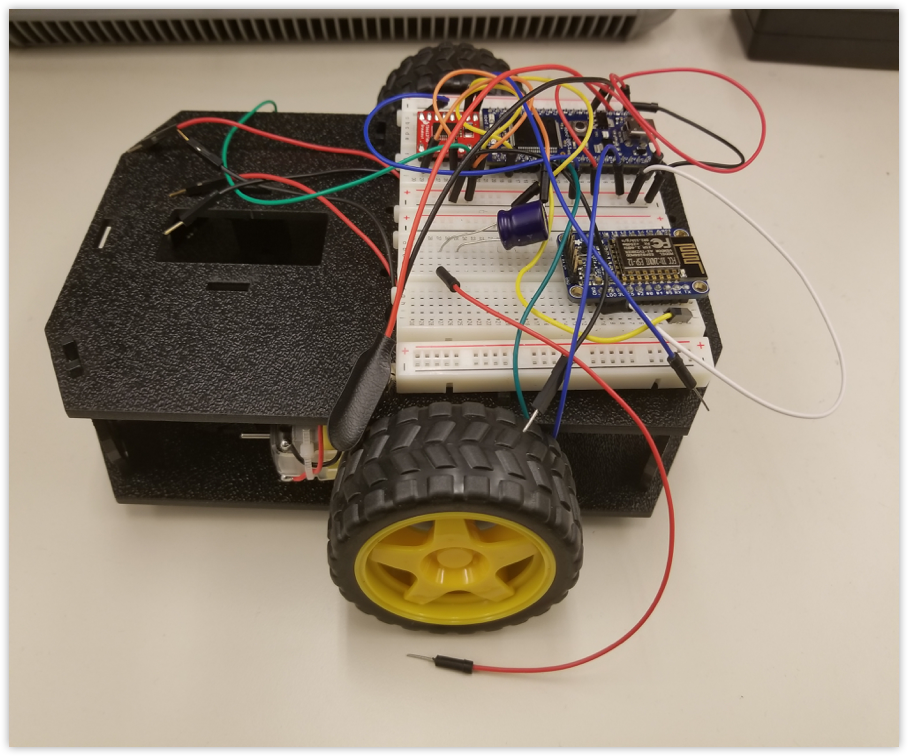
Both robots have similar construction and functions. The basic assembly followed the instructions provided by SparkFun here: *https://learn.sparkfun.com/tutorials/assembly-guide-for-redbot-with-shadow-chassis/all. For wireless communication, we used the ESP8266 wifi module. For motor control, we used the H-bridge included in the kit to drive both motors and powered them with a 9 volt battery.
ESP8266 Wifi Chip
| mbed | ESP8266 |
|---|---|
| p13 | Rx |
| p14 | Tx |
H-bridge
| mbed | H-bridge | Motor A | Motor B |
|---|---|---|---|
| p21 | PWMA | - | - |
| p22 | PWMB | - | - |
| p5 | AIN1 | - | - |
| p6 | AIN2 | - | - |
| p7 | BIN1 | - | - |
| p8 | BIN2 | - | - |
| - | A01 | ' + ' | - |
| - | A02 | ' - ' | - |
| - | B01 | - | ' + ' |
| - | B02 | - | ' - ' |
Alexa Interaction Model
In order to have Alexa recognize commands and send them to the Pi server, we need to set up a custom skill forAlexa. In the skill, there are "intents" or phrases that Alexa will recognize when spoken and associate them to variables. This data is finally sent to the Pi which will process it accordingly. From here we made a custom skill kit for each of the robots. The data is sent using JSON and can be interpreted through Python running on the RaspBerry Pi. The skill intents for both robots are identical:
Robot A/Robot B Intent Schema (replace: A with B in some spots)
{
  "intents": [
    {
      "slots": [
        {
          "name": "sectorID",
          "type": "SECTOR_LIST"
        }
      ],
      "intent": "SectorMoveA"
    },
    {
      "slots": [
        {
          "name": "moveSet",
          "type": "MOVE_SET"
        }
      ],
      "intent": "ManualDriveA"
    }
  ]
}
Custom Slot Types:
SECTPR_LIST: A, B, C, D, E MOVE_SET: Left, Right, Drive, Stop, Sweep
Sample Utterances:
SectorMoveA to go to sector {sectorID} SectorMoveA to move to sector {sectorID} SectorMoveA to deliver to sector {sectorID} SectorMoveA to drive to sector {sectorID} ManualDriveA to go {moveSet} ManualDriveA to {moveSet}
Once that is all set up, we now set up the RaspBerry Pi to read the Alexa commands
RaspBerry Pi and Python
To get the RaspBerry Pi to receive Alexa commands and talk to the robot a fair bit of set up is required. First update all the the apps using the command sudo apt-get update and sudo apt-get dis-upgrade . To get the Pi to "listen" for Alexa commands we need Flask-Ask libraries. This runs a server on the pi (locally) and listens to any incoming requests. We will also need to run a server that is accessible from anywhere on the web. For that, we will use ngrok. Go to ngrok.com and download ngrok for linux/arm not the 32 bit one. You then ssh it or use a thumbdrive and put it on the pi. From there unzip and run. Getting Flask-Ask is a process and will need to install these python libraries using pip beforehand:
pip install cffi pip install cryptography pip install flask pip3 install flask-ask (Yes PIP3 not PIP) sudo pip install virtualenv
You then need to run the ngrok server at port 5000: ./ngrok http 5000, and run the python script at the same time. Now the Pi will be listening for Alexa.
Python Code:
from flask import Flask
from flask_ask import Ask, statement, convert_errors
import logging
import os
import sys
import fileinput
import requests

app = Flask(__name__)
ask = Ask(app, '/')

logging.getLogger("flask_ask").setLevel(logging.DEBUG)

#Sector move for robot A
@ask.intent('SectorMoveA')
def botstatus(sectorID):

    if sectorID == 'a':
        payload = { 'RAA':'RAA'}
    elif sectorID == 'b':
        payload = { 'RB':'RB'}
    elif sectorID == 'c':
        payload = { 'RC':'RC'}
    else:
        payload = { 'RD':'RD'}

    try:
        with requests.Session() as s:
                p = s.post('http://143.215.102.70', data=payload, timeout=3.5)
    except:
        return statement('Command Sent to Robot A')

#Manual Drive for robot A
@ask.intent('ManualDriveA')
def robotDrive(moveSet):

    if moveSet == 'drive':
        payload = { 'RADA':'RADA'}
    elif moveSet == 'left':
        payload = { 'RAL':'RAL'}
    elif moveSet == 'right':
        payload = { 'RAR':'RAR'}
    else:
        payload = { 'RAS':'RAS'}

    try:
        with requests.Session() as s:
                p = s.post('http://143.215.102.70', data=payload, timeout=3.5)
    except:
        return statement('Command Sent to robot A')

#Sector move for robot B
@ask.intent('SectorMoveB')
def botstatus(sectorID):

    if sectorID == 'a':
        payload = { 'RAB':'RAB'}
    elif sectorID == 'b':
        payload = { 'RB':'RB'}
    elif sectorID == 'c':
        payload = { 'RC':'RC'}
    else:
        payload = { 'RD':'RD'}

    try:
        with requests.Session() as s:
                p = s.post('http://143.215.102.70', data=payload, timeout=3.5)
    except:
        return statement('Command Sent to Robot B')

#Manual Drive for robot B
@ask.intent('ManualDriveB')
def robotDrive(moveSet):

    if moveSet == 'drive':
        payload = { 'RADB':'RADB'}
    elif moveSet == 'left':
        payload = { 'RAL':'RAL'}
    elif moveSet == 'right':
        payload = { 'RAR':'RAR'}
    else:
        payload = { 'RAS':'RAS'}

    try:
        with requests.Session() as s:
                p = s.post('http://143.215.102.70', data=payload, timeout=3.5)
    except:
        return statement('Command Sent to robot B')

if __name__ == '__main__':
    app.run()
From here the python makes post requests to the mbed with the certain commands.
Mbed Code
The following is the code we used to drive the robots and listen for requests on the mbed using the wifi chip. The mbed constantly looks for POST requests and acts accordingly.
#include "mbed.h"
#include "ESP8266Interface.h"
#include "Socket.h"
#include "motordriver.h"
#include "ultrasonic.h"
#include "string.h"
#include "rtos.h"
ESP8266 ESP(p13,p14,p26,9600,20000);
Serial pc(USBTX,USBRX);
Motor Bot_Left(p23,p5,p6,1);
Motor Bot_Right(p25,p7,p8,1);
DigitalOut LED(LED1);
DigitalOut LED_2(LED2);
DigitalOut LED_3(LED3);
DigitalOut LED_4(LED4);
Thread Drive;
Thread Sonar;
Timer Time;
int Distance;
bool Collision;
char Sector;
bool search();
void drive(float);
void dist(int distance)
{
    Distance = distance;
    pc.printf("Distance = %d mm\r\n", distance);
    if(Distance < 400 && Distance != 2)
    {
        LED_4 = 1;
        Collision = true;
    }
    else if (Distance > 400 && Distance != 2)
    {   LED_4 = 0;
        Collision = false;
    }
}

ultrasonic sonar(p29,p30,.1,1,&dist);

void turn(bool dir)
{
    LED_3 = 1;
    float L_Speed = Bot_Left.state();
    float R_Speed = Bot_Right.state();
    if(dir == false)
    {
        Bot_Left.speed(.65);
        Bot_Right.speed(0);
        wait(.55);
        Bot_Left.speed(0);
        Bot_Right.speed(0);
    }
    else if(dir == true)
    {
        Bot_Left.speed(0);
        Bot_Right.speed(.65);
        wait(.63);
        Bot_Right.speed(0);
        Bot_Left.speed(0);
    }
    LED_3 = 0;
}

bool search()
{
    Bot_Left.speed(0);
    Bot_Right.speed(0);
    turn(false);
    wait(1);
    Bot_Left.speed(.6);
    Bot_Right.speed(.6);
    wait(1);
    Bot_Left.speed(0);
    Bot_Right.speed(0);
    turn(true);
    wait(1);
    if(Collision == false)
    {
        Collision = false;
        return true;
    }
    turn(true);
    Bot_Left.speed(.6);
    Bot_Right.speed(.6);
    wait(2);
    Bot_Left.speed(0);
    Bot_Right.speed(0);
    turn(false);
    wait(1);
    if(Collision == false)
    {
        Collision = false;
        return true;
    }
    return false;
}

void drive(float time) {

    if(Collision == true)
{
if(search() == false)
{
        return;
}
}
    LED_2 = 1;
    Bot_Left.speed(.55);
    Bot_Right.speed(.55);
    for(float i = 0; i < time ; i+= .05)
    {
        if(Collision == true)
        {
            Bot_Left.speed(0);
            Bot_Right.speed(0);
            if(search() == false)
            {
                LED_2 = 0;
                return;
            }
            Bot_Left.speed(.55);
            Bot_Right.speed(.55);
         }
        wait(.05);
    }
    Bot_Left.speed(0);
    Bot_Right.speed(0);
    LED_2 = 0;
}


void sector_A() {
    drive(1);
    if(Collision == true)
        return;
    turn(false);
    if (Collision == true)
        return;
    drive(2.5);
    if (Collision == true)
        return;
    turn(true);
    if (Collision == true)
        return;
    drive(7);
    if  (Collision == true)
        return;
    turn(false);
    if  (Collision == true);
        return;
    drive(1);
    if  (Collision == true);
        return;
    Sector = 'A';
}
void sector_B() {
    if(Collision == true)
        return;
    drive(1);
    if(Collision == true)
        return;
    turn(true);
    if(Collision == true)
        return;
    drive(2.5);
    if(Collision == true)
        return;
    turn(false);
    if(Collision == true)
        return;
    drive(5);
    if(Collision == true)
        return;
    turn(true);
    if(Collision == true)
        return;
    drive(1);
    if(Collision == true)
        return;
    Sector = 'B';
}

void listen() {
pc.printf("Hello!\r\n");
    pc.baud(9600);
    char ssid[32] = "GTother";
    char pwd[32] = "GeorgeP@1927";
    int d = ESP.init();
    pc.printf("%d\r\n", d);
    if(d == 1)
        LED = 1;
    pc.printf("%d\r\n",ESP.connect(ssid,pwd));
    pc.printf("IP Address: %s\r\n", ESP.getIPAddress());
    ESP.command("srv=net.createServer(net.TCP)");
    ESP.command("srv:listen(80,function(conn)");
    ESP.command("conn:on('receive',function(conn,payload)");
    ESP.command("print(payload)");
    ESP.command("conn:send('HTTP/1.0 200 OK \\r\\nContent-Type: text/html \\r\\n\\r\\n <h1> Hello, Commander. </h1>')");
    ESP.command("end)");
    ESP.command("end)");
    ESP.execute();
    ESP.flush();
    while(true)
    {
        int k = ESP.serialgetc();
        char command1[k];
        if(k > 0)
        {
            for (int i = 0; i <= k; i++) {
            int c = ESP.serialgetc();
            if (c < 0)
                continue;
            if (c == '\r') {
               printf("\r");
               break;
            }
            printf("%c",c);
            command1[i] = c;
        }
    }
    if(command1[0] == 'R')
    {
    if(command1[1] == 'A')
    {
         if(command1[2] == 'R')
            turn(1);
         else if(command1[2] == 'L')
            turn(0);
         else if(command1[2] == 'D')
            drive(4);
        else if(command1[2] == 'S')
        {
            Bot_Right.stop(0);
            Bot_Left.stop(0);
        }
        else if(command1[2] == 'A' && Distance > 300)
        {
            sector_A();
        }
        else if(command1[2] == 'B' && Distance > 300)
        {
            sector_B();
        }
    }
    }
    }
}


int main()
{
    sonar.startUpdates();
    Drive.start(listen);
    while(1)
    {
        sonar.checkDistance();
    }
}
Please log in to post comments.
Alexa Controlled Delivery Robots
Page owner: Marcellus Pleasant
Created 05 Dec 2017.
Last updated 14 Dec 2017