Mini Project - Tic Tac Toe with Sparkfun Touch Keypad
Page last updated 20 Oct 2015, by  Guanlin Chen.
0
replies
Guanlin Chen.
0
replies
Guanlin Chen.
0
replies
Description
For this project, we implemented the classic Tic Tac Toe Game by using the touch keypad. The lower area of the keypad can be pressed and then a circle or cross would be placed on the corresponding area on the board on the LCD screen. The shiftbrite part works as an indicator of the current game status such as the next player and the winner of the game. The speaker will play the sound effects that stored in the SD card.
Components
- mbed
- Touch Keypad
- uLCD144
- Shiftbrite
- MicroSD Breakour Board
- Speaker
Circuit
MicroSD Breakout
| mbed | MicroSD Breakout |
| Vcc | Vout |
| Gnd | Gnd |
| P14 | CS |
| P5 | DI |
| P7 | SCK |
| P6 | DO |
| CD |
uLCD
| mbed | uLCD Header | uLCD cable |
| 5V=VU | 5V | 5V |
| Gnd | Gnd | Gnd |
| TX=P9 | RX | TX |
| RX=P10 | TX | RX |
| P11 | Reset | Reset |
Touch Keypad
| mbed | Touch Keypad |
| Gnd | Gnd |
| p28 | SDA |
| p27 | SCL |
| p26 | IRQ |
| Vout(3.3V) | Vcc |
ShiftBrite
| mbed | ShiftBrite |
| Gnd | Gnd |
| p11 | DI |
| p15 | LI |
| p16 | EI |
| p13 | CI |
| VU(5V) | V+ |
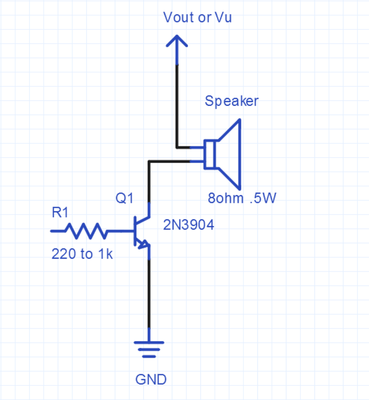
Speaker
Demonstration
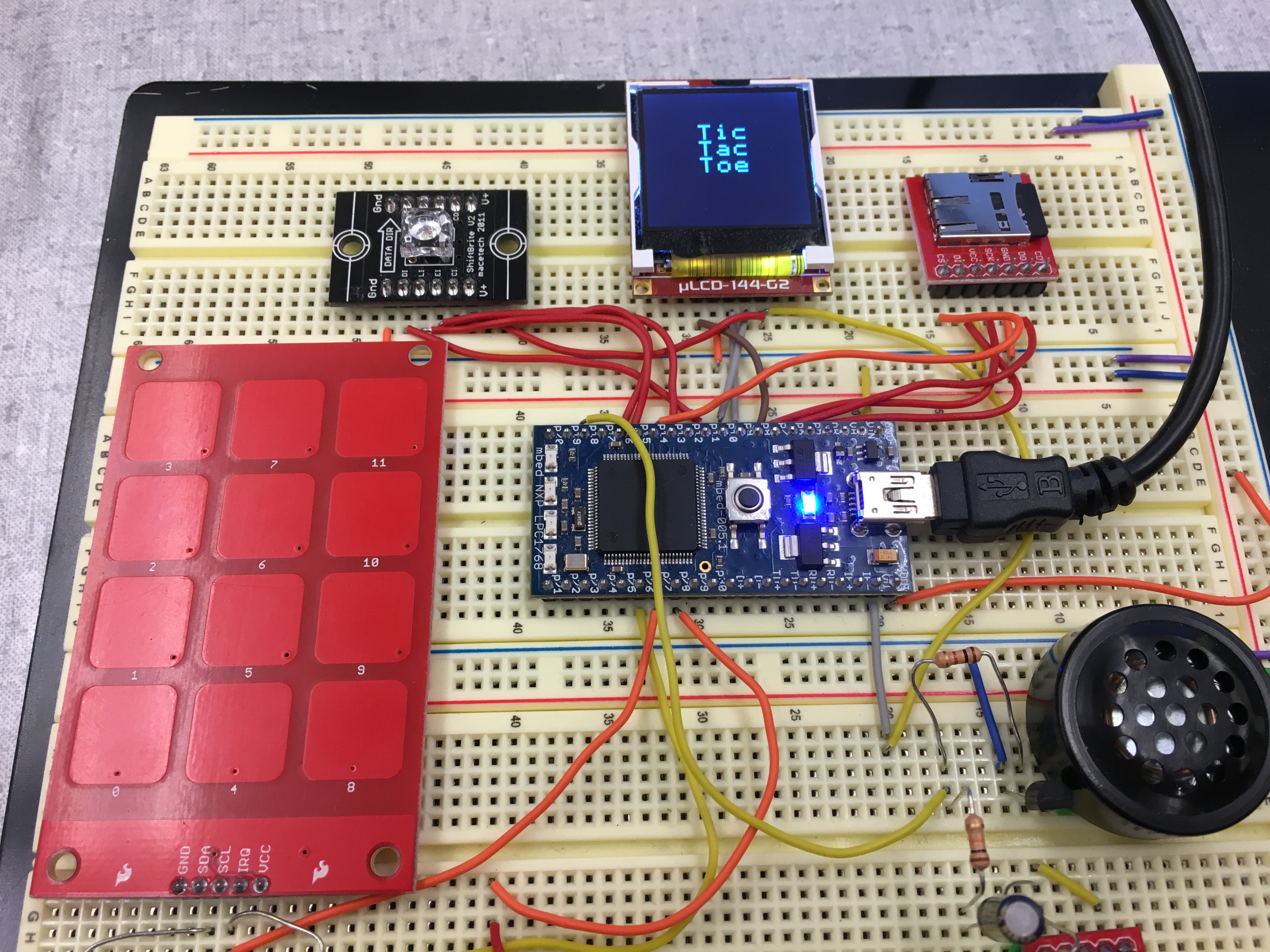
General Layout of this project
Instructions on the screen

Demo Vedio
Code for this mini project
#include "mbed.h"
#include "uLCD_4DGL.h"
#include "SDFileSystem.h"
#include "wave_player.h"
#include "PinDetect.h"
#include <mpr121.h>

Serial pc(USBTX, USBRX);

uLCD_4DGL lcd(p9, p10, p8);
SDFileSystem sd(p5, p6, p7, p14, "sd"); //SD card

int key = 0;
int *keyptr = &key;
int turn = 0;
int *turnptr = &turn;
char won = 'n';
char start = 'n';

//Speaker
AnalogOut DACout(p18);
wave_player waver(&DACout);

FILE *wave_file;
void drawerase()
{
    wave_file=fopen("/sd/erase16.wav","r");
    waver.play(wave_file);
    fclose(wave_file);
}
void drawcircle()
{
    wave_file=fopen("/sd/circle16.wav","r");
    waver.play(wave_file);
    fclose(wave_file);
}
void drawcross()
{
    wave_file=fopen("/sd/cross16.wav","r");
    waver.play(wave_file);
    fclose(wave_file);
}

//shift brite
DigitalOut latch(p15);
DigitalOut enable(p16);
SPI spi(p11, p12, p13);
void RGB_LED(int red, int green, int blue)
{
    unsigned int low_color=0;
    unsigned int high_color=0;
    high_color=(blue<<4)|((red&0x3C0)>>6);
    low_color=(((red&0x3F)<<10)|(green));
    spi.write(high_color);
    spi.write(low_color);
    latch=1;
    latch=0;
}
void winningLED()
{
    while(key!=4) {
        RGB_LED( 100, 0, 0);
        wait(.05);
        RGB_LED( 0, 100, 0);
        wait(.05);
        RGB_LED( 0, 0, 100);
        wait(.05);
    }
}
void tieLED()
{
    RGB_LED(100, 100, 100);
}

DigitalOut myled1(LED1);
DigitalOut myled2(LED2);
DigitalOut myled3(LED3);
DigitalOut myled4(LED4);

int pressed[12]={0};

//touch  pad
InterruptIn interrupt(p26);
// Setup the i2c bus on pins 9 and 10
I2C i2c(p28, p27);
// Setup the Mpr121:
// constructor(i2c object, i2c address of the mpr121)
Mpr121 mpr121(&i2c, Mpr121::ADD_VSS);

// Key hit/release interrupt routine
void fallInterrupt() {
  int key_code=0;
  int i=0;
  int value=mpr121.read(0x00);
  value +=mpr121.read(0x01)<<8;
  // LED demo mod
  i=0;
  // puts key number out to LEDs for demo
  for (i=0; i<12; i++) {
  if (((value>>i)&0x01)==1) key_code=i+1;
  }
  myled4=key_code & 0x01;
  myled3=(key_code>>1) & 0x01;
  myled2=(key_code>>2) & 0x01;
  myled1=(key_code>>3) & 0x01;
  *keyptr = key_code;
  start = 'y';
}

void drawBKG()
{
    lcd.cls();
    lcd.background_color(0x254542);
    drawerase();
    lcd.line(2, 44, 126, 44, WHITE);
    lcd.line(2, 85, 126, 85, WHITE);
    lcd.line(44, 2, 44, 126, WHITE);
    lcd.line(85, 2, 85, 126, WHITE);
}

void winnercheck()
{
    if (pressed[3]==pressed[7]&&pressed[7]==pressed[11]&&pressed[3]!=0) {
        if(pressed[3]==1)   {
            lcd.locate(4,0);
            lcd.printf("circle wins");
        } else if(pressed[3]==2)   {
            lcd.locate(5,0);
            lcd.printf("cross wins");
        }
        lcd.line(23,23,107,23, WHITE);
        won = 'w';
        winningLED();
    } else if (pressed[2]==pressed[6]&&pressed[6]==pressed[10]&&pressed[2]!=0) {
        if(pressed[2]==1)   {
            lcd.locate(4,0);
            lcd.printf("circle wins");
        } else if(pressed[2]==2)     {
            lcd.locate(5,0);
            lcd.printf("cross wins");
        }
        lcd.line(23,65,107,65, WHITE);
        won = 'w';
        winningLED();
    } else if (pressed[1]==pressed[5]&&pressed[5]==pressed[9]&&pressed[1]!=0) {
        if(pressed[1]==1)   {
            lcd.locate(4,0);
            lcd.printf("circle wins");
        } else if(pressed[1]==2)    {
            lcd.locate(5,0);
            lcd.printf("cross wins");
        }
        lcd.line(23,107,107,107, WHITE);
        won = 'w';
        winningLED();
    } else if (pressed[3]==pressed[2]&&pressed[2]==pressed[1]&&pressed[3]!=0) {
        if(pressed[3]==1)   {
            lcd.locate(4,0);
            lcd.printf("circle wins");
        } else if(pressed[3]==2)   {
            lcd.locate(5,0);
            lcd.printf("cross wins");
        }
        lcd.line(23,23,23,107, WHITE);
        won = 'w';
        winningLED();
    } else if (pressed[7]==pressed[6]&&pressed[6]==pressed[5]&&pressed[7]!=0) {
        if(pressed[7]==1)   {
            lcd.locate(4,0);
            lcd.printf("circle wins");
        } else if(pressed[7]==2)    {
            lcd.locate(5,0);
            lcd.printf("cross wins");
        }
        lcd.line(65,23,65,107, WHITE);
        won = 'w';
        winningLED();
    } else if (pressed[11]==pressed[10]&&pressed[10]==pressed[9]&&pressed[11]!=0) {
        if(pressed[11]==1)   {
            lcd.locate(4,0);
            lcd.printf("circle wins");
        } else if(pressed[11]==2)    {
            lcd.locate(5,0);
            lcd.printf("cross wins");
        }
        lcd.line(107,23,107,107, WHITE);
        won = 'w';
        winningLED();
    } else if (pressed[3]==pressed[6]&&pressed[6]==pressed[9]&&pressed[3]!=0) {
        if(pressed[3]==1)   {
            lcd.locate(4,0);
            lcd.printf("circle wins");
        } else if(pressed[3]==2)   {
            lcd.locate(5,0);
            lcd.printf("cross wins");
        }
        lcd.line(23,23,107,107, WHITE);
        won = 'w';
        winningLED();
    } else if (pressed[11]==pressed[6]&&pressed[6]==pressed[1]&&pressed[11]!=0) {
        if(pressed[11]==1)  {
            lcd.locate(4,0);
            lcd.printf("circle wins");
        } else if(pressed[11]==2)   {
            lcd.locate(5,0);
            lcd.printf("cross wins");
        }
        lcd.line(107,23,23,107, WHITE);
        won = 'w';
        winningLED();
    } else if (pressed[1]!=0 && pressed[2]!=0 &&pressed[3]!=0 && pressed[5]!=0 && pressed[6]!=0 && pressed[7]!=0 && pressed[9]!=0 && pressed[10]!=0 && pressed[11]!=0) {
        lcd.locate(7,0);
        lcd.printf("Tie");
        won = 'w';
        tieLED();
    }
}

void resetgame(){
    drawBKG();
    int i;
    for (i =0; i<=11;i++)pressed[i]=0;
    *turnptr = 0;
    won = 'n';
    RGB_LED(100,0,0);
    }

int main()
{
    spi.format(16,0);
    spi.frequency(500000);
    enable=0;
    latch=0;

    interrupt.fall(&fallInterrupt);
    interrupt.mode(PullUp);

    //welcome
    lcd.baudrate(3000000);
    lcd.text_width(2);
    lcd.text_height(2);
    lcd.locate(0,2);
    lcd.text_mode(TRANSPARENT);
    lcd.color(WHITE);
    lcd.printf("   Tic\n   Tac\n   Toe");
    wait(3);
    lcd.cls();
    lcd.color(RED);
    lcd.printf("Use lower area of the keypad to draw a circle or cross\n\nKey 3 to reset the game\n\nLED indicates next player\n\nPress any key to continue...");
    while(start!='y') {
        wait(1);
    }

    lcd.cls();
    lcd.background_color(0x254542);
    resetgame();
    lcd.textbackground_color(0x254542);
    while (1) {
        if (key == 4) {
            resetgame();
        }
        else if (pressed[key]==0 && won == 'n') {
            if (key == 1) {
                if (turn == 0) {
                    lcd.circle(23, 107, 10, RED);
                    drawcircle();
                    RGB_LED(0,0,100);
                } else if(turn == 1) {
                    lcd.line(18, 100, 28, 114, BLUE);
                    lcd.line(18, 114, 28, 100, BLUE);
                    drawcross();
                    RGB_LED(100,0,0);
                }
                pressed[1]=turn+1;
                *turnptr = (turn+1)%2;
                winnercheck();
            } else if (key == 2) {
                if (turn == 0) {
                    lcd.circle(23, 65, 10, RED);
                    drawcircle();
                    RGB_LED(0,0,100);
                } else if(turn == 1) {
                    lcd.line(18, 58, 28, 72, BLUE);
                    lcd.line(18, 72, 28, 58, BLUE);
                    drawcross();
                    RGB_LED(100,0,0);
                }
                pressed[2]=turn+1;
                *turnptr = (turn+1)%2;
                winnercheck();
            } else if (key == 3) {
                if (turn == 0) {
                    lcd.circle(23, 23, 10, RED);
                    drawcircle();
                    RGB_LED(0,0,100);
                } else if(turn == 1) {
                    lcd.line(18, 16, 28, 30, BLUE);
                    lcd.line(18, 30, 28, 16, BLUE);
                    drawcross();
                    RGB_LED(100,0,0);
                }
                pressed[3]=turn+1;
                *turnptr = (turn+1)%2;
                winnercheck();
            } else if (key == 5) {
                if (turn == 0) {
                    lcd.circle(65, 107, 10, RED);
                    drawcircle();
                    RGB_LED(0,0,100);
                } else if(turn == 1) {
                    lcd.line(60, 100, 70, 114, BLUE);
                    lcd.line(60, 114, 70, 100, BLUE);
                    drawcross();
                    RGB_LED(100,0,0);
                }
                pressed[5]=turn+1;
                *turnptr = (turn+1)%2;
                winnercheck();
            } else if (key == 6) {
                if (turn == 0) {
                    lcd.circle(65, 65, 10, RED);
                    drawcircle();
                    RGB_LED(0,0,100);
                } else if(turn == 1) {
                    lcd.line(60, 58, 70, 72, BLUE);
                    lcd.line(60, 72, 70, 58, BLUE);
                    drawcross();
                    RGB_LED(100,0,0);
                }
                pressed[6]=turn+1;
                *turnptr = (turn+1)%2;
                winnercheck();
            } else if (key == 7) {
                if (turn == 0) {
                    lcd.circle(65, 23, 10, RED);
                    drawcircle();
                    RGB_LED(0,0,100);
                } else if(turn == 1) {
                    lcd.line(60, 16, 70, 30, BLUE);
                    lcd.line(60, 30, 70, 16, BLUE);
                    drawcross();
                    RGB_LED(100,0,0);
                }
                pressed[7]=turn+1;
                *turnptr = (turn+1)%2;
                winnercheck();
            } else if (key == 9) {
                if (turn == 0) {
                    lcd.circle(107, 107, 10, RED);
                    drawcircle();
                    RGB_LED(0,0,100);
                } else if(turn == 1) {
                    lcd.line(102, 100, 112, 114, BLUE);
                    lcd.line(102, 114, 112, 100, BLUE);
                    drawcross();
                    RGB_LED(100,0,0);
                }
                pressed[9]=turn+1;
                *turnptr = (turn+1)%2;
                winnercheck();
            } else if (key == 10) {
                if (turn == 0) {
                    lcd.circle(107, 65, 10, RED);
                    drawcircle();
                    RGB_LED(0,0,100);
                } else if(turn == 1) {
                    lcd.line(102, 58, 112, 72, BLUE);
                    lcd.line(102, 72, 112, 58, BLUE);
                    drawcross();
                    RGB_LED(100,0,0);
                }
                pressed[10]=turn+1;
                *turnptr = (turn+1)%2;
                winnercheck();
            } else if (key == 11) {
                if (turn == 0) {
                    lcd.circle(107, 23, 10, RED);
                    drawcircle();
                    RGB_LED(0,0,100);
                } else if(turn == 1) {
                    lcd.line(102, 16, 112, 30, BLUE);
                    lcd.line(102, 30, 112, 16, BLUE);
                    drawcross();
                    RGB_LED(100,0,0);
                }
                pressed[11]=turn+1;
                *turnptr = (turn+1)%2;
                winnercheck();
            }
        }
    }
}
Import programTic_Tac_Toe_with_Touchpad
Use touchpad to play the tic tac toe game
Last commit 20 Oct 2015 by Ye Qiu
Please log in to post comments.
Mini Project - Tic Tac Toe with Sparkfun Touch Keypad
Page owner: Guanlin Chen
Created 20 Oct 2015.
Last updated 20 Oct 2015