Nerf Gun Robot
 Lionel Jones.
0
replies
Lionel Jones.
0
replies
By Bria Matthews and Lionel Jones
Description
The robot is phone controlled through a bluetooth app called Adafruit Bluefruit BLE. You can control the vehicle's movement as well as shoot the nerf gun through this app.
Materials
- 2 small breadboards
- Mbed
- Modulus Stryfe Nerf Gun
- Shadow robot kit
- 2 hall effect sensors
- Dual H-bridge motor driver
- Adafruit Bluefruit Module
- 2 motors
- HS-6450mg servo
- 2 4.8V battery packs
- Lightweight wood
- 3 standoff and screw sets
- 4 screw and nut sets
- Zip-tie
- String
Setup
The robot shadow chassis can be set up using instructions from Shadow robot kit. Don't attach the top chassis plate.The motor driver can be attached as demonstrated in Motor. And the bluetooth module can be setup using Adafruit Bluefruit LE UART Friend - Bluetooth Low Energy (BLE).
The trigger of the Nerf gun is pulled by a servo motor. To set this up, the Nerf gun and servo were mounted onto a plank of wood as shown below:
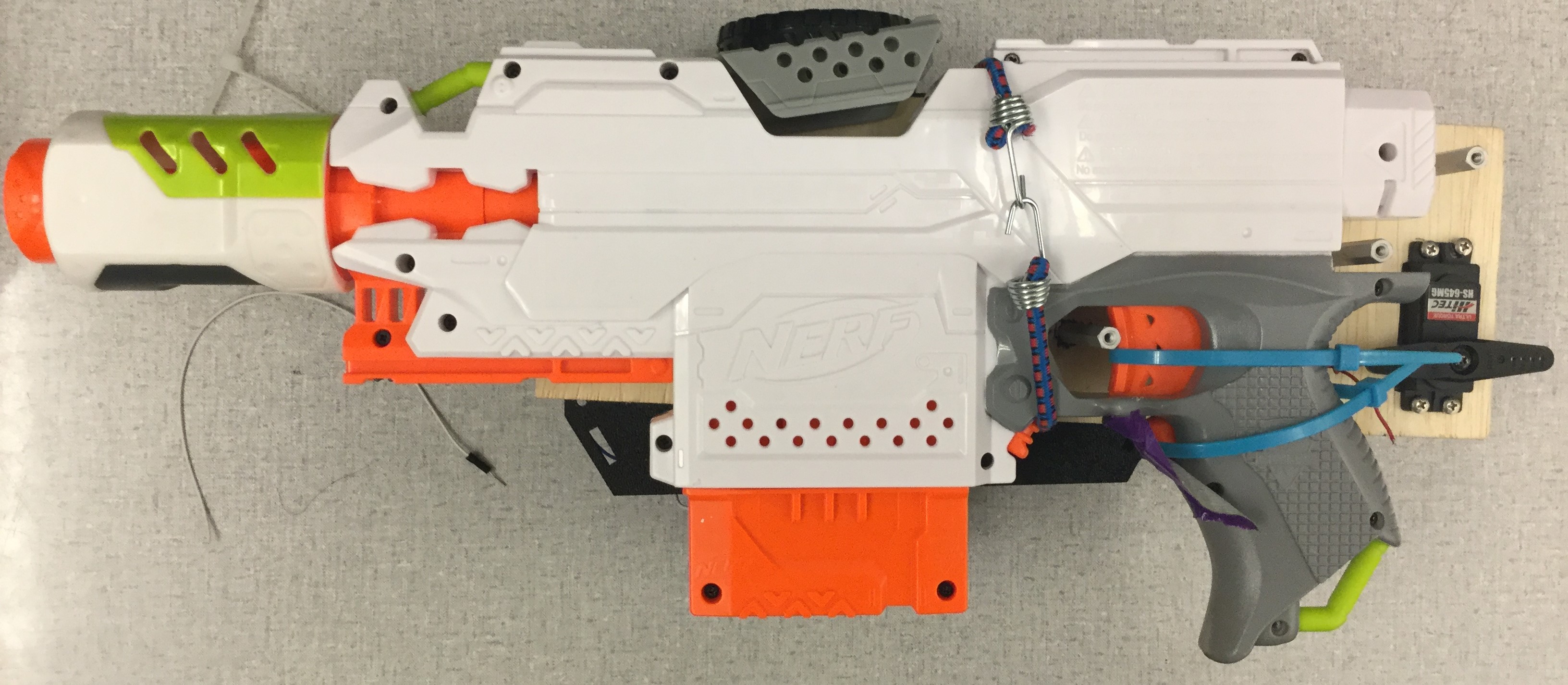
First, to mount the servo, trace the servo onto the plank of wood. Cut out the shape using a drill and a small saw. Next, put the servo into the cutout and trace out the 4 mounting holes. Drill the holes and mount the servo using small screws and nuts.
Next, place the Nerf gun on the plank of wood and mark 3 or more spots into which to screw standoffs. These will keep the gun in place when the servo pulls the trigger. Drill holes into the marked spots and insert the standoffs.
Below is the layout of the Nerf gun [1]:
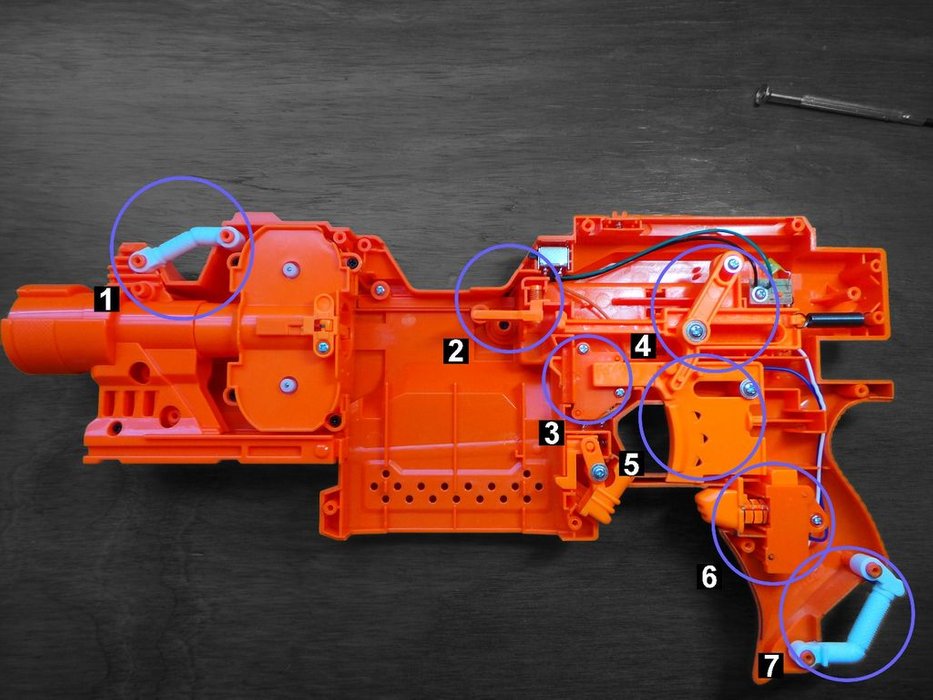
The important parts are 5 (the trigger) and 6 (the motor trigger).
To setup the trigger pull mechanism, place a zip tie around the trigger. Pull the zip tie as tight as possible without depressing the trigger. Next, loop a thin, long string inside the zip tie and into a hole on the servo. Pull this as tight as possible without depressing the trigger. Next, hold down the motor trigger with a rubber band or tape.
Connections
The first battery pack (BP1) will power the mbed and Servo motor. The second battery pack (BP2) will power the two motors, hall sensors, and Bluetooth module.
Motor Connections
| mbed | H-bridge | Left Motor | Right Motor | BP2 |
|---|---|---|---|---|
| A01 | black wire | |||
| A02 | red wire | |||
| B01 | red wire | |||
| B02 | black wire | |||
| p21 | PWMA | |||
| p15 | AI2 | |||
| p16 | AI1 | |||
| ST/BY | 5V | |||
| p26 | BI1 | |||
| p25 | BI2 | |||
| p24 | PWMB | |||
| Gnd | GND |
Bluetooth Connections
| mbed | Adafruit | BP2 |
|---|---|---|
| Gnd | GND | |
| Vin | 5V | |
| p9 | RXI | |
| p10 | TXO | |
| CTS | GND |
Servo Connections
| mbed | HS-6450mg | BP1 |
|---|---|---|
| p22 | signal | |
| + | 5v | |
| - | GND |
Hall Effect Sensor Connections
| mbed | Left sensor | Right Sensor | BP2 |
|---|---|---|---|
| p5 | signal | ||
| p6 | signal | ||
| + | + | 5V | |
| - | - | GND |
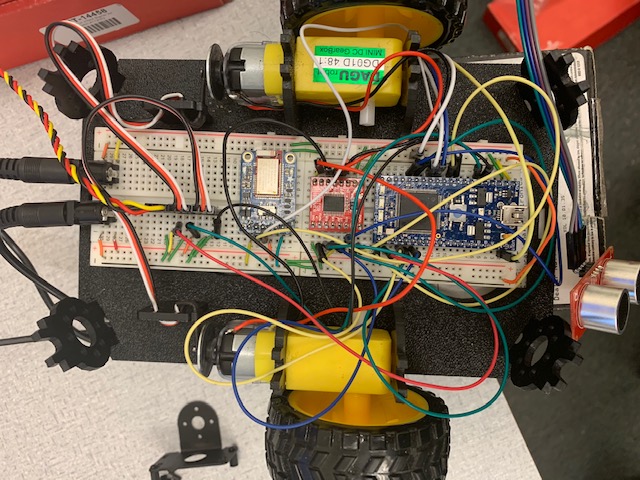
Here's the completed breadboard:
Code
Below is the mbed code:
#include "mbed.h"
#include "Servo.h"
#include "rtos.h"
#include "motordriver.h"

//create threads
Thread thread1;
Thread thread2;

//mutexs
Mutex motors;


//motor
Motor ml(p21, p15, p16, 1); // pwm, fwd, rev, can brake motor a
Motor mr(p24, p25, p26, 1); // pwm, fwd, rev, can brake motor b
float sr = 0.0;
float sl = 0.0;
float speedincrement = 0.12;
float turndiff = 0.3;
bool turn = 1; //0: straight movemnt 1: turning or stopped
bool forw =0; //0: backwards 1: forwards


//hall effect
volatile long int countl = 0;
volatile long int countr = 0;

//bluetooth
RawSerial  blue(p9,p10);

//Serial
DigitalOut myled(LED1);
Serial pc(USBTX, USBRX);

//Servos for shooting
Servo b1(p22);
//Servo b2(p23);
float pos = 0.1;

//counter class for hall effect
class Counter {
public:
    Counter(PinName pin) : _interrupt(pin) {        // create the InterruptIn on the pin specified to Counter
        _interrupt.mode(PullUp);
        _interrupt.rise(this, &Counter::increment); // attach increment function of this counter instance
    }

    void increment() {
        _count++;
        if(turn){
            _count = 0;
        }
    }

    int read() {
        return _count;
    }
    void reset(){
        _count = 0;
    }

private:
    InterruptIn _interrupt;
    volatile int _count;
};

Counter risel(p6);
Counter riser(p5);


//correct wheel movement with hall affect
void hall(){
    int diff;
    while(1) {
        diff = riser.read() - risel.read();
        riser.reset();
        risel.reset();
        if(!turn){
            if(forw){//if moving forward
                if(diff < -5) sl -= speedincrement;
                else if (diff > 5) sr -= speedincrement;
                if((sl<0.5)|| (sl<0.5)){
                     sl += 0.5;
                     sr += 0.5;
                }
            }
            else{
                if(diff < -5) sl += speedincrement;
                else if (diff > 5) sr += speedincrement;
                if((sl>-0.5)|| (sl>-0.5)){
                     sl += 0.5;
                     sr += 0.5;
                }
            }

        }
        //drive motor
        ml.speed(sl);
        mr.speed(sr);
//        motors.unlock();
        Thread::wait(100);
    }
}
//servo help
//https://os.mbed.com/questions/55410/Servo-only-move-90-deg/

int main() {
    b1.calibrate(0.00085,180.0);
    b1 = 1.0;
    thread2.start(hall);

    //receive command from bluetooth and execute
    char bnum=0;
    char bhit=0;
    while(1) {
        //motors.lock();
        if (blue.getc()=='!') {
            if (blue.getc()=='B') { //button data packet
                bnum = blue.getc(); //button number
                bhit = blue.getc(); //1=hit, 0=release
                if (blue.getc()==char(~('!' + 'B' + bnum + bhit))) { //checksum OK?
                    //myled = bnum - '0'; //current button number will appear on LEDs
                    switch (bnum) {
                        case '1': //number button 1
                            if (bhit=='1') {// fire button
                                b1 = 0.6; //shoot by turning servo
                                Thread::wait(1000);
                                b1 = 0.0;
                                Thread::wait(500);
                                b1 = 0.2; //shoot by turning servo
                                Thread::wait(1000);
                                b1 = 1.0;
                            } else {
                                //add release code here
                            }
                            break;
                        case '2': //number button 2
                            if (bhit=='1') {
                                //add hit code here
                            } else {
                                //add release code here
                            }
                            break;
                        case '3': //number button 3
                            if (bhit=='1') {
                                //add hit code here
                            } else {
                                //add release code here
                            }
                            break;
                        case '4': //number button 4
                            if (bhit=='1') {
                                //add hit code here
                            } else {
                                //add release code here
                            }
                            break;
                        case '5': //button 5 up arrow
                            if (bhit=='1') {
//                                if(sr<1) sr += speedincrement;
//                                else sr = 1;
//                                if(sl<1) sl += speedincrement;
//                                else sl = 1;
                                sl = 1.0;
                                sr = 1.0;
                                turn = 0;
                                forw = 1;
                                //pc.printf("go/n");
                            } else {
                                sl = 0.0;
                                sr = 0.0;
                                turn = 1;
                                //pc.printf("stop/n");
                            }
                            break;
                        case '6': //button 6 down arrow
                            if (bhit=='1') {
                                sr= -1.0;
                                forw = 0;
                                turn = 0;
                            } else {
                                sl = 0.0;
                                sr = 0.0;
                                turn = 1;
                            }
                            break;
                        case '7': //button 7 left arrow
                            if (bhit=='1') {
                                sr = 1.0;
                                sl = sr - turndiff;

                                turn = 1;
                            } else {
                                sl = 0.0;
                                sr = 0.0;
                            }
                            break;
                        case '8': //button 8 right arrow
                            if (bhit=='1') {
                                sl = 1.0;
                                sr = sl - turndiff;
                                turn = 1;
                            } else {
                                sl = 0.0;
                                sr = 0.0;
                            }
                            break;
                        default:
                            break;
                    }
                }
            }
        }
        Thread::wait(300); //wait 300ms
    }
}
Demo
Below is a video of the phone control of the robot:
References
[1] https://www.instructables.com/id/Beginners-Stryfe-Modification/
Please log in to post comments.