Important changes to repositories hosted on mbed.com
Mbed hosted mercurial repositories are deprecated and are due to be permanently deleted in July 2026.
To keep a copy of this software download the repository Zip archive or clone locally using Mercurial.
It is also possible to export all your personal repositories from the account settings page.
Dependencies: Nucleo_Sensor_Shield mbed
Fork of
Nucleo_Sensors_Demo_Old
by  Daniel Griffin
You are viewing an older revision! See the latest version
Homepage
Nucleo Sensors Demo
This example demonstrates how to use the X-NUCLEO-IKS01A1 shield with the STM32F411 Nucleo board to obtain real-time sensor data from the onboard sensors:
- LSM6DS0 (3D accelerometer + 3D gyroscope)
- LIS3MDL (3D magnetometer)
- LPS25H (pressure)
- HTS221 (humidity + temperature).
First, attach the sensor shield to the Nucleo board as shown here:
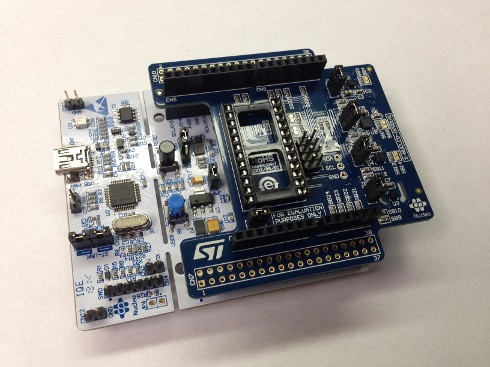
Next, connect the STM32F411 Nucleo board to your PC with a USB cable.
Import the Nucleo Sensors Demo project into your mbed compiler <screenshot>
Click “Import” button on the pop up window shown below <screenshot>
Compile and load the image onto the F411 Nucleo board
Note
Refer to Getting Started with mbed and the STM32F411 Nucleo Board to learn how to compile and load a program onto the Nucleo board
Open a terminal window to display the status of your WiFi connection. For this example, set the terminal BAUD rate to 9600
Note
Refer to Creating Console Output for setting a terminal emulator
You should now see the various sensor readings displayed on your console output.