You are viewing an older revision! See the latest version
Program3_BLEHeartRate
This example demonstrates how to use the X-NUCLEO-IDB05A1 component with one of the STM32 Nucleo platforms tested with the X-NUCLEO-IDB05A1 component to obtain heart rate information:
First, attach the X-NUCLEO-IDB05A1 to the STM32 Nucleo platform as shown here:
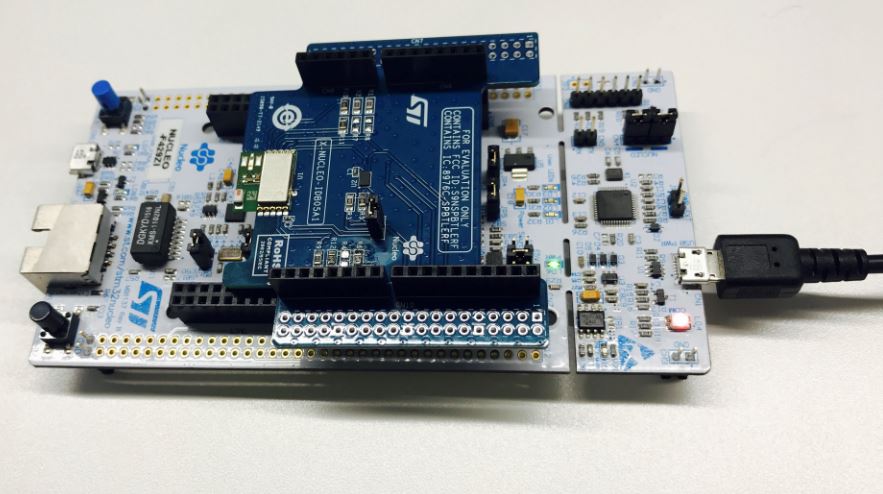
Steps:
- Import Program3_BLEHeartRate to your online compiler.
- Update the BLE_API library if it is outdated.
- Compile the example with flag: -DIDB0XA1_D13_PATCH or add the line #define IDB0XA1_D13_PATCH to X_NUCLEO_IDB0XA1/x_nucleo_idb0xa1/x_nucleo_idb0xa1_targets.h
- Remove all instances of LED1 in main.cpp as the shield’s LED is on the same line as SPI CLK which will prevent the board from working
- Now press Compile. A file downloads (BLE_HeartRate_IDB0XA1_NUCLEO_F429ZI.bin).
- Drag the file to the 'NODE_F429ZI' disk. The LED on the board will flash.
- After flashing, hit the 'Reset' button to start the program.
- Now open the BLE scanner on your phone. Start a scan.
- Find your device; it should be named `bluenrg!`.
- Click the connect to establish the connection with your device.
- Click the Heart Rate Measurement. If you can see some notification from the device, congratulations!