
Important changes to forums and questions
All forums and questions are now archived. To start a new conversation or read the latest updates go to forums.mbed.com.
11 years, 8 months ago.
Data sent from Rfduino is readable but can't read
Hi all, I have tried to send data from Android App to Rfduino and Rfduino to Mbed.
But Mbed can only read 0x01 from RFduino. When I sent data such as 0x02, etc., the data is readable but Mbed can’t read.
The main.cpp and rfduino_sketch are as below: <I modified Drew Barbier’s programs>.
#include "mbed.h"
#include "RFDuino.h"

DigitalOut StateH(LED1); // Mbed is able to successfully communicate with the RFduino.

DigitalOut StateC(LED2); //RFduino has made a successful Bluetooth connection.

DigitalOut StateR(LED3); //Rfduino is readable.

DigitalOut StateA(LED4);

DigitalOut StateB(p18);

RFDuino rfd(p9, p10);

unsigned char RfBuff[255];

int a;

int main() {

StateH = StateC = StateR = StateA = 1;

wait(5);// make sure to wait for about 5 seconds before handshake

StateH = StateC = StateR = StateA = 0; //Off all LEDs after 5 seconds and check for handshake

//ON LED1 if Handshake

if(rfd.handshake()) {

StateH = 1;

printf("Handshake!\n");// Mbed is able to successfully communicate with the RFduino.

}

if(rfd.isConnected()) {

StateC = 1;

printf("Conntected!\n");// RFduino has made a successful Bluetooth connection.

}

while(1) {

if (rfd.readable()) {

StateR = 1;

printf("Readable!\n");

a = rfd.read(RfBuff, 255);

if( a > 0 && a < 255) {

RfBuff[0] = a;

switch (a) {

case 0x01:

StateA = 1;

printf("%d\n", a);

break;

case 0x02:

StateB = 1;

printf("%d\n",a);

break;

default:

break;

}

}

}

}

}
rfduino_sketch
#include <RFduinoBLE.h>

#define HANDSHAKE 0x11
#define CONNECTED 0x22
#define TRANSMIT 0x33
#define RECEIVE 0X44>.


unsigned char cFlag;


unsigned char Tbuf[255];

const int ledPin = 4; //the number of the LED pin

const int ledPin1 = 5; //the number of the LED pin

void setup() {

cFlag = 0;


Serial.begin(9600, 2, 3);

Serial.println("SetUp.\n");


pinMode(ledPin, OUTPUT);

pinMode(ledPin1,OUTPUT);

RFduinoBLE.deviceName = "Dorothy";

RFduinoBLE.advertisementInterval = MILLISECONDS(300);>.


RFduinoBLE.advertisementData = "test10";


RFduinoBLE.begin();

}

void loop() {


RFduino_ULPDelay(350);

}

void Handshake() {

Serial.write(HANDSHAKE);

}

void Connected() {

Serial.write(cFlag);

}

void Transmit() {

unsigned int len;


len = (unsigned int)Serial.read();

if(len > 255) {len = 255;}


for(int i=0;i<len;len++) {

Tbuf[i]=Serial.read();

}

RFduinoBLE.send((const char*)Tbuf, len);

}

void serialEvent() {

if(Serial.available()) {


unsigned char comm = (char)Serial.read();

switch (comm) {

case HANDSHAKE:

Handshake();

break;

case CONNECTED:

Connected();

break;

case TRANSMIT:

Transmit();

break;

default:

break;

}

}>.

}

void RFduinoBLE_onConnect() {

cFlag=1;

Serial.println("Connected.\n");

}

void RFduinoBLE_onDisconnect() {

cFlag=0;

Serial.println("NotConnected.\n");

}

void RFduinoBLE_onReceive(char *data, int len) {

if(len>255) { len=255;} limit to 255 bytes for now

Serial.write(RECEIVE);

Serial.write((unsigned char)len);

uint8_t a = data[0];

if( a==1 )

{

digitalWrite(ledPin1,LOW);

digitalWrite(ledPin, HIGH);

Serial.write(0x01);

}

else if( a==2 )

{

digitalWrite(ledPin, LOW);

digitalWrite(ledPin1, HIGH);

Serial.write(0x02);

}

}
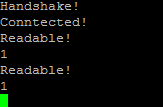
I really appreciate all help. I am doing my final year project. I really need help for this.
Thank you so much.
Regards
Dorothy
Question relating to:

1 Answer
11 years, 8 months ago.
Alot better now, although still not exactly standard formatting like indentations ;)
Anyway, I don't know exactly what the code should be doing and what you are supplying it at the Arduino side, but if I understand it correctly you want the second one to print '2' instead of '1'.
However from your code:
a = rfd.read(RfBuff, 255);

if( a > 0 && a < 255) {

RfBuff[0] = a;
Now according to the documentation, the read function returns the number of bytes read. Which I guess is one. Then for some reason you overwrite the first received byte with this value, and then you do a switch, again on the length of this value. Isn't it supposed to do it on the received value?
So like:
while(1)
{
    if (rfd.readable()) {
        StateR = 1;
        printf("Readable!\n");
        a = rfd.read(RfBuff, 255);
        if( a > 0 && a < 255) {                 //Verify that the length is correct
            //RfBuff[0] = a;                        //Not needed
            switch (RfBuff[0]) {                 //Switch on the received data
                case 0x01:
                    StateA = 1;
                    printf("%d\n", RfBuff[0]);   //And print the received data
                    break;
                case 0x02:
                    StateB = 1;
                    printf("%d\n",RfBuff[0]);
                    break;
                default:
                    break;
            }
        }
    }
}
Hi thank you so much for your help.
I have tried as your suggestion.
But I couldn't get the data that I sent. It stills the same problem.
It is just readable now.
From RFduino side, I sent the data as follow:
<<void RFduinoBLE_onReceive(char *data, int len) {>>
<</if(len>255) { len=255;} limit to 255 bytes for now>>
<</Serial.write(RECEIVE);>>
<</Serial.write((unsigned char)len);>>
<</uint8_t a = data[0];>.
<</if( a==1 )>>
<</{>>
<</digitalWrite(ledPin1,LOW);>>
<</digitalWrite(ledPin, HIGH);>>
<</Serial.write(0x01);>>
<</}>>
<</else if( a==2 )>>
<</{>>
<</digitalWrite(ledPin, LOW);>>
<</digitalWrite(ledPin1, HIGH);>>
<</Serial.write(0x02);>>
<</}>>
<</}>>
From the Android App, when I sent uint8_t = 1, Serial.write ( 0x01) When I sent uint8_t = 2, Serial.write (0x02).
I used nRF Master Control Panel App to send data to Rfduino.
I really help for this.
I appreciate every single help.
Thank you so much.
Regards.
posted by 18 Jul 2014My above comment is a bit messy. So sorry for that. I received data from App at
void RFduinoBLE_onReceive(char *data, int len)
You may kindly refer to the above rfduino_sketch program.
I really need your help for this.
Thank you so much :D
Regards
Dorothy
posted by 18 Jul 2014But you did do it in your question (or did someone else dit it?). Here is the syntax: http://mbed.org/cookbook/Wiki-Syntax. Please use it for code. Reading unformatted code is a pain.
posted by 18 Jul 2014
Just use
<<code>> and <</code>>around your code (and remove then the empty lines). Then it gets a proper code layout. And unless it is again not working, edit your questions. Now there are 4 identical ones.//Example #include "mbed.h" DigitalOut out(LED1); int main() { int i = 5; while(1); }You can also click on editting tips when making the question (or editting it).
posted by Erik - 17 Jul 2014Hi Thank you for your advice. I really appreciate. :D
posted by Dorothy Luai 17 Jul 2014