
Important changes to forums and questions
All forums and questions are now archived. To start a new conversation or read the latest updates go to forums.mbed.com.
12 years, 5 months ago.
mbed switch and lcd
hi, im new with mbed and programming and i wanted to know a code for pushing a button and shows a message on lcd. for example, when i push a button on the mbed board it shows on the screen a message for example "HELLO" and when i remove my hand it disappears. on the mbed board there are 4 switch buttons, i want each switch to show different message. will be any one able to help me with the code because i have a project and im struggling for 3 weeks now and cant find any code for that. the mbed i use is LPP1768. Thanks in advance
1 Answer
12 years, 5 months ago.
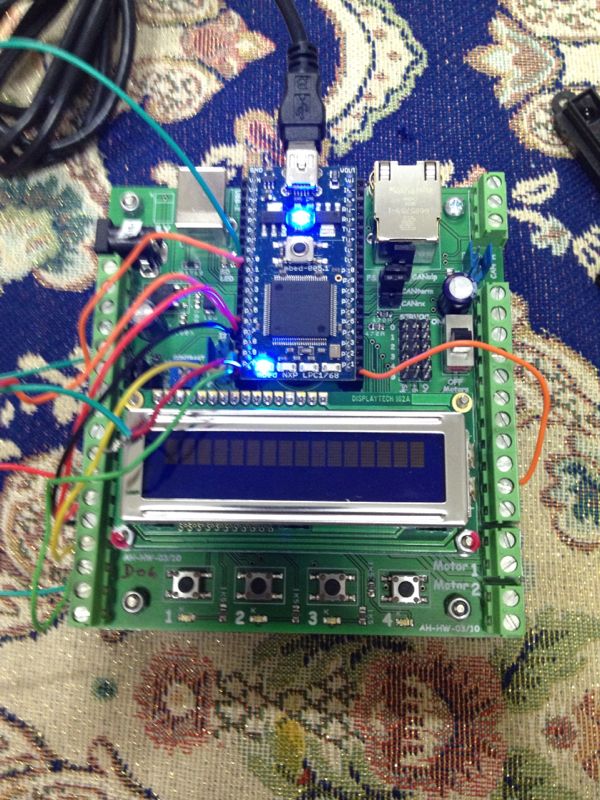
thats the board im using. yeah i already know the code for printing something on the lcd and here is the code
- include "mbed.h"
- include "MCP23017.h"
- include "WattBob_TextLCD.h"
- define BACK_LIGHT_ON(INTERFACE) INTERFACE->write_bit(1,BL_BIT)
- define BACK_LIGHT_OFF(INTERFACE) INTERFACE->write_bit(0,BL_BIT) MCP23017 *par_port; WattBob_TextLCD *lcd; int main() { par_port = new MCP23017(p9, p10, 0x40); lcd = new WattBob_TextLCD(par_port); par_port->write_bit(1,BL_BIT); lcd->cls(); lcd->locate(0,0); lcd->printf("HI FUNDROID TEAM"); for(;;); }
no i cant read a button!!
Which board are you using together with your lpc1768? Since that doesn't have 4 switch buttons.
Also how far did you get yourself? Can you already print something on your LCD? Can you read a button?
posted by Erik - 07 Oct 2013